





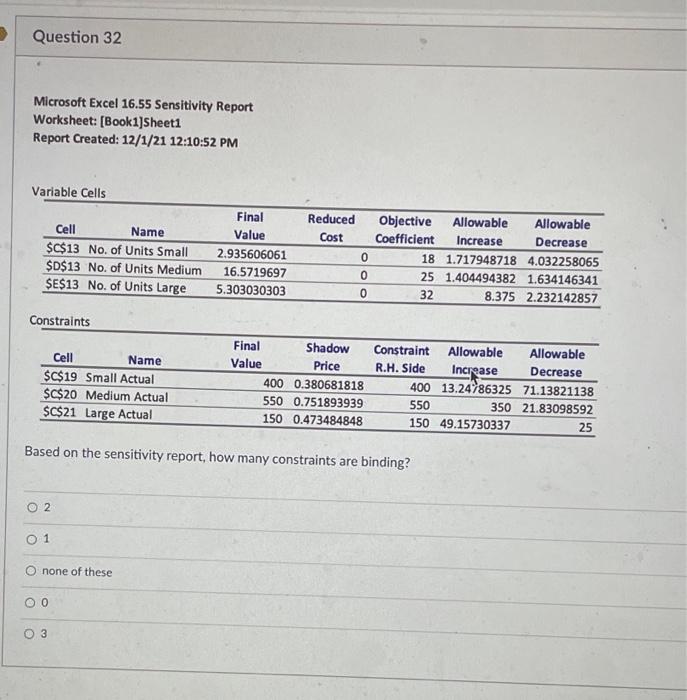
Question: Question 32 Microsoft Excel 16.55 Sensitivity Report Worksheet: [Book1]Sheet1 Report Created: 12/1/21 12:10:52 PM Variable Cells Reduced Cost Cell Name $C$13 No. of Units Small
Question 32 Microsoft Excel 16.55 Sensitivity
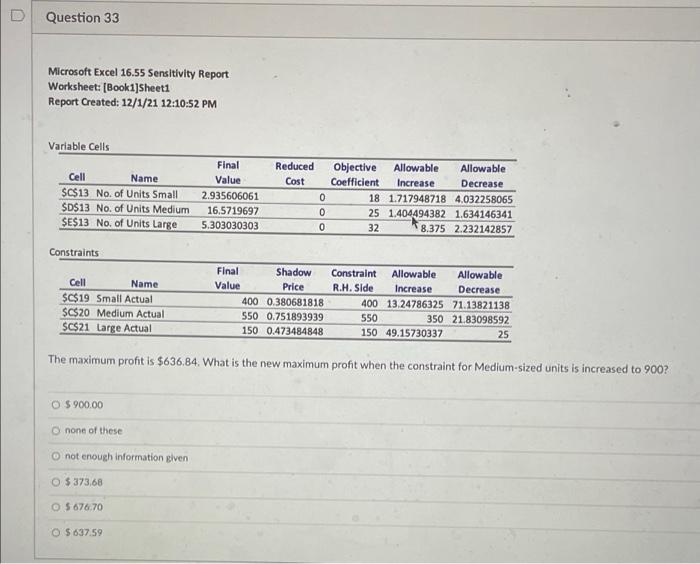
Question 32 Microsoft Excel 16.55 Sensitivity Report Worksheet: [Book1]Sheet1 Report Created: 12/1/21 12:10:52 PM Variable Cells Reduced Cost Cell Name $C$13 No. of Units Small $D$13 No. of Units Medium $E$13 No. of Units Large Final Value 2.935606061 16.5719697 5.303030303 0 Objective Allowable Allowable Coefficient Increase Decrease 18 1.717948718 4.032258065 25 1.404494382 1.634146341 32 8.375 2.232142857 0 0 Constraints Cell Name $C$19 Small Actual $C$20 Medium Actual $C$21 Large Actual Final Shadow Value Price 400 0.380681818 550 0.751893939 150 0.473484848 Constraint Allowable Allowable R.H. Side Increase Decrease 400 13.24786325 71.13821138 550 350 21.83098592 150 49.15730337 25 Based on the sensitivity report, how many constraints are binding? O 2 0 1 none of these 3 D Question 33 Microsoft Excel 16.55 Sensitivity Report Worksheet: (Booki]Sheet1 Report Created: 12/1/21 12:10:52 PM Variable Cells Cell Name $C$13 No. of Units Small $D$13 No. of Units Medium $E$13 No. of Units Large Final Value 2.935606061 16.5719697 5.303030303 Reduced Cost 0 0 0 Objective Allowable Allowable Coefficient Increase Decrease 18 1.717948718 4.032258065 25 1.404494382 1.634146341 32 8.375 2.232142857 Constraints Cell Name $C$19 Small Actual $C$20 Medium Actual $C$21 Large Actual Final Shadow Constraint Allowable Allowable Value Price R.H. Side Increase Decrease 400 0.380681818 400 13.24786325 71.13821138 550 0.751893939 550 350 21.83098592 150 0.473484848 150 49.15730337 25 The maximum profit is $636,84. What is the new maximum profit when the constraint for Medium-sized units is increased to 900? O S 900.00 none of these not enough information given O $373,68 O 5 676.70 O $637.59

Step by Step Solution

There are 3 Steps involved in it

1 Expert Approved Answer
Step: 1 Unlock blur-text-image

Question Has Been Solved by an Expert!

Get step-by-step solutions from verified subject matter experts

Step: 2 Unlock
Step: 3 Unlock

Students Have Also Explored These Related General Management Questions!