







Question: question. Instead of creating every formula one by one, how could you create just one formula in cell B 2 that can be copied and
question. Instead of creating every formula one by one, how could you create just one formula in cell B that can be copied and pasted to all cells? Note that there are
negative values in the Financial Statement Data sheet. Choose the correct formula.
I. 'Financial Statement Data'!$BFinancial Statement Data'!B
II'Financial Statement Data'!BFinancial Statement Data'!$B
III. 'Financial Statement Data'!BFinancial Statement Data'!B$
IV'Financial Statement Data'!BFinancial Statement Data'!$B$
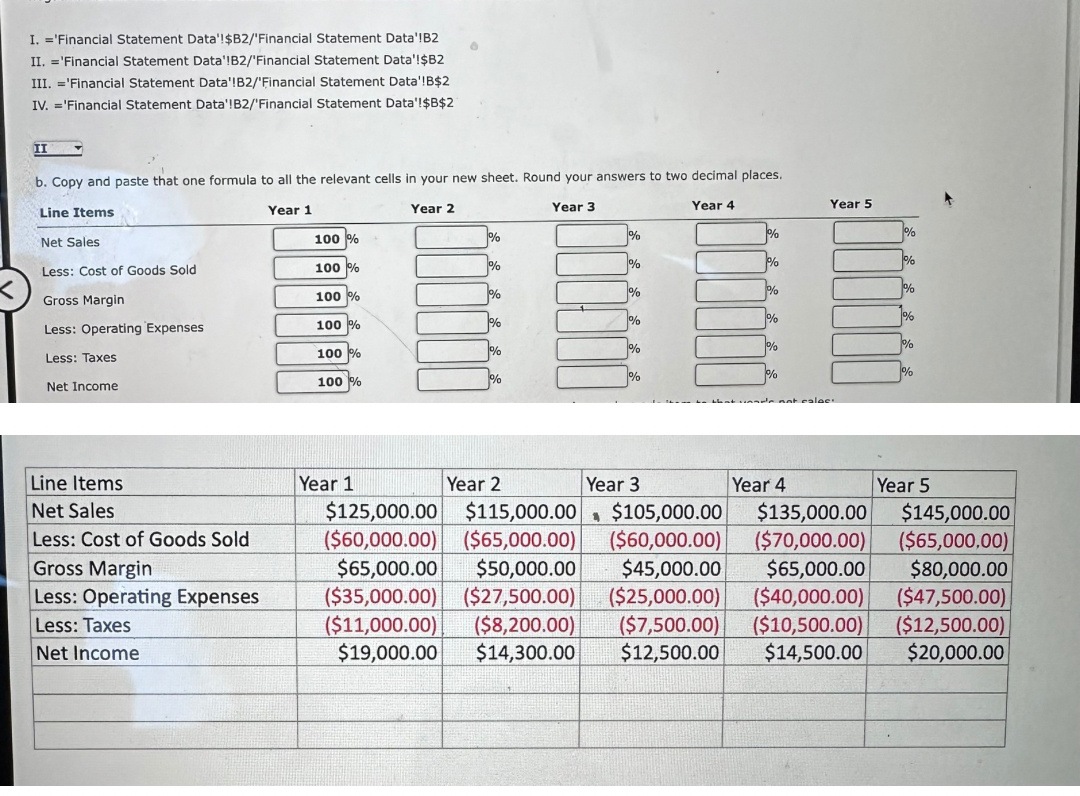
b Copy and paste that one formula to all the relevant cells in your new sheet. Round your answers to two decimal places.
Vertical analysis: Create another new sheet to perform the vertical analysis, comparing each year's item to that year's net sales:
a Instead of creating every formula one by one, how can you create just one formula intell B that can be copied and pasted to all cells? Note that there are negative
values in the Financial Statement Data sheet, Choose the correct formula,
question. Instead of creating every formula one by one, how could you create just one formula in cell B that can be copied and pasted to all cells? Note that there are
negative values in the Financial Statement Data sheet. Choose the correct formula.
I. 'Financial Statement Data'!$BFinancial Statement Data'!B
II'Financial Statement Data'!BFinancial Statement Data'!$B
III. 'Financial Statement Data'!BFinancial Statement Data'!B$
IV'Financial Statement Data'!BFinancial Statement Data'!$B$
b Copy and paste that one formula to all the relevant cells in your new sheet. Round your answers to two decimal places.
Vertical analysis: Create another new sheet to perform the vertical analysis, comparing each year's item to that year's net sales:
a Instead of creating every formula one by one, how can you create just one formula in cell B that can be copied and pasted to all cells? Note that there are negative
values in the Financial Statement Data sheet. Choose the correct formula.
I. 'Financial Statement Data'!$BFinancial Statement Data'!B
II'Financial Statement Data'!BFinancial Statement Data'!$B
III. 'Financial Statement Data'!BFinancial Statement Data'!B$
IV'Financial Statement Data'!BFinancial Statement Data'!$B$
b Copy and paste that one formula to all the relevant cells in your new sheet. Round your answers to two decimal places.
Step by Step Solution
There are 3 Steps involved in it
1 Expert Approved Answer
Step: 1 Unlock

Question Has Been Solved by an Expert!
Get step-by-step solutions from verified subject matter experts
Step: 2 Unlock
Step: 3 Unlock
 Study Help