







Question: Question No. 4 Populate given webform1 text boxes values in webform2 labels accordingly. Implement above scenario using sessions and if webform1 button is clicked on
Question No. 4 Populate given webform1 text boxes values in webform2 labels accordingly.
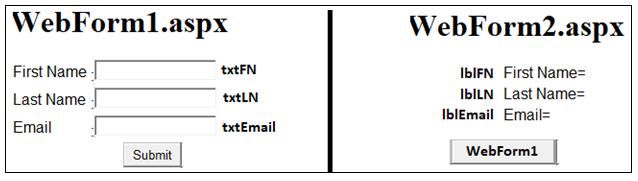
Implement above scenario using sessions and if webform1 button is clicked on webform2 page then user will navigate to webform1 after deleting the created session.
Implement above scenario using persistent cookies.
- Copy-Paste Code of .aspx and .aspx.cs files to your Answer Sheet.
- Add Screen Shots, in which there should be Your First Name in txtFN, Your last name in txtLN, and your Orginal Email in txtEmail
Note: First Name = Tayyab Last Name = Mehmood
WebForml.aspx WebForm2.aspx First Name Last Name Email txtFN txtLN IbIFN First Name= IbILN Last Name IblEmail Email= txtEmail Submit WebForm1
Step by Step Solution
There are 3 Steps involved in it
1 Expert Approved Answer
Step: 1 Unlock

Question Has Been Solved by an Expert!
Get step-by-step solutions from verified subject matter experts
Step: 2 Unlock
Step: 3 Unlock
 Study Help