







Question: Q-Write generalized bash-shell scripts that are able to work correctly on any Unix/Linux computer, with any user account, and starting from any working directory without
Q-Write generalized bash-shell scripts that are able to work correctly on any Unix/Linux computer, with any user account, and starting from any working directory without any modification, to carry out each of the following tasks:
Use environment variables, string patterns, and wild-card characters to generalize the script, make sure possible errors are handled correctly.
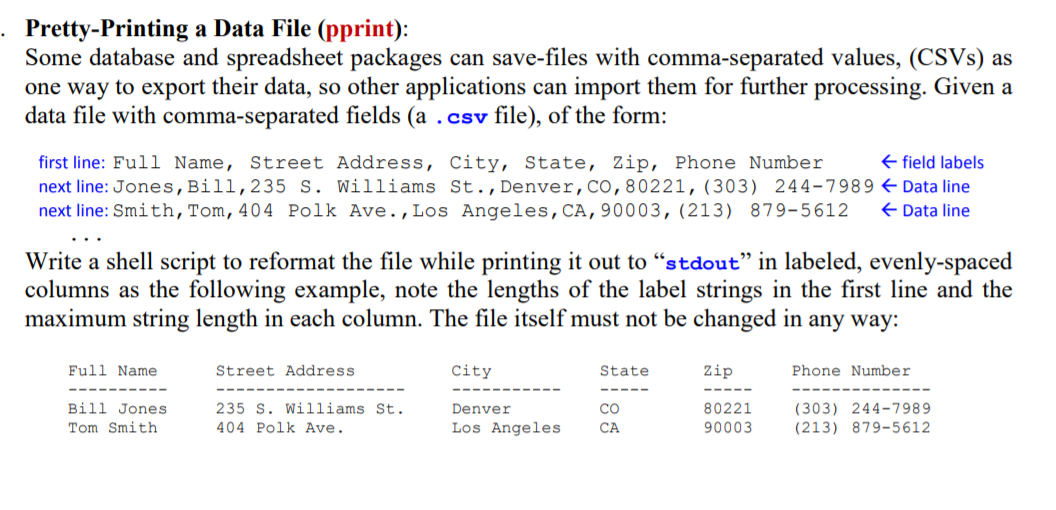
Pretty-Printing a Data File (pprint): Some database and spreadsheet packages can save-files with comma-separated values, (CSVS) as one way to export their data, so other applications can import them for further processing. Given a data file with comma-separated fields (a .csv file), of the form: first line: Full Name, Street Address, City, State, Zip, Phone Number field labels next line: Jones, Bill, 235 S. Williams St., Denver, CO, 80221, (303) 244-7989 Data line next line: Smith, Tom, 404 Polk Ave., Los Angeles, CA, 90003, (213) 879-5612 Data line Write a shell script to reformat the file while printing it out to stdout in labeled, evenly-spaced columns as the following example, note the lengths of the label strings in the first line and the maximum string length in each column. The file itself must not be changed in any way: Full Name Street Address City State Zip Phone Number Bill Jones Tom Smith 235 S. Williams St. 404 Polk Ave. Denver Los Angeles CA 80221 90003 (303) 244-7989 (213) 879-5612
Step by Step Solution
There are 3 Steps involved in it

Get step-by-step solutions from verified subject matter experts
 Study Help