







Question: Q-Write generalized bash-shell scripts that are able to work correctly on any Unix/Linux computer, with any user account, and starting from any working directory without
Q-Write generalized bash-shell scripts that are able to work correctly on any Unix/Linux computer, with any user account, and starting from any working directory without any modification, to carry out each of the following tasks:
Use environment variables, string patterns, and wild-card characters to generalize the script, make sure possible errors are handled correctly.
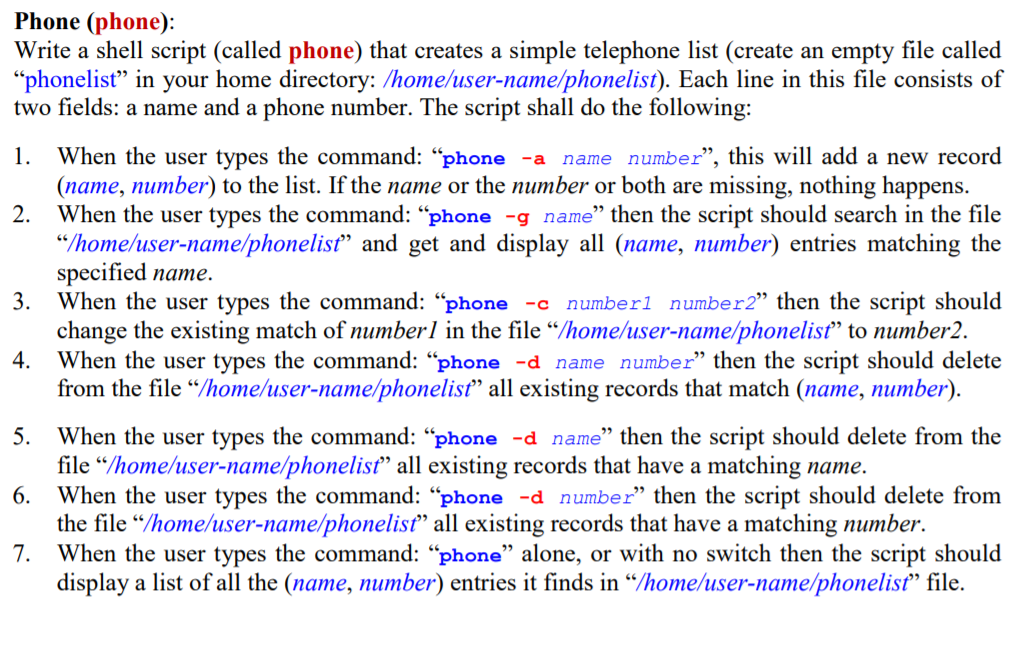
1. Phone (phone): Write a shell script (called phone) that creates a simple telephone list (create an empty file called phonelist in your home directory: /home/user-name/phonelist). Each line in this file consists of two fields: a name and a phone number. The script shall do the following: When the user types the command: phone -a name number, this will add a new record (name, number) to the list. If the name or the number or both are missing, nothing happens. 2. When the user types the command: phone -g name then the script should search in the file "/home/user-name/phonelist and get and display all (name, number) entries matching the specified name. 3. When the user types the command: phone -c number1 number2" then the script should change the existing match of numberl in the file "/home/user-name/phonelist to number2. 4. When the user types the command: phone -d name number then the script should delete from the file"/home/user-name/phonelist all existing records that match (name, number). 5. When the user types the command: phone -d name then the script should delete from the file"/home/user-name/phonelist all existing records that have a matching name. 6. When the user types the command: phone -d number then the script should delete from the file "/home/user-name/phonelist all existing records that have a matching number. 7. When the user types the command: phone alone, or with no switch then the script should display a list of all the (name, number) entries it finds in Thome/user-name/phonelist file. 1. Phone (phone): Write a shell script (called phone) that creates a simple telephone list (create an empty file called phonelist in your home directory: /home/user-name/phonelist). Each line in this file consists of two fields: a name and a phone number. The script shall do the following: When the user types the command: phone -a name number, this will add a new record (name, number) to the list. If the name or the number or both are missing, nothing happens. 2. When the user types the command: phone -g name then the script should search in the file "/home/user-name/phonelist and get and display all (name, number) entries matching the specified name. 3. When the user types the command: phone -c number1 number2" then the script should change the existing match of numberl in the file "/home/user-name/phonelist to number2. 4. When the user types the command: phone -d name number then the script should delete from the file"/home/user-name/phonelist all existing records that match (name, number). 5. When the user types the command: phone -d name then the script should delete from the file"/home/user-name/phonelist all existing records that have a matching name. 6. When the user types the command: phone -d number then the script should delete from the file "/home/user-name/phonelist all existing records that have a matching number. 7. When the user types the command: phone alone, or with no switch then the script should display a list of all the (name, number) entries it finds in Thome/user-name/phonelist file
Step by Step Solution
There are 3 Steps involved in it

Get step-by-step solutions from verified subject matter experts
 Study Help