







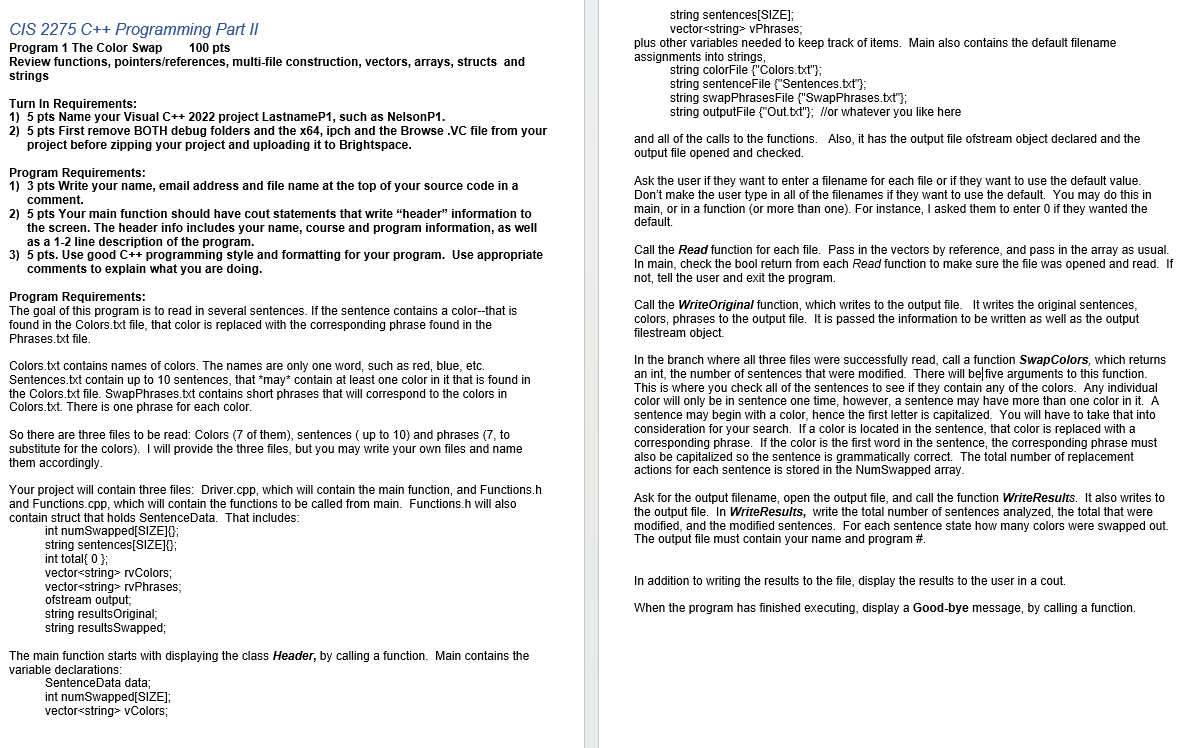
Question: Read the questions and comments provide a code solution, that coresspond with the code. On the screenshot there are variables there to use for the
Read the questions and comments provide a code solution, that coresspond with the code. On the screenshot there are variables there to use for the code. Put the code in the comments do NOT leave comments with no code. ColorFunctions.cpp #include "ColorFunctions.h
#include
using namespace std;
void WriteHeader
put your name, course and program information
cout"Brayan Licano, C and this is about swapping colors"on the sentences."
#include
#include
#include "Functions.h
using namespace std; int main
Display class header
displayClassHeader;
Declare variables
SentenceData data;
vector vColors;
vector vPhrases;
Set default filenames
string colorFileColorstxt;
string sentenceFileSentencestxt;
string swapPhrasesFileSwapPhrasestxt;
string outputFileOuttxt;
Ask user for filenames or use defaults
getUserInputFilenamescolorFile sentenceFile swapPhrasesFile, outputFile;
Call Read functions
Call WriteOriginal function
ofstream outFileoutputFile;
writeOriginaloutFile data.sentences, vColors, vPhrases;
Call SwapColors function
int numModified swapColorsdata vColors, vPhrases;
Ask for output filename
Open output results file and call WriteResults function
ofstream resultsFileoutputResultsFile;
writeResultsresultsFile data, numModified;
Display results to the user
displayResultsdata numModified;
Display Goodbye message
displayGoodbyeMessage;
return ;
Step by Step Solution
There are 3 Steps involved in it
1 Expert Approved Answer
Step: 1 Unlock

Question Has Been Solved by an Expert!
Get step-by-step solutions from verified subject matter experts
Step: 2 Unlock
Step: 3 Unlock
 Study Help