


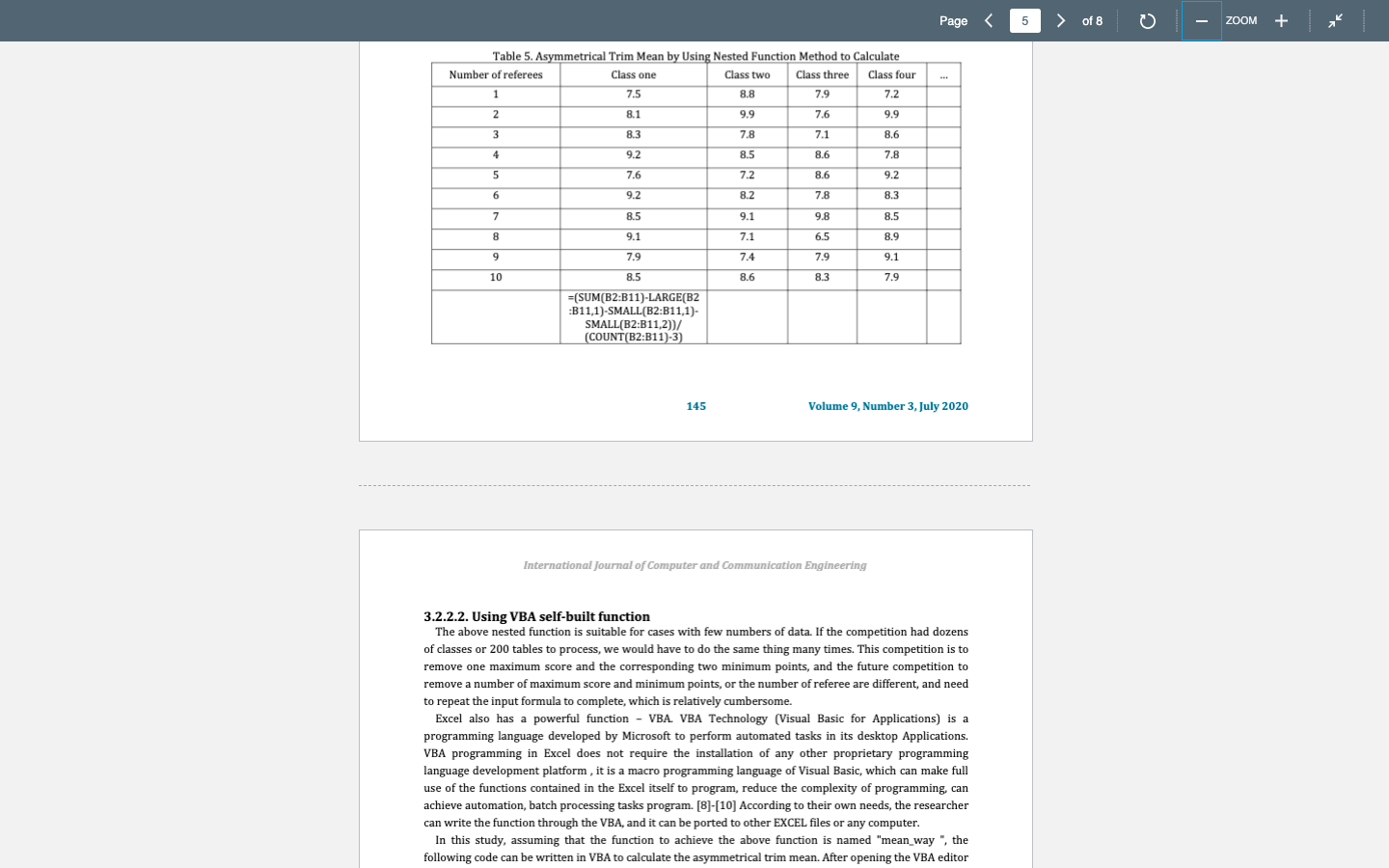
Question: Re-create Table 5 in Excel and solve the asymmetrical trim mean for Classes One-Four using the formula provided. (You can add another row to the

Re-create Table 5 in Excel and solve the asymmetrical trim mean for Classes One-Four using the formula provided. (You can add another row to the same table that you used to re-create Table 2 if you wish.) Re-create Table 5 in Excel and solve the
3.2.2.2. Using VBA self-built function The above nested function is suitable for cases with few numbers of data. If the competition had dozens of classes or 200 tables to process, we would have to do the same thing many times. This competition is to remove one maximum score and the corresponding two minimum points, and the future competition to remove a number of maximum score and minimum points, or the number of referee are different, and need to repeat the input formula to complete, which is relatively cumbersome. Excel also has a powerful function - VBA. VBA Technology (Visual Basic for Applications) is a programming language developed by Microsoft to perform automated tasks in its desktop Applications. VBA programming in Excel does not require the installation of any other proprietary programming language development platform, it is a macro programming language of Visual Basic, which can make full use of the functions contained in the Excel itself to program, reduce the complexity of programming, can achieve automation, batch processing tasks program. [8]-[10] According to their own needs, the researcher can write the function through the VBA, and it can be ported to other EXCEL files or any computer. In this study, assuming that the function to achieve the above function is named "mean_way ", the following code can be written in VBA to calculate the asymmetrical trim mean. After opening the VBA editor

Step by Step Solution

There are 3 Steps involved in it

1 Expert Approved Answer
Step: 1 Unlock blur-text-image

Question Has Been Solved by an Expert!

Get step-by-step solutions from verified subject matter experts

Step: 2 Unlock
Step: 3 Unlock

Students Have Also Explored These Related General Management Questions!