







Question: Refer to the class shown below which compiles with no errors and runs with no exceptions but does not produce correct results. Answer the questions
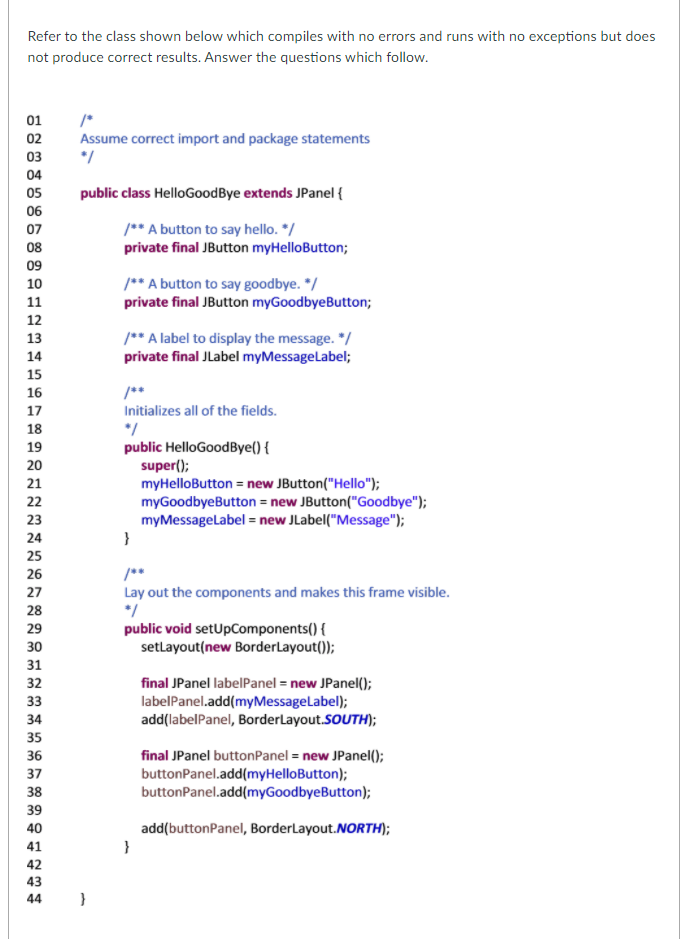
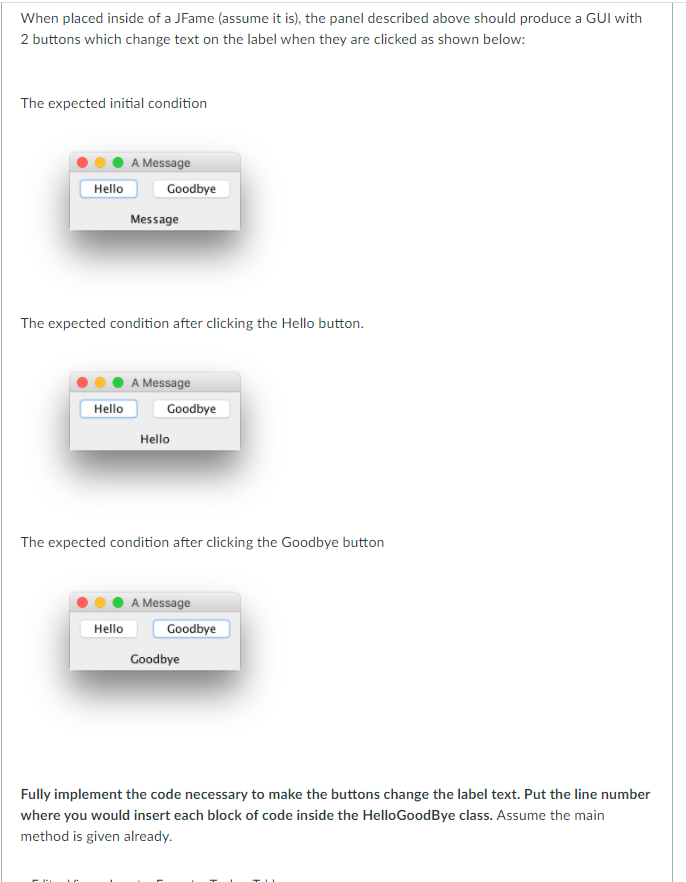
Refer to the class shown below which compiles with no errors and runs with no exceptions but does not produce correct results. Answer the questions which follow. Assume correct import and package statements 01 02 03 04 05 06 07 08 09 10 public class Hello GoodBye extends JPanel { /** A button to say hello. */ private final JButton myHelloButton; 11 /** A button to say goodbye. */ private final JButton myGoodbyeButton; /** A label to display the message. */ private final JLabel myMessageLabel; 12 13 14 15 16 17 18 19 20 21 22 Initializes all of the fields. *7 public Hello GoodBye() { super(); myHelloButton = new JButton("Hello"); myGoodbyeButton = new JButton("Goodbye"); myMessageLabel = new JLabel("Message"); } 23 24 25 26 27 28 29 30 Lay out the components and makes this frame visible. */ public void setUpComponents() { setLayout(new BorderLayout()); final JPanel labelPanel = new JPanel(); labelPanel.add(my MessageLabel); add(labelPanel, BorderLayout.SOUTH); 31 32 33 34 35 36 37 38 final JPanel buttonPanel = new JPanel(); buttonPanel.add(myHelloButton); buttonPanel.add(myGoodbyeButton); 39 40 add(buttonPanel, BorderLayout.NORTH); 41 } 42 43 44 } When placed inside of a JFame (assume it is), the panel described above should produce a GUI with 2 buttons which change text on the label when they are clicked as shown below: The expected initial condition A Message Goodbye Hello Message The expected condition after clicking the Hello button. A Message Goodbye Hello Hello The expected condition after clicking the Goodbye button Hello A Message Goodbye Goodbye Fully implement the code necessary to make the buttons change the label text. Put the line number where you would insert each block of code inside the Hello GoodBye class. Assume the main method is given already. TI
Step by Step Solution
There are 3 Steps involved in it

Get step-by-step solutions from verified subject matter experts
 Study Help