







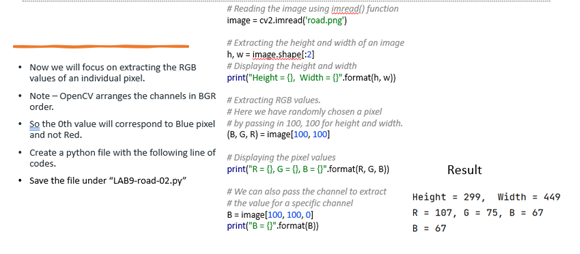
Question: # Reoding the imoge using imread() function image = cv2.imread('road.png') # Extracting the height and width of an image h, w = imageshape[:2] - Now
![Extracting the height and width of an image h, w = imageshape[:2]](https://dsd5zvtm8ll6.cloudfront.net/si.experts.images/questions/2024/09/66e2bef2479fa_04966e2bef1a8fb7.jpg)
\# Reoding the imoge using imread() function image = cv2.imread('road.png') \# Extracting the height and width of an image h, w = imageshape[:2] - Now we will focus on extracting the RGB \# Displaying the height and width values of an individual porel. print("Height ={, Width ={3",format(h, w)\} - Note - OpenCV arranges the channels in BGR \# Extracting RGB volues. order. \# Here we have randomly chosen a pivel - So the Oth value will correspond to Blue pixel \#o by possing in 100 , 100 for height and width. and not Red. (B,G,R)= image (100,100] - Create a python file with the following line of codes. - Save the file under "LAB9-road-02.py" \# Displaying the pixel values Result B= image [100,100,0] R=107,6=75,B=67 print("B = [\}" format(B)\} B=67
Step by Step Solution
There are 3 Steps involved in it

Get step-by-step solutions from verified subject matter experts
 Study Help