



Question: Run the ClockAnimation Explain in your own words how the animation works. 1 import javafx.application.Application; 2 import javafx.stage.Stage; 3 import javafx.animation.KeyFrame; 4 import javafx.animation.Timeline; 5
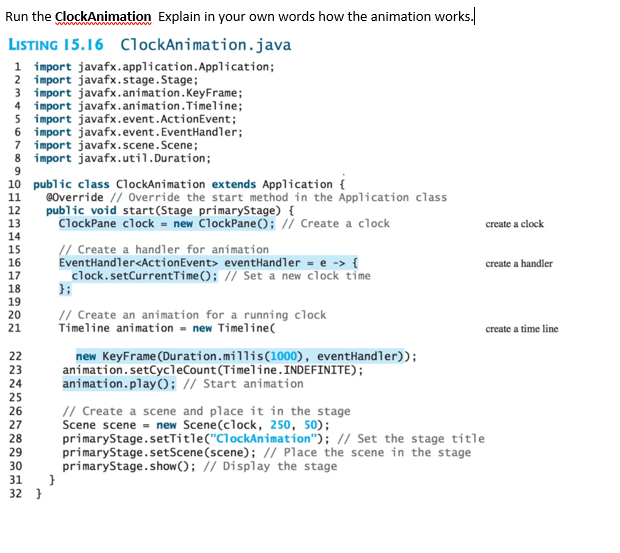
Run the ClockAnimation Explain in your own words how the animation works. 1 import javafx.application.Application; 2 import javafx.stage.Stage; 3 import javafx.animation.KeyFrame; 4 import javafx.animation.Timeline; 5 import javafx.event.ActionEvent; 6 import javafx.event.EventHandler; 7 import javafx.scene.Scene; 8 import javafx.util.Duration; 9 10 public class ClockAnimation extends Application { 11 @Override//Override the start method in the Application class 12 public void start(Stage primaryStage) { 13 ClockPane clock = new ClockPane();//Create a clock create a clock 14 15//Create a handler for animation 16 EventHandler eventHandler = e - > { create a handler 17 clock.setCurrentTime();//Set a new clock time 18 }; 19 20//Create an animation for a running clock 21 Timeline animation = new Timeline(create a time line 22 new KeyFrame(Duration.millis(1000), eventHandler)); 23 animation.setCycleCount(Timeline.INDEFINITE); 24 animation.play();//Start animation 25 26//Create a scene and place it in the stage 27 Scene scene = new Scene(clock, 250, 50); 28 primaryStage.setTitle("ClockAnimation");//Set the stage title 29 primaryStage.setScene(scene);//Place the scene in the stage 30 primaryStage.show();//Display the stage 31 } 32 }
Step by Step Solution
There are 3 Steps involved in it

Get step-by-step solutions from verified subject matter experts