







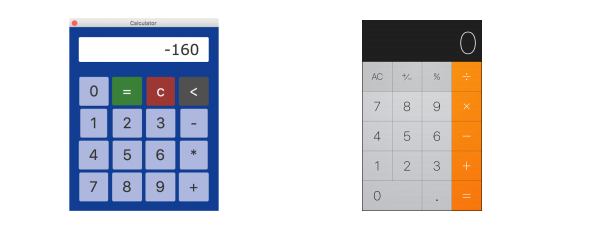
Question: javafx problem. Modify the app by changing the interface (similar to the one on iphones). You may change colors and fonts and then Add more
javafx problem.
Modify the app by changing the interface (similar to the one on iphones). You may change colors and fonts
and then Add more functions for the calculator, e.g., 1/x (which is reciprocal of x),x^2 ,
import javafx.application.Application; import javafx.beans.binding.Bindings; import javafx.beans.property.DoubleProperty; import javafx.beans.property.SimpleDoubleProperty; import javafx.event.ActionEvent; import javafx.event.EventHandler; import javafx.geometry.Pos; import javafx.scene.Scene; import javafx.scene.control.Button; import javafx.scene.control.TextField; import javafx.scene.layout.TilePane; import javafx.scene.layout.VBox; import javafx.scene.paint.Color; import javafx.scene.text.Font; import javafx.stage.Stage; import javafx.stage.StageStyle;
/* This is the GUI class that visualize the calculator * * */ public class Calculator extends Application { private MyStack stack = new MyStack(); private double font_size = 30; //by default the font size on the screen is 30 /*The keyboard key values*/ private static final String[][] key_values = { { "0", "=", "c", "
public static void main(String[] args) { launch(args); }
@Override public void start(Stage stage) { /*The outside layout*/ final VBox layout = new VBox(30); //the size vertically
/*The inside layout for keys or buttons*/ TilePane keypad = new TilePane(); //even it is called keypad, it is a layout keypad.setVgap(7); keypad.setHgap(7); //set the gap between keys /*Create Calculator Screen */ calculator_screen = new TextField(); calculator_screen.getStyleClass().add("screen1"); //set the style of the screen calculator_screen.setAlignment(Pos.CENTER_RIGHT); //make the screen in the center of the calculator calculator_screen.setEditable(false); //make sure the screen cannot be typed in manually calculator_screen.setPrefWidth(300); //set the windth of the screen calculator_screen.setPrefHeight(30); calculator_screen.setFont(Font.font("Verdana", font_size)); /*Create Calculator keyboard*/ keypad.setPrefColumns(key_values[0].length); //set the preferred number of columns
for (int i = 0; i (){
@Override public void handle(ActionEvent event) { StackNode node = new StackNode(key_values[a][b]); if(a == 0 && b == 2) //if the key is "c" { stack.clear(); calculator_screen.setFont(Font.font("Verdana", 30)); font_size = 30; } else if(a == 0 && b == 3) //if the key is "b" stack.pop(); else if (a == 0 && b == 1) // if the key is "=" { stack.computeExp(); } else stack.push(node); //otherwise push the key into the list String math_exp = stack.getAllNodeValues(); if(math_exp.length() * font_size > 1.2 * calculator_screen.getPrefWidth()) { font_size /= 1.2; calculator_screen.setFont(Font.font("Verdana", font_size)); } calculator_screen.setText(math_exp); } } ); //Add special style for the "=" button if(a == 0 && b == 1) btn[i][j].getStyleClass().add("btnEqual"); else if(a == 0 && b == 2) btn[i][j].getStyleClass().add("btnClear"); else if(a == 0 && b == 3) btn[i][j].getStyleClass().add("btnBackspace"); keypad.getChildren().add(btn[i][j]); } } /*Put the calculator screen and keypad into a VBox layout*/ layout.setAlignment(Pos.CENTER); layout.getChildren().addAll(calculator_screen, keypad); layout.getStyleClass().add("vbox1"); calculator_screen.prefWidthProperty().bind(keypad.widthProperty()); /*Show the window*/ stage.setTitle("Calculator"); stage.initStyle(StageStyle.UTILITY); stage.setResizable(false); Scene scene = new Scene(layout); scene.getStylesheets().add(getClass().getResource("application.css").toExternalForm()); stage.setScene(scene); stage.show(); } }
Calculator O -160 XL + 1 789 + Calculator O -160 XL + 1 789 +
Step by Step Solution
There are 3 Steps involved in it

Get step-by-step solutions from verified subject matter experts
 Study Help