





Question: Sales Register Calculation and Display using Functions Create a Windows console program named Lab02-SalesRegister in a suitable folder. Do not create a separate directory for
 Sales Register Calculation and Display using Functions Create a Windows consoleprogram named Lab02-SalesRegister in a suitable folder. Do not create a separate

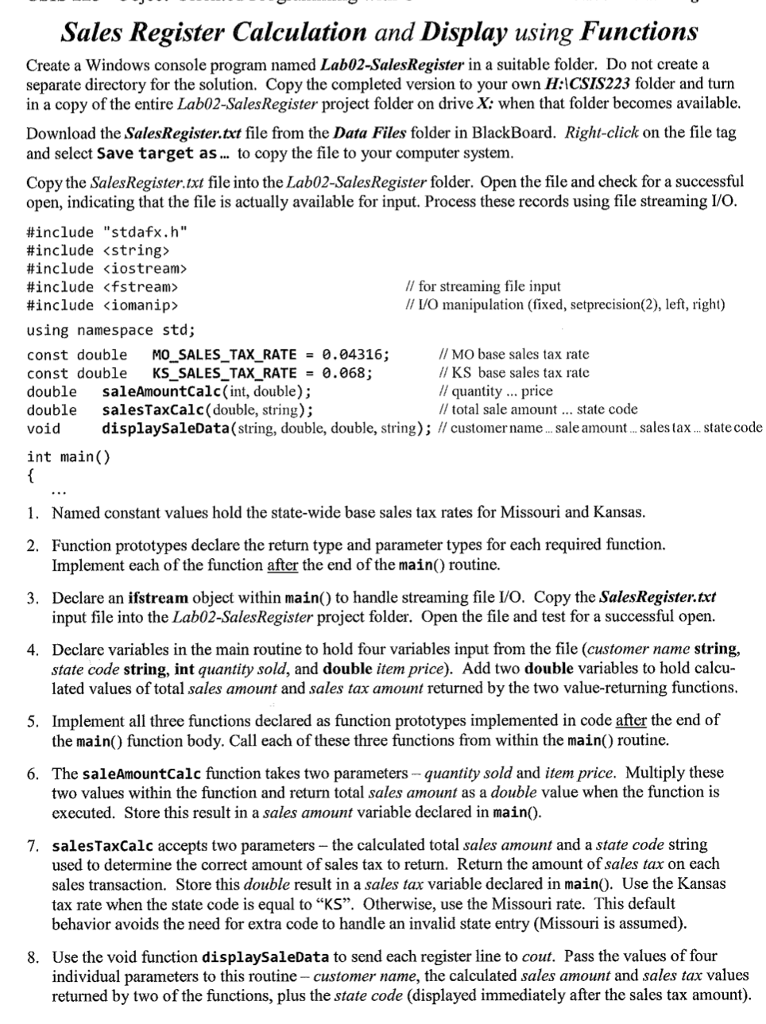
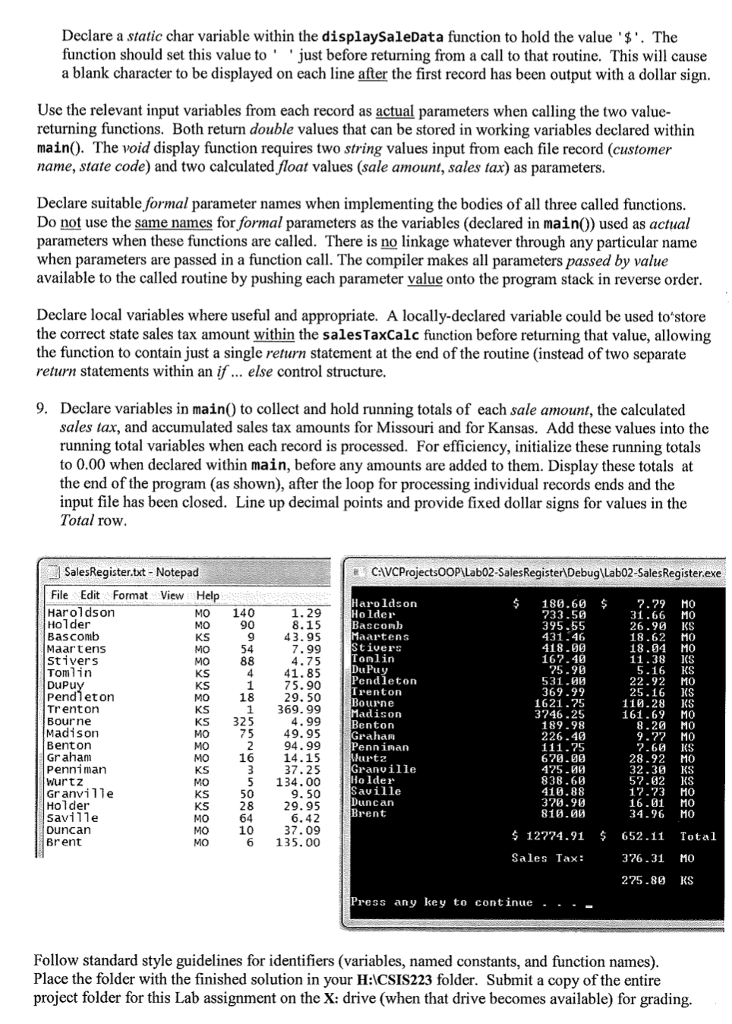
Sales Register Calculation and Display using Functions Create a Windows console program named Lab02-SalesRegister in a suitable folder. Do not create a separate directory for the solution. Copy the completed version to your own H:ICSIS223 folder and turn in a copy of the entire Lab02-SalesRegister project folder on drive X: when that folder becomes available Download the SalesRegister.txt file from the Data Files folder in BlackBoard. Right-click on the file tag and select Save target as. to copy the file to your computer system Copy the Sales Register.txt file into the Lab02-SalesRegister folder. Open the file and check for a successful open, indicating that the file is actually available for input. Process these records using file streaming I/O #include "stdafx.h" #include #include #include #include ioma nip> using namespace std; const double MO-SALES-TAX-RATE-04316; const double KS-SALES-TAX-RATE=0.068; double saleAmountCalc(int, double); double salesTaxCalc (double, string); void displaySaleData(string, double, double, string); II customer name... sale amount ..sales tax.. state code II for streaming file input I/ L/O manipulation (fixed, setprecision(2), left, right) // MO base sales tax rate //KS base sales tax rate /quantity .. price // total sale amount... state code int main() 1. Named constant values hold the state-wide base sales tax rates for Missouri and Kansas Function prototypes declare the return type and parameter types for each required function. Implement each of the function after the end of the main routine. 2. Declare an ifstream object within main) to handle streaming file L/O. Copy the SalesRegister.txt input file into the Lab02-SalesRegister project folder. Open the file and test for a successful open. 3. Declare variables in the main routine to hold four variables input from the file (customer name string, state code string, int quantity sold, and double item price). Add two double variables to hold calcu lated values of total sales amount and sales tax amount returned by the two value-returning functions 4. Implement all three functions declared as function prototypes implemented in code after the end of the main) function body. Call each of these three functions from within the main() routine. 5. The saleAmountCalc function takes two parameters-quantity sold and item price. Multiply these two values within the function and return total sales amount as a double value when the function is executed. Store this result in a sales amount variable declared in main). 6. salesTaxcalc accepts two parameters - the calculated total sales amount and a state code string used to determine the correct amount of sales tax to return. Return the amount of sales tax on each sales transaction. Store this double result in a sales tax variable declared in main). Use the Kansas tax rate when the state code is equal to "KS". Otherwise, use the Missouri rate. This default behavior avoids the need for extra code to handle an invalid state entry (Missouri is assumed) 7. Use the void function displaysaleData to send each register line to cout. Pass the values of four individual parameters to this routine - customer name, the calculated sales amount and sales tax values returned by two of the functions, plus the state code (displayed immediately after the sales tax amount) 8

Step by Step Solution

There are 3 Steps involved in it

1 Expert Approved Answer
Step: 1 Unlock blur-text-image
Question Has Been Solved by an Expert!

Get step-by-step solutions from verified subject matter experts

Step: 2 Unlock
Step: 3 Unlock

Students Have Also Explored These Related Databases Questions!