







Question: Sample DFD 1. Data Flow Diagram (DFD) Fresh Pizza Pty Ltd starts pizza business. The business is split into a number of functional units. It
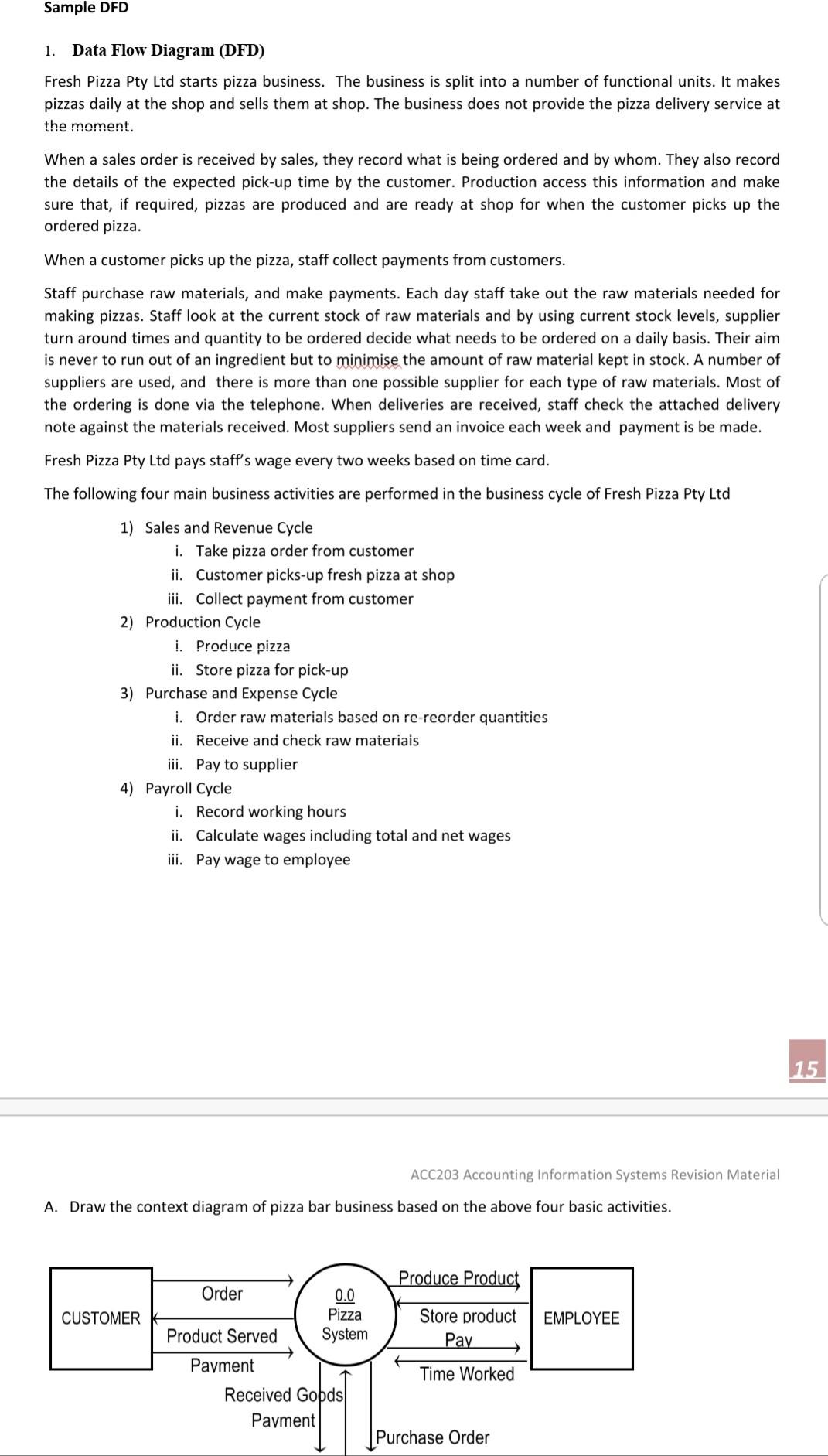
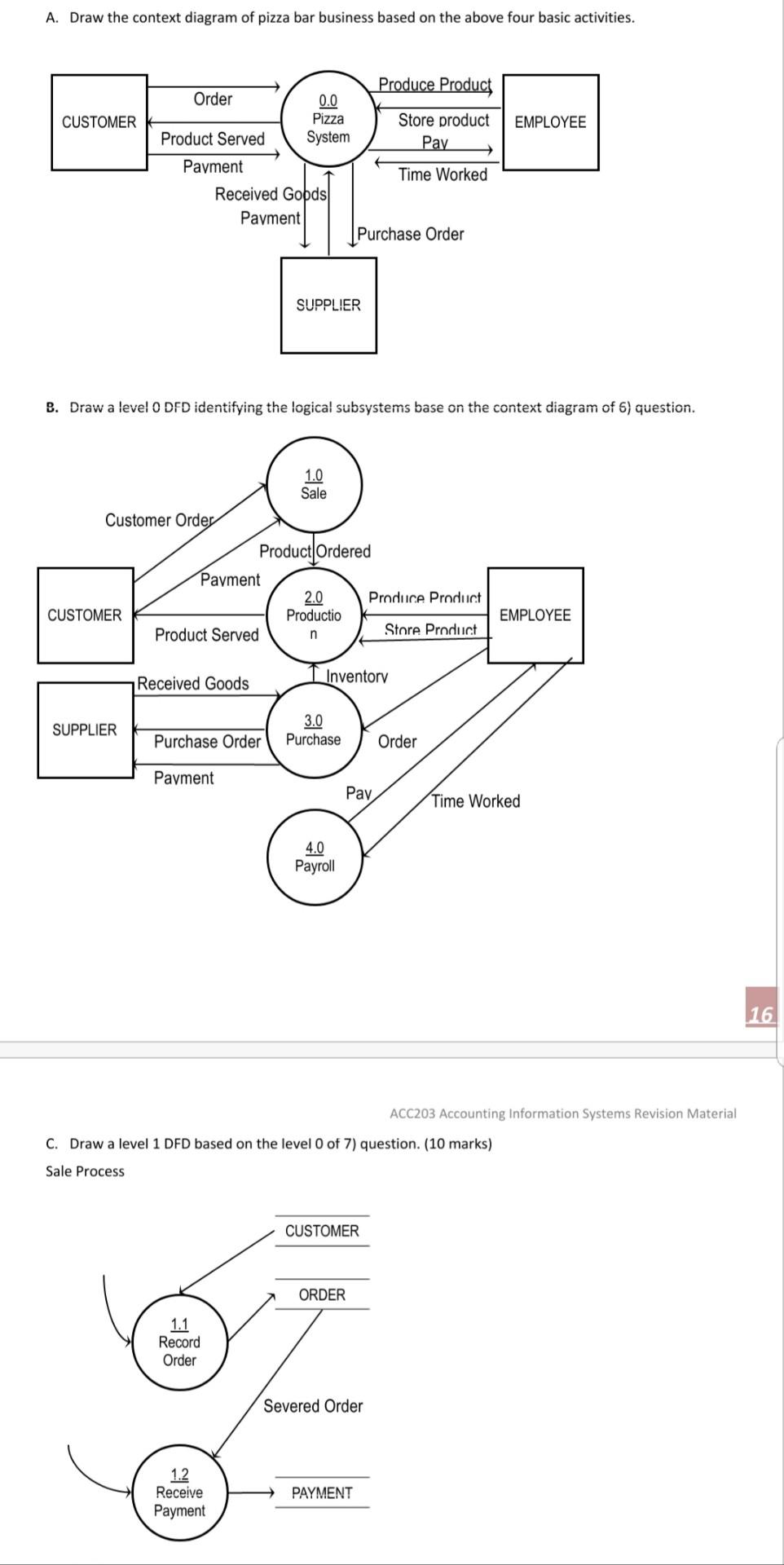
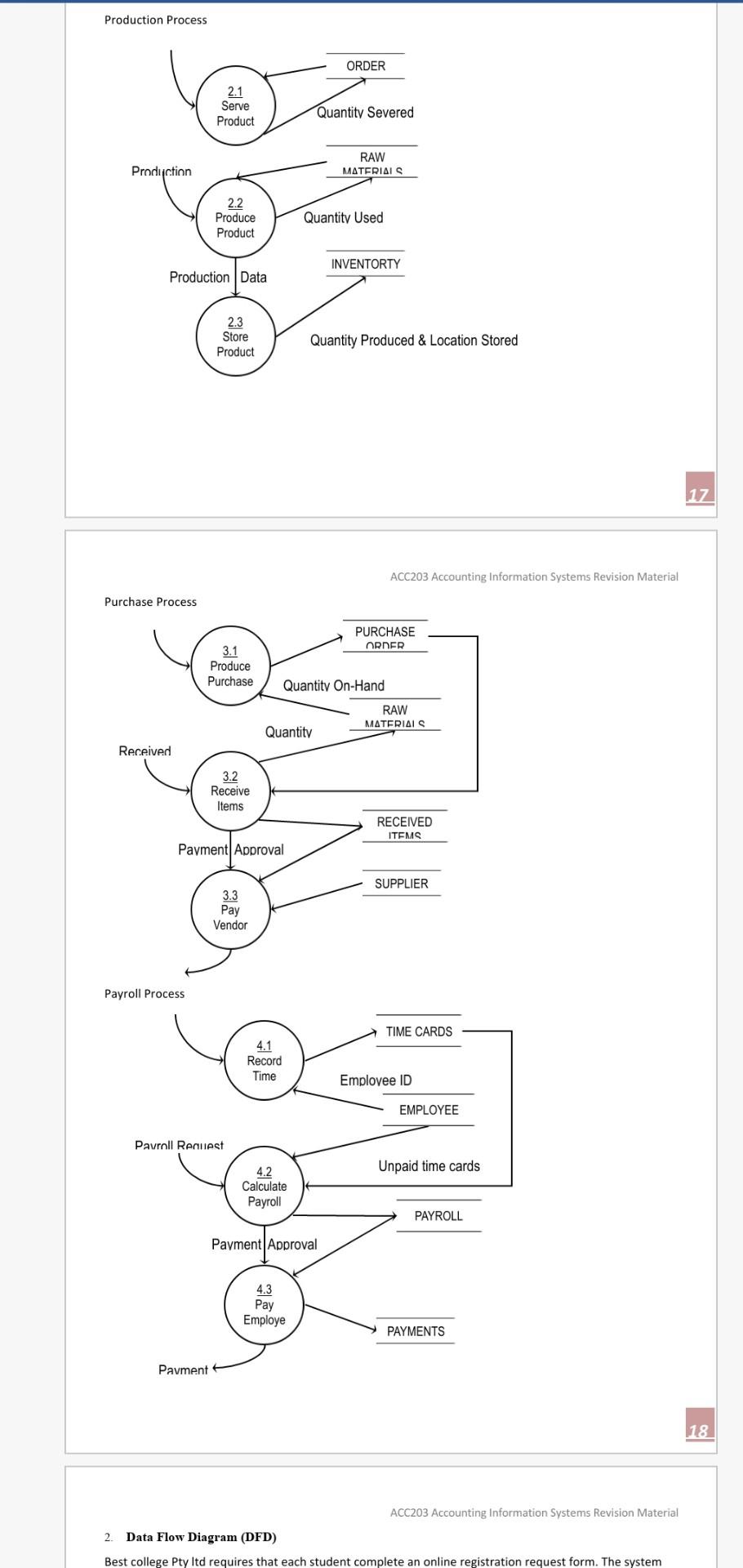
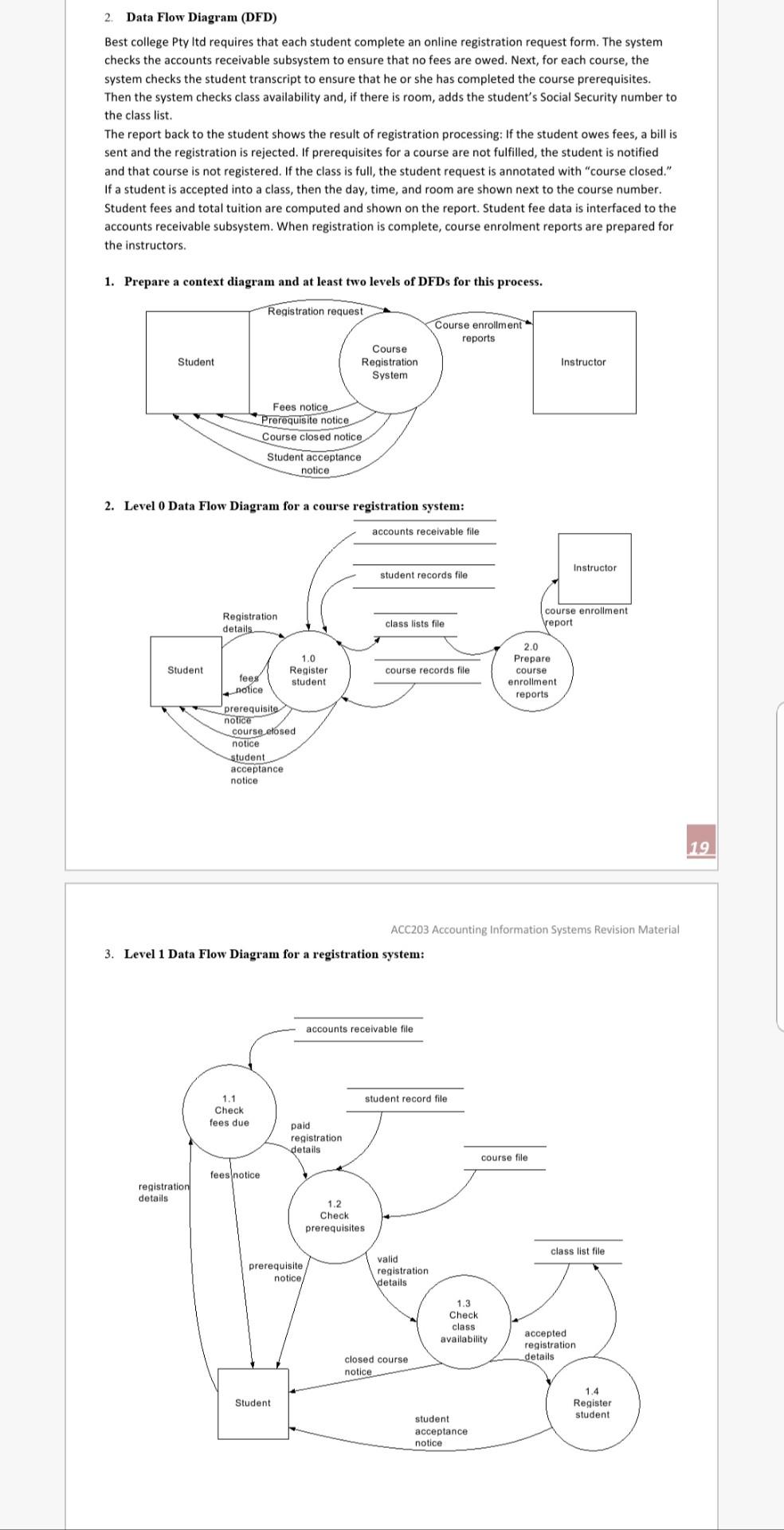
Sample DFD 1. Data Flow Diagram (DFD) Fresh Pizza Pty Ltd starts pizza business. The business is split into a number of functional units. It makes pizzas daily at the shop and sells them at shop. The business does not provide the pizza delivery service at the moment. When a sales order is received by sales, they record what is being ordered and by whom. They also record the details of the expected pick-up time by the customer. Production access this information and make sure that, if required, pizzas are produced and are ready at shop for when the customer picks up the ordered pizza. When a customer picks up the pizza, staff collect payments from customers. Staff purchase raw materials, and make payments. Each day staff take out the raw materials needed for making pizzas. Staff look at the current stock of raw materials and by using current stock levels, supplier turn around times and quantity to be ordered decide what needs to be ordered on a daily basis. Their aim is never to run out of an ingredient but to minimise the amount of raw material kept in stock. A number of suppliers are used, and there is more than one possible supplier for each type of raw materials. Most of the ordering is done via the telephone. When deliveries are received, staff check the attached delivery note against the materials received. Most suppliers send an invoice each week and payment is be made. Fresh Pizza Pty Ltd pays staff's wage every two weeks based on time card. The following four main business activities are performed in the business cycle of Fresh Pizza Pty Ltd 1) Sales and Revenue Cycle i. Take pizza order from customer ii. Customer picks-up fresh pizza at shop iii. Collect payment from customer 2) Production Cycle i. Produce pizza ii. Store pizza for pick-up 3) Purchase and Expense Cycle i. Order raw materials based on re reorder quantities ii. Receive and check raw materiais iii. Pay to supplier 4) Payroll Cycle i. Record working hours ii. Calculate wages including total and net wages iii. Pay wage to employee 15 ACC203 Accounting Information Systems Revision Material A. Draw the context diagram of pizza bar business based on the above four basic activities. Produce Product Order CUSTOMER 0.0 Pizza System EMPLOYEE Product Served Store product Pay Payment Time Worked Received Goods Payment Purchase Order A. Draw the context diagram of pizza bar business based on the above four basic activities. Produce Product Order CUSTOMER 0.0 Pizza System EMPLOYEE Product Served Store product Pay Payment Time Worked Received Gods Payment Purchase Order SUPPLIER B. Draw a level O DFD identifying the logical subsystems base on the context diagram of 5) question. 1.0 Sale Customer Order Product Ordered Payment 2.0 Produce Product Productio Product Served Store Product n CUSTOMER EMPLOYEE Received Goods Inventory SUPPLIER 3.0 Purchase Purchase Order Order Payment Pay Time Worked 4.0 Payroll 16 ACC203 Accounting Information Systems Revision Material C. Draw a level 1 DFD based on the level 0 of 7) question. (10 marks) Sale Process CUSTOMER ORDER 1.1 Record Order Severed Order 1.2 Receive Payment PAYMENT Production Process ORDER 2.1 Serve Product Quantity Severed RAW Production MATERIALS 2.2 Produce Product Quantity Used INVENTORTY Production Data 2.3 Store Product Quantity Produced & Location Stored 17 ACC203 Accounting Information Systems Revision Material Purchase Process PURCHASE ORDER 3.1 Produce Purchase Quantity On-Hand RAW MATERIALS Quantity Received 3.2 Receive Items RECEIVED ITEMS Payment Approval SUPPLIER 3.3 Pay Vendor Payroll Process TIME CARDS 4.1 Record Time Employee ID EMPLOYEE Pavroll Request Unpaid time cards 4.2 Calculate Payroll PAYROLL Payment Approval 4.3 Pay Employe PAYMENTS Pavment 118 ACC203 Accounting Information Systems Revision Material 2 Data Flow Diagram (DFD) Best college Pty Itd requires that each student complete an online registration request form. The system 2. Data Flow Diagram (DFD) Best college Pty Itd requires that each student complete an online registration request form. The system checks the accounts receivable subsystem to ensure that no fees are owed. Next, for each course, the system checks the student transcript to ensure that he or she has completed the course prerequisites. Then the system checks class availability and, if there is room, adds the student's Social Security number to the class list. The report back to the student shows the result of registration processing: If the student owes fees, a bill is sent and the registration is rejected. If prerequisites for a course are not fulfilled, the student is notified and that course is not registered. If the class is full, the student request is annotated with "course closed." If a student is accepted into a class, then the day, time, and room are shown next to the course number. Student fees and total tuition are computed and shown on the report. Student fee data is interfaced to the accounts receivable subsystem. When registration is complete, course enrolment reports are prepared for the instructors. 1. Prepare a context diagram and at least two levels of DFDs for this process. Registration request Course enrollment reports Student Course Registration System Instructor Fees notice Prerequisite notice Course closed notice Student acceptance notice 2. Level 0 Data Flow Diagram for a course registration system: accounts receivable file Instructor Instructor student records file course enrollment Registration details class lists file Veport Student course records file 2.0 Prepare course enrollment reports 1.0 fees Register student notice prerequisite notice course etosed notice student acceptance notice 12 ACC203 Accounting Information Systems Revision Material 3. Level 1 Data Flow Diagram for a registration system: accounts receivable file student record file 1.1 Check fees due paid registration details course file fees notice registration details 1.2 Check prerequisites class list file prerequisite notice valid registration \details 1.3 Check class availability accepted registration details closed course notice Student 1.4 Register student student acceptance notice
Step by Step Solution
There are 3 Steps involved in it
1 Expert Approved Answer
Step: 1 Unlock

Question Has Been Solved by an Expert!
Get step-by-step solutions from verified subject matter experts
Step: 2 Unlock
Step: 3 Unlock
 Study Help