



Question: Sarge's Bagel Hut has asked you to write an application that their staff can use to record an order as it is requested. The
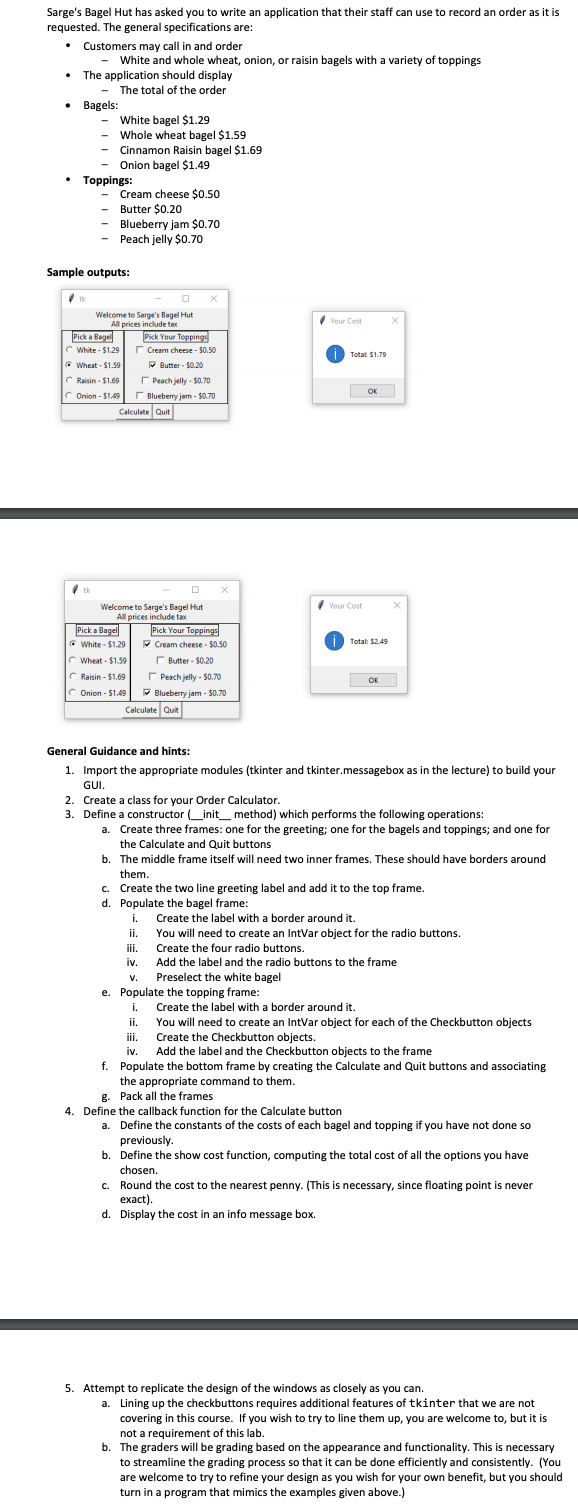
Sarge's Bagel Hut has asked you to write an application that their staff can use to record an order as it is requested. The general specifications are: Customers may call in and order - White and whole wheat, onion, or raisin bagels with a variety of toppings The application should display - The total of the order Bagels: - White bagel $1.29 Toppings: tk Whole wheat bagel $1.59 Cinnamon Raisin bagel $1.69 Onion bagel $1.49 - Cream cheese $0.50 - Butter $0.20 Sample outputs: tk Blueberry jam $0.70 Peach jelly $0.70 0 Welcome to Sarge's Bagel Hut All prices include tax Pick a Bagel C White - $1.29 Wheat - $1.59 Raisin-$1.69 Onion-$1.49 Calculate Quit Pick a Bagel White-$1.29 Wheat - $1.59 0 Welcome to Sarge's Bagel Hut All prices include tax CRaisin-$1.69 COnion-$1.49 Pick Your Toppings Cream cheese - $0.50 Butter - $0.20 Peach jelly-$0.70 Blueberry jam - $0.70 i. ii. Calculate Quit iii. iv. V. Pick Your Toppings Cream cheese- $0.50 ii. Butter- $0.20 Peach jelly - $0.70 Blueberry jam - $0.70 iii. iv. Your Cost Total: $1.79 e. Populate the topping frame: i. Your Cost General Guidance and hints: 1. Import the appropriate modules (tkinter and tkinter.messagebox as in the lecture) to build your GUI. Total: $2.49 2. Create a class for your Order Calculator. 3. Define a constructor (_init_method) which performs the following operations: a. Create three frames: one for the greeting; one for the bagels and toppings; and one for the Calculate and Quit buttons b. The middle frame itself will need two inner frames. These should have borders around them. c. Create the two line greeting label and add it to the top frame. d. Populate the bagel frame: OK Create the label with a border around it. OK X Create the label with a border around it. X You will need to create an IntVar object for the radio buttons. Create the four radio buttons. Add the label and the radio buttons to the frame Preselect the white bagel You will need to create an IntVar object for each of the Checkbutton objects Create the Checkbutton objects. Add the label and the Checkbutton objects to the frame f. Populate the bottom frame by creating the Calculate and Quit buttons and associating the appropriate command to them. g. Pack all the frames 4. Define the callback function for the Calculate button a. Define the constants of the costs of each bagel and topping if you have not done so previously. b. Define the show cost function, computing the total cost of all the options you have chosen. c. Round the cost to the nearest penny. (This is necessary, since floating point is never exact). d. Display the cost in an info message box. 5. Attempt to replicate the design of the windows as closely as you can. a. Lining up the checkbuttons requires additional features of tkinter that we are not covering in this course. If you wish to try to line them up, you are welcome to, but it is not a requirement of this lab. b. The graders will be grading based on the appearance and functionality. This is necessary to streamline the grading process so that it can be done efficiently and consistently. (You are welcome to try to refine your design as you wish for your own benefit, but you should turn in a program that mimics the examples given above.)
Step by Step Solution
3.52 Rating (142 Votes )
There are 3 Steps involved in it

Get step-by-step solutions from verified subject matter experts