





Question: Save and submit the Word document with two RStudio chart screen prints and one screen print of the decision tree made using Palisade Neural Network
Save and submit the Word document with two

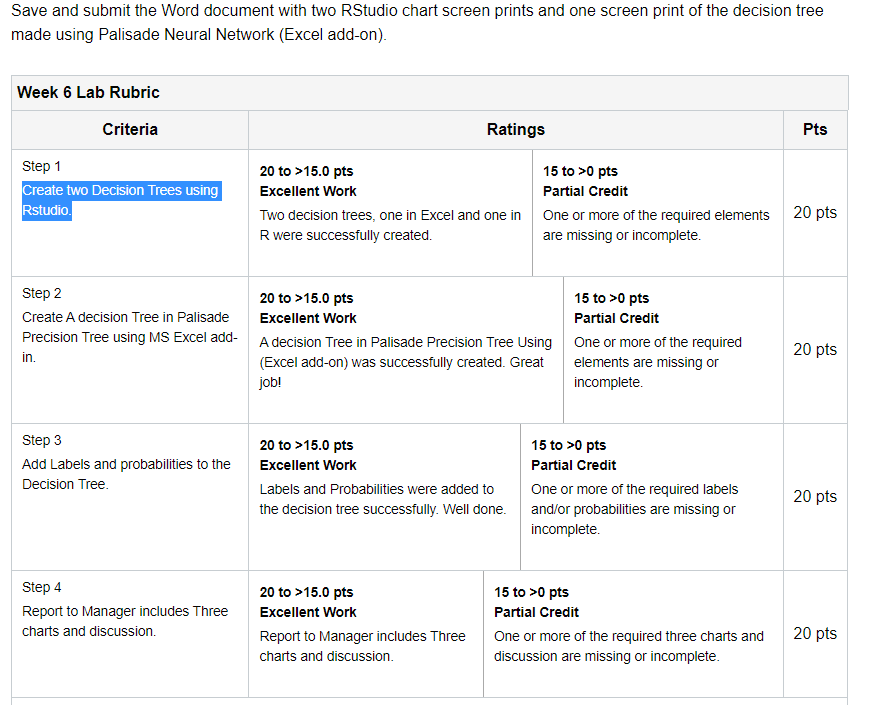
Save and submit the Word document with two RStudio chart screen prints and one screen print of the decision tree made using Palisade Neural Network (Excel add-on). Week 6 Lab Rubric Criteria Ratings Pts Step 1 Create two Decision Trees using Rstudio 20 to >15.0 pts 15 to >0 pts Excellent Work Partial Credit Two decision trees, one in Excel and one in one or more of the required elements R were successfully created. are missing or incomplete. 20 pts Step 2 20 to >15.0 pts 15 to >0 pts Create A decision Tree in Palisade Excellent Work Partial Credit Precision Tree using MS Excel add- A decision Tree in Palisade Precision Tree Using One or more of the required in. (Excel add-on) was successfully created. Great elements are missing or job! incomplete. 20 pts Step 3 Add Labels and probabilities to the Decision Tree. 20 to >15.0 pts 15 to >0 pts Excellent Work Partial Credit Labels and Probabilities were added to One or more of the required labels the decision tree successfully. Well done and/or probabilities are missing or incomplete. 20 pts Step 4 Report to Manager includes Three charts and discussion 20 to >15.0 pts Excellent Work Report to Manager includes Three charts and discussion. 15 to >0 pts Partial Credit One or more of the required three charts and discussion are missing or incomplete. 20 pts Save and submit the Word document with two RStudio chart screen prints and one screen print of the decision tree made using Palisade Neural Network (Excel add-on). Week 6 Lab Rubric Criteria Ratings Pts Step 1 Create two Decision Trees using Rstudio 20 to >15.0 pts 15 to >0 pts Excellent Work Partial Credit Two decision trees, one in Excel and one in one or more of the required elements R were successfully created. are missing or incomplete. 20 pts Step 2 20 to >15.0 pts 15 to >0 pts Create A decision Tree in Palisade Excellent Work Partial Credit Precision Tree using MS Excel add- A decision Tree in Palisade Precision Tree Using One or more of the required in. (Excel add-on) was successfully created. Great elements are missing or job! incomplete. 20 pts Step 3 Add Labels and probabilities to the Decision Tree. 20 to >15.0 pts 15 to >0 pts Excellent Work Partial Credit Labels and Probabilities were added to One or more of the required labels the decision tree successfully. Well done and/or probabilities are missing or incomplete. 20 pts Step 4 Report to Manager includes Three charts and discussion 20 to >15.0 pts Excellent Work Report to Manager includes Three charts and discussion. 15 to >0 pts Partial Credit One or more of the required three charts and discussion are missing or incomplete. 20 pts

Step by Step Solution

There are 3 Steps involved in it

1 Expert Approved Answer
Step: 1 Unlock blur-text-image

Question Has Been Solved by an Expert!

Get step-by-step solutions from verified subject matter experts

Step: 2 Unlock
Step: 3 Unlock

Students Have Also Explored These Related General Management Questions!