



Question: SEE AL AaBbCcDdEe AaBbCcDdEe No Spacing AaBbCcDc AaBbc Heading 1 Headi Normal 8. To hardcode the current time into a cell: a. Ctrl + Shift
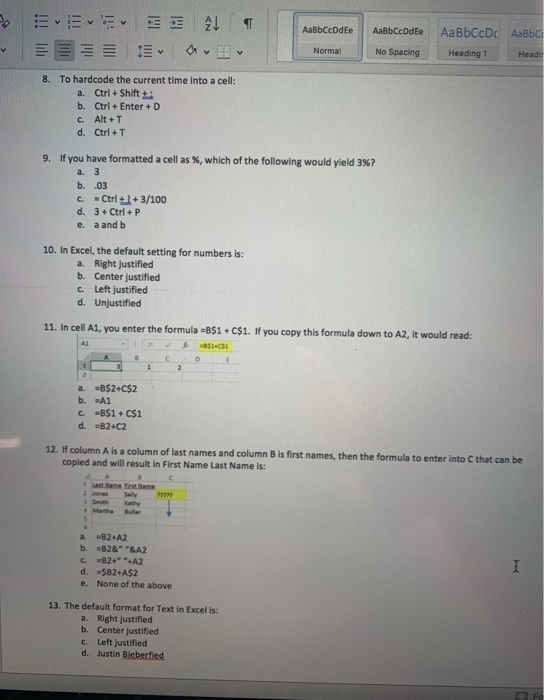
SEE AL AaBbCcDdEe AaBbCcDdEe No Spacing AaBbCcDc AaBbc Heading 1 Headi Normal 8. To hardcode the current time into a cell: a. Ctrl + Shift + b. Ctrl+Enter +D c. Alt +T d. Ctrl+T 9. If you have formatted a cell as %, which of the following would yield 3%? b. .03 C. - Ctrl +1+3/100 d. 3 + Ctrl + P e. a and b 10. In Excel, the default setting for numbers is: a. Right justified b. Center justified c. Left justified d. Unjustified 11. In cell A1, you enter the formula -8$1 C$1. If you copy this formula down to A2, it would read: AL 1 35151 a. -B$2+C$2 b. -A1 c -B$1+C$1 d. -82-C2 12. If column A is a column of last names and column B is first names, then the formula to enter into C that can be copied and will result in First Name Last Name is: a. -B2+A2 b. -B28" "&A2 c.-82" **A2 d. $B2+A$2 e. None of the above 13. The default format for Text In Excel is: a. Right justified b. Center justified c. Left justified d. Justin Bieberfied
Step by Step Solution
There are 3 Steps involved in it

Get step-by-step solutions from verified subject matter experts