







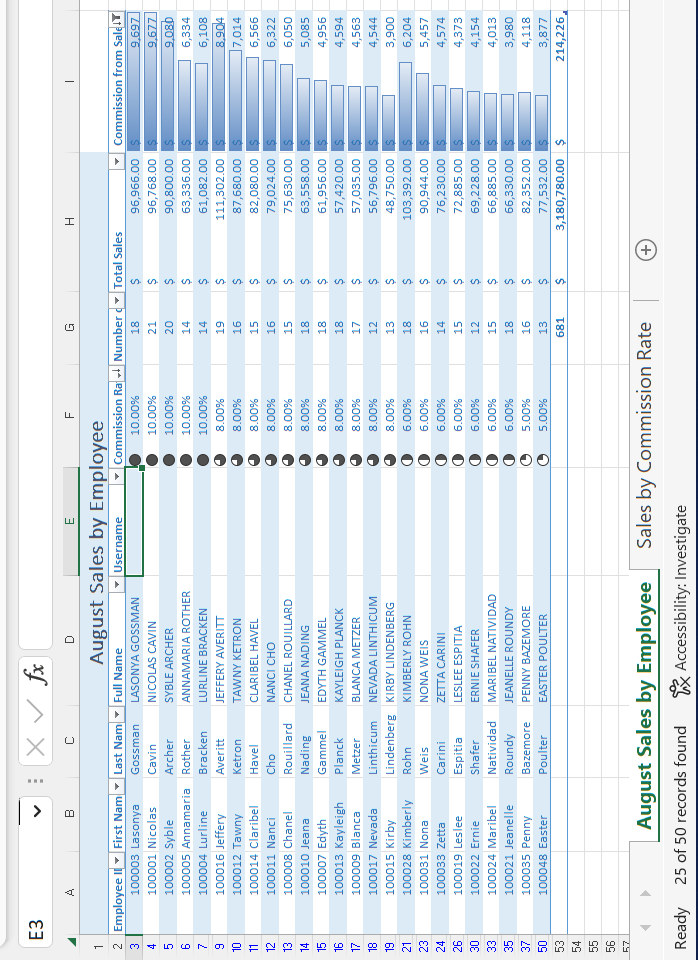
Question: Select cell E3. Use the LOWER(), LEFT(), and RIGHT() functions to create a username that is the first letter of the employees first name, the
Select cell E3. Use the LOWER(), LEFT(), and RIGHT() functions to create a username that is the first letter of the employees first name, the employees last name, and the last 3 digits of the employees ID number. All lowercase.
HINT: Refer to the videos on the Format and Modify Text page. You may need to use an & to string the 3 items together.
Example: ncavin001.
Fill the remaining cells in the Username column with your formula.
Step by Step Solution
There are 3 Steps involved in it
1 Expert Approved Answer
Step: 1 Unlock

Question Has Been Solved by an Expert!
Get step-by-step solutions from verified subject matter experts
Step: 2 Unlock
Step: 3 Unlock
 Study Help