







Question: sendemail.php Email Confirmation Contact Confirmation Screen // FIX THIS $message = This needs to be changed to be whatever the user enters.; // CHANGE THE
sendemail.php
Email Confirmation
Contact Confirmation Screen
// FIX THIS
$message = "This needs to be changed to be whatever the user enters.";
// CHANGE THE LINE BELOW TO AN EMAIL ADDRESS YOU RECEIVE MESSAGES AT.
$toaddress = "noOne@NoWhere"; // PLEASE don't leave noOne@NoWhere in this - it won't work...
// create a subject line for the email - THIS SHOULD GIVE THE NAME ENTERED INTO THE FORM
$subjectline = "Message from John Smith";
// set the from address for the email; this is required
$headers = "from:bus.support@lsbu.ac.uk "; // Daydream will send an email only if this header is present
$success = false;
// Send the email. The mail command is commented out. Remove the // to activate it.
// It is commented out because if the server does not support sending mails it might crash the script.
//$success = mail( $toaddress, $subjectline, $message, $headers);
// THIS TEXT SHOULD ALSO GIVE THE NAME ENTERED BY THE USER, NOT John Smith.
print "
Thank you John Smith, the following message has been sent to the website owner:
";
print "
";
print "
Subject: ".$subjectline."
";
print "
".$message."
";
print " ";
if ( !$success) {
print "
Error: Message not sent!
";
}
?>
You will need to fix the following (all highlighted in red ) see the picture. to archive the fellowing please: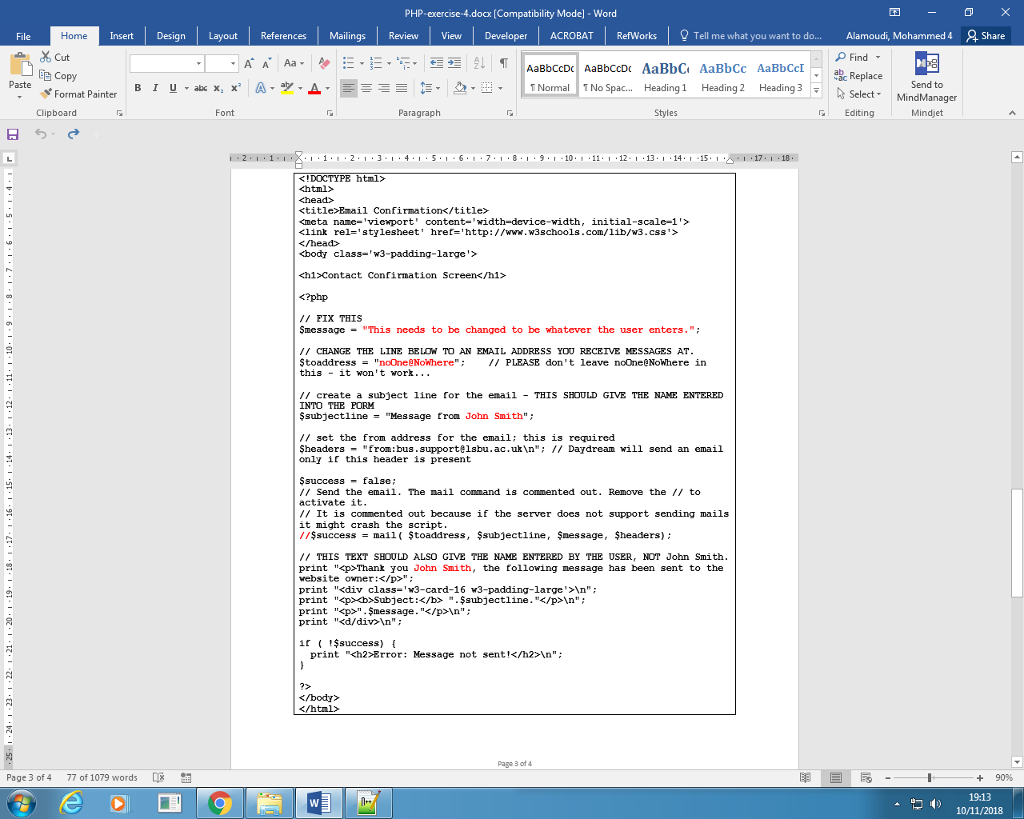 );
);
The text of the message should come from the form input.
The value for the variable $toAddress should be a real email address you own. This is where the email will get sent.
The subject line should not say John Smith, but give the names the user entered on the form.
The thank you message should also not say John Smith, but the name entered on the form.
The mail command itself has been disabled by preceding it with the comment symbol //. Once you have fixed all the other problems listed above and tested that it looks right, remove the // before the mail command and hopefully you will actually receive the email at the address you gave for $toAddress.
PHP-exercise 4.doa: [Compatibility Mode] -Word Insert Design Layout References Mailings Review View Developer ACROBAT Refworks Share Alamoudi Mohammed 4 Find c Replace File Home Tell me what you want to do... Cut AaBbCcDc AaBbCcDc AaBbC AaBbCc AaBbCcIab TNormal 1No Spac e Copy Paste H.. Send to Heading 1 Heading 2 Heading 3 Format Painter Clipboard Font Paragraph Styles G Editing Mindjet 171 18 Contact Conrirmation Screen
// FIX THS SmessagcThis nceds to be changed to be whatever the user cnters."; CHANGE THE LINE BELOW TO AN EMAIL ADDRESS YOU RECEIVE MESSAGES AT Stoaddress"noOneeNowhere:// PLEASE don't leave noOneeNoWhere in thisit won't work... / create a subject line for the enail - THIS SHOULD GIVE THE NAME ENTERED INTO THE PORM Ssubjectline "Message froa John Smith" sct the from address for the email: this is required headers - "from:bus.supportelsbu.ac.uk "; 1/ Daydream will send an email only if this header is present Ssuccess - false; // Send the email. The nail conmand is comnented out. Remove the // to activate it It is commented out because if the server does not support sending mails it might crash the script /$success mail toaddress, $subjectline, message, headers) THIS TEXT SHOULD ALSO GIVE THE NAME ENTERED BY THE USER, NOT John Smith print "p>Thank you John Smith, the following nessage has been sent to the vebsite owneri print "
Step by Step Solution
There are 3 Steps involved in it

Get step-by-step solutions from verified subject matter experts
 Study Help