







Question: Should be solved on excel Skip the Grade column, no grading criteria was given. Do not solve the first question 3 For the question of
Should be solved on excel
Skip the Grade column, no grading criteria was given. Do not solve the first question 3
For the question of Sort the data based on grade, kindly do it using Total marks and not grade. Solve the remaining questions. thanks
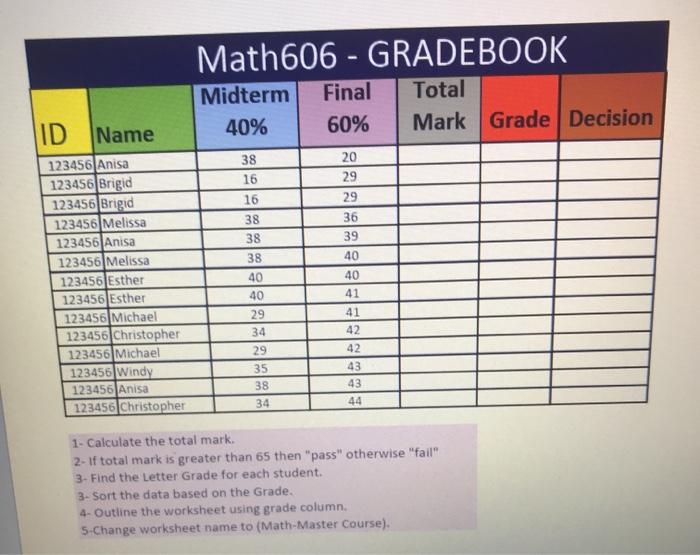
Math606 - GRADEBOOK Midterm Final Total 40% 60% Mark Grade Decision ID Name 38 16 20 29 29 36 39 40 123456|Anisa 123456 Brigid 123456 Brigid 123456 Melissa 123456|Anisa 123456] Melissa 123456 Esther 123456 Esther 123456 Michael 123456 Christopher 123456 Michael 123456 Windy 123456|Anisa 123456 Christopher 16 38 38 38 40 40 29 34 40 41 41 42 42 29 35 38 34 43 43 44 1- Calculate the total mark. 2- If total mark is greater than 65 then "pass" otherwise "fail" 3. Find the Letter Grade for each student. 3. Sort the data based on the Grade. 4. Outline the worksheet using grade column. 5-Change worksheet name to (Math-Master Course)
Step by Step Solution
There are 3 Steps involved in it
1 Expert Approved Answer
Step: 1 Unlock

Question Has Been Solved by an Expert!
Get step-by-step solutions from verified subject matter experts
Step: 2 Unlock
Step: 3 Unlock
 Study Help