







Question: show all work in formula in excel format Scenario Analysis (Excel Scenario Manager) Scenario analysis is used to determine the range of possible outcomes for
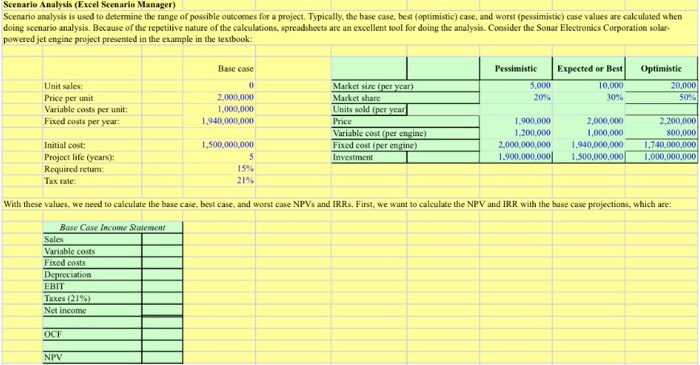
Scenario Analysis (Excel Scenario Manager) Scenario analysis is used to determine the range of possible outcomes for a project. Typically, the base case, best (optimistic) case, and worst (pessimistic) case values are calculated when doing scenario analysis. Because of the repetitive nature of the calculations, spreadsheets are an excellent tool for doing the analysis. Consider the Sonar Electronics Corporation solar- powered jet engine project presented in the example in the textbook: Optimistic Pessimistic 5.000 20% Expected or Best 10,000 Base case 0 2,000,000 1,000,000 1,940,000,000 30% Unit sales: Price per unit Variable costs per unit: Fixed costs per year 20,000 50% Market size (per year) Market share Units sold (per year Price Variable cost(per engine) Fixed cost (per engine) Investment 1.900.000 1.200,000 2,000,000,000 1.900.000.000 2,000,000 1,000,000 1.940,000,000 1.500.000.000 2,200,000 800,000 1.740,000,000 1,000,000,000 1,500,000,000 5 15% 21% Initial cost: Project life (years): Required return: Tax rate With these values, we need to calculate the base case, best case, and worst case NPVs and IRRs. First, we want to calculate the NPV and IRR with the base case projections, which are: Base Case Income Statement Sales Variable costs Fixed costs Depreciation EBIT Taxes (21%) Net income OCF NPV
Step by Step Solution
There are 3 Steps involved in it

Get step-by-step solutions from verified subject matter experts
 Study Help