







Question: Show me the function in Excel Please 1) Using the name manager, create a named range called ShipCharge from the table above. 2) Using a
Show me the function in Excel Please
1) Using the name manager, create a named range called "ShipCharge" from the table above.
2) Using a function with a combination of a Nested IF and a Vlookup, determine the correct shipping charge for the order.
3) Determine the total price of the order.
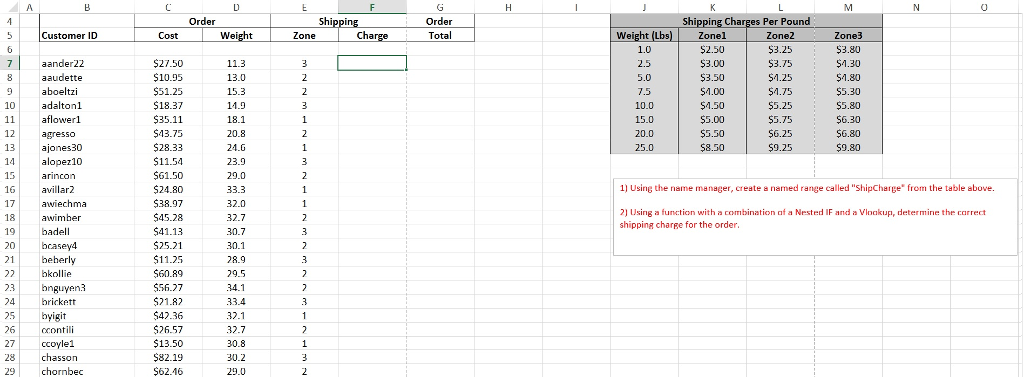
Customer ID aand er22 aaud aboeltzi 10 adaltonl 11 owerl. 12 agresso 13 ajones 300 14 alopez 10 16 ar2 17 wiechma wimbe 18 19 adel 20 bcasey4 21 beherly bkollie 23 bnguyen 24. bricket 25 byig 27 ccoyle1. 28 chasson 29 chornbec order Shippin order Cost tweight Zone Charge Total 3 $27.50 11.3 $10.95 13.0 $51.25 15.3 $18.37 11.9 $35.11 18.1 $13.7 20.8 $28.33 24.6 $11.54 23.9 $61.50 29.0 $24.80 33.3 $38.97 32.0 $45.28 32.7 30.7 $41.13 $25.21 30.1 $11.25 28.9 $60.89 29.5 $56.27 R2 33.4. $42.36 32 $26.57 32.7 $13.50 30.8 582-19 30.2 $62.16 29.0 Shipping Charges Per Pound Weight (Lbs) zonel zone 2 zone 3 $8.50 1) Using the name manage create a named range called "ShipCharge om the table above. 2) Using a function with a combination of a Nested IF and a Vinakup, determine thr carrect shippi ng charfe for the orde
Step by Step Solution
There are 3 Steps involved in it

Get step-by-step solutions from verified subject matter experts
 Study Help