







Question: Signal analysis, For the Matlab code given below, it is required to 1- add the settling time function to get the settling time at each
Signal analysis,
For the Matlab code given below,
it is required to 1- add the settling time function to get the settling time at each alpha,
2-fix the 3dB line (which equal to (1/root(2))* magnitude) to be shown correctly
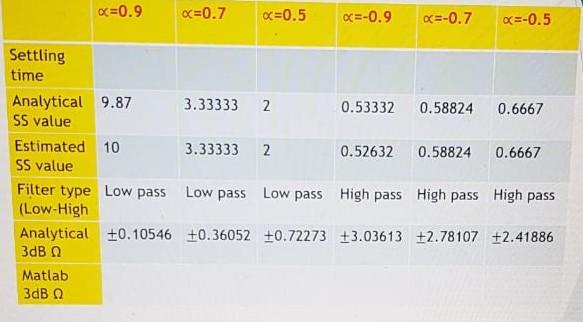
in order to complete the following table
***the settling time is the time required for the step response to reach and stay within a range of 5% of the final steady-state value. It can be used to evaluate system speed (higher settling time corresponds to a slower system). Use Matlab to find the settling time for this case***
The Matlab code:
clc; close all; clear; syms w n z; %creating symbolic variables w,n,z wr = -pi:0.1:pi; %range of w for magnitude and phase plot nr = 0:40; %n range for plotting the signal in time domain alpha_arr = [0.9 0.7 0.5 -0.9 -0.7 -0.5]; %defining array for required alpha valuesfor i = 1:length(alpha_arr) figure; %opening a new figure alpha = alpha_arr(i); x = alpha^n; %defining the function x(n) subplot 221 stem(nr,subs(x,n,nr)); % for plotting x(n) hold on; plot(nr,0.05*ones(1,length(nr)),'r'); %plotting the upperline for 5% settling time plot(nr,-0.05*ones(1,length(nr)),'r'); %plotting the downline for 5% settling time hold off; title(["Impulse response for alpha = " alpha]); legend("x(n)","5% value"); xlabel("n"); ylabel("h(n)"); Zx = ztrans(x); %for freq response we first need to find the z transform Step_z = Zx*1/(1-z^-1); %z transform of TF multiplied with z transform of step input Step_n = iztrans(Step_z); %finding the step response subplot 222 stem(nr,subs(Step_n,n,nr)); %plotting the step response title(["Step Response for alpha = " alpha]); xlabel("n"); ylabel("S(n)"); X_w = subs(Zx,z,exp(1i*w)); % Put z = exp(jw) to find the frequency response subplot 223 plot(wr,(abs(subs(X_w,w,wr)))); %plotting the magnitude response hold on; plot(wr,-3*ones(1,length(wr)),'r'); %-3dB line hold off; title(["Magnitude plot (in dB) for alpha = " alpha]); legend("Magnitude plot","-3dB line"); xlabel("w"); ylabel("|H(e^jw)|"); subplot 224 plot(wr,180*angle(subs(X_w,w,wr))/pi); %plotting the phase response title(["Phase Plot for alpha = " alpha]); xlabel("w"); ylabel("<[H(e^jw)]"); end
Settling time x=0.9 Analytical 9.87 SS value Estimated 10 SS value Matlab 3dB x=0.7 x=0.5 3.33333 2 3.33333 2 Filter type Low pass Low pass Low pass (Low-High Analytical 0.10546 +0.36052 +0.72273 3dB x=-0.9 x=-0.7 x=-0.5 0.53332 0.58824 0.6667 0.52632 0.58824 0.6667 High pass High pass High pass +3.03613 +2.78107 +2.41886
Step by Step Solution
3.49 Rating (172 Votes )
There are 3 Steps involved in it
To address the tasks we need to modify the given MATLAB code to calculate and plot the settling time ... View full answer

Get step-by-step solutions from verified subject matter experts
 Study Help