







Question: Simple Python Guess Number Program: In this short PA, you will write a simple number guessing game. This number guessing game will require you to
Simple Python Guess Number Program: 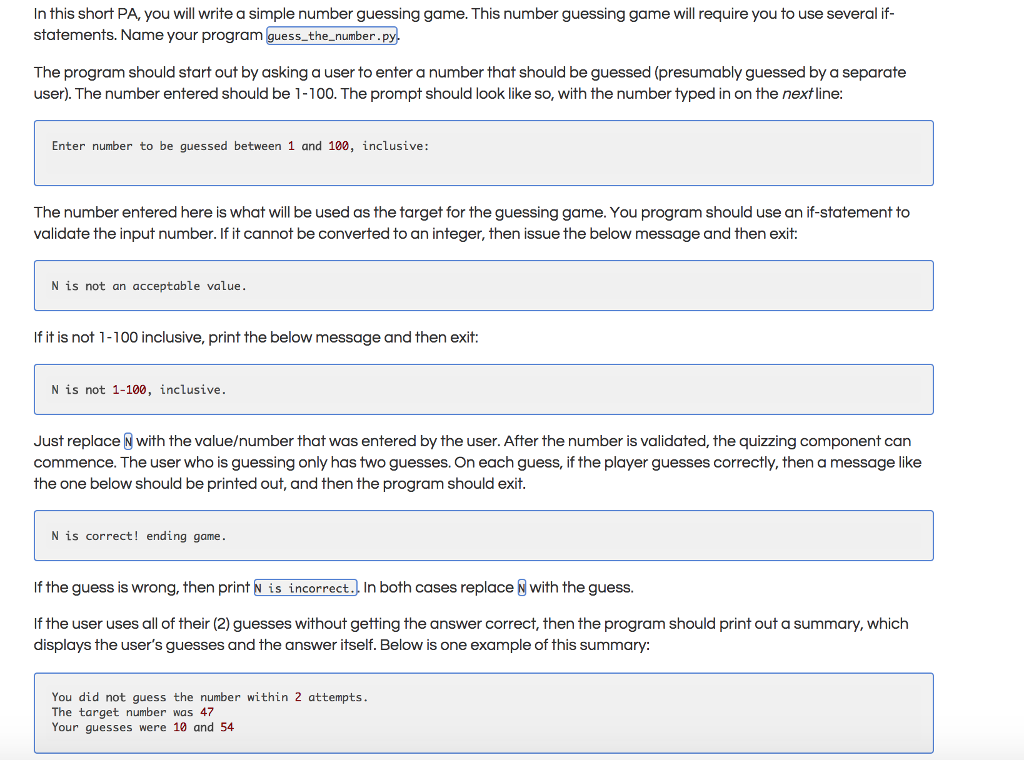
In this short PA, you will write a simple number guessing game. This number guessing game will require you to use several if- statements. Name your program guess-the number.py. The program should start out by asking a user to enter a number that should be guessed (presumably guessed by a separate user). The number entered should be 1-100. The prompt should look like so, with the number typed in on the nextline: Enter number to be guessed between 1 and 100, inclusive: The number entered here is what will be used as the target for the guessing game. You program should use an if-statement to validate the input number. If it cannot be converted to an integer, then issue the below message and then exit: N is not an acceptable value If it is not 1-100 inclusive, print the below message and then exit: N is not 1-100, inclusive. Just replace N with the valueumber that was entered by the user. After the number is validated, the quizzing component can commence. The user who is guessing only has two guesses. On each guess, if the player guesses correctly, then a message like the one below should be printed out, and then the program should exit. N is correct! ending game If the guess is wrong, then print N is incorrect., In both cases replace with the guess. If the user uses all of their (2) guesses without getting the answer correct, then the program should print out a summary, which displays the user's guesses and the answer itself. Below is one example of this summary: You did not guess the number within 2 attempts The target number was 47 Your guesses were 10 and 54
Step by Step Solution
There are 3 Steps involved in it

Get step-by-step solutions from verified subject matter experts
 Study Help