







Question: Simulate this arduino uno circuit to proteus 8. program: // Interactive LED Flowing Lights, LEDs light up one by one in turn. Adjust the potentiometer,
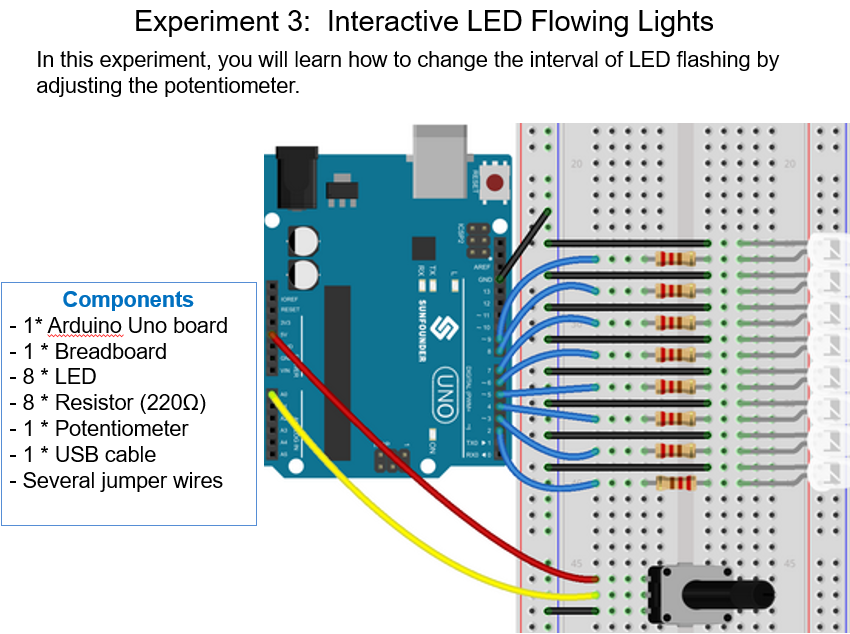
Simulate this arduino uno circuit to proteus 8.
program:
// Interactive LED Flowing Lights, LEDs light up one by one in turn. Adjust the potentiometer,
// and you will find the time interval of LED lighting up changes. int ledNum = 8; //the number of the led you attach byte ledPin[] = { 2, 3, 4, 5, 6, 7, 8, 9}; // Create array for LED pins int ledDelay; // delay between changes int direction = 1; int currentLED = 0; unsigned long changeTime; int potPin = 0; // select the input pin for the potentiometer
void setup() { for (int x = 0; x
void loop()
{ ledDelay = analogRead(potPin); // read the value from the pot if ((millis() - changeTime) > ledDelay) { // if it has been ledDelay ms since last change
changeLED(); changeTime = millis(); } }
void changeLED() { for (int x=0; x Experiment 3: Interactive LED Flowing Lights In this experiment, you will learn how to change the interval of LED flashing by adjusting the potentiometer. Components - 1* Arduino Uno board 1 * Breadboard 8 *ED - 8 * Resistor (220) 1 Potentiometer 1 USB cable - Several jumper wires
Step by Step Solution
There are 3 Steps involved in it

Get step-by-step solutions from verified subject matter experts
 Study Help