







Question: SOLUTION REQUIREMENTS a . The Offset property MUST be used to position all the row and column labels in the summary data table ( e
SOLUTION REQUIREMENTS
a The Offset property MUST be used to position all the row and column labels in the summary
data table eg "Vessel Calls" and "Minimum" You may use any cell in the worksheet "Prob
as the base cell ie row and column cell when using the property. The numerical
values in the summary table can be positioned in the table using any Excel VBA property you
deem appropriate.
b The sub procedure SummaryTable must comply with the following formatting requirements of
the summary table:
Row labels must be BOLD, Italic, BLUE, and left aligned.
Column labels must be BOLD, RED, and centered.
The interior color of every other column should be changed to improve readability. You are
at liberty to pick the interior color. Note that Black and White are NOT acceptable colors to
fulfill this requirement.
Borders around the cells must be created via code using a continuous line style and a thin
weight.
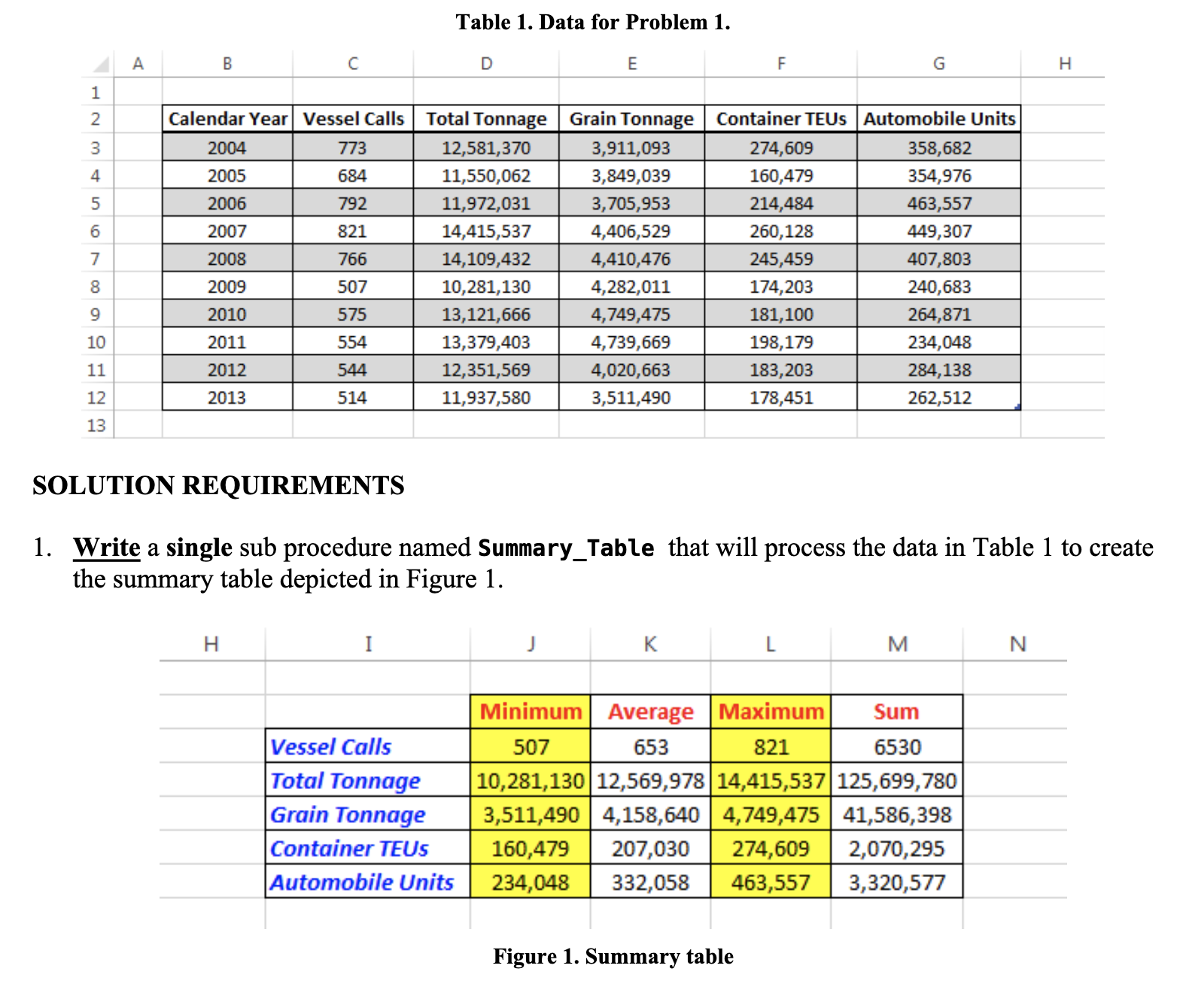
c The following formulas must be used to perform the calculations for each row category in the
summary table see Figure :
MIN
AVERAGE
MAX
SUM
d The display of every column of the summary table and corresponding formats should occur
with a delay of one second from each other. For example, once the procedure SummaryTable
is executed, the display of the column that contains the row labels in the summary table eg
Vessel Calls, Total Tonnage, etc. and corresponding formats should be displayed after one
second. Then, another second must elapse before the data in the column labeled "Minimum" are
displayed, and so on
e Column widths MUST adjust automatically to its contents after each column is displayed.
f Range I:M should be cleared automatically by your procedure immediately after the
rectangular shape button is pressed.
g You must use the WITH construct to make your code more readable.
h Your sub procedure must end by selecting cell A
Write a single sub procedure named SummaryTable that will process the data in Table to create the summary table depicted in Figure
Please use basic VBA code and Comment your code aswell. I will Like when the work is done and please test the code to see if if it works correctly as well as follows the guidlines. Thank you so much this has been a headache.
Step by Step Solution
There are 3 Steps involved in it
1 Expert Approved Answer
Step: 1 Unlock

Question Has Been Solved by an Expert!
Get step-by-step solutions from verified subject matter experts
Step: 2 Unlock
Step: 3 Unlock
 Study Help