







Question: Solve as a MATLAB function written out, 2 . 2 adobePhotoshop Function Name: adobePhotoshop Input: ( 1 xx N char ) A filename of an
Solve as a MATLAB function written out, adobePhotoshop
Function Name: adobePhotoshop
Input:
xx N char A filename of an image of a background with a png extension
xx M char A filename of an image of an foreground with a png extension
File Output:
The new image file with the foreground on the background image
Description:
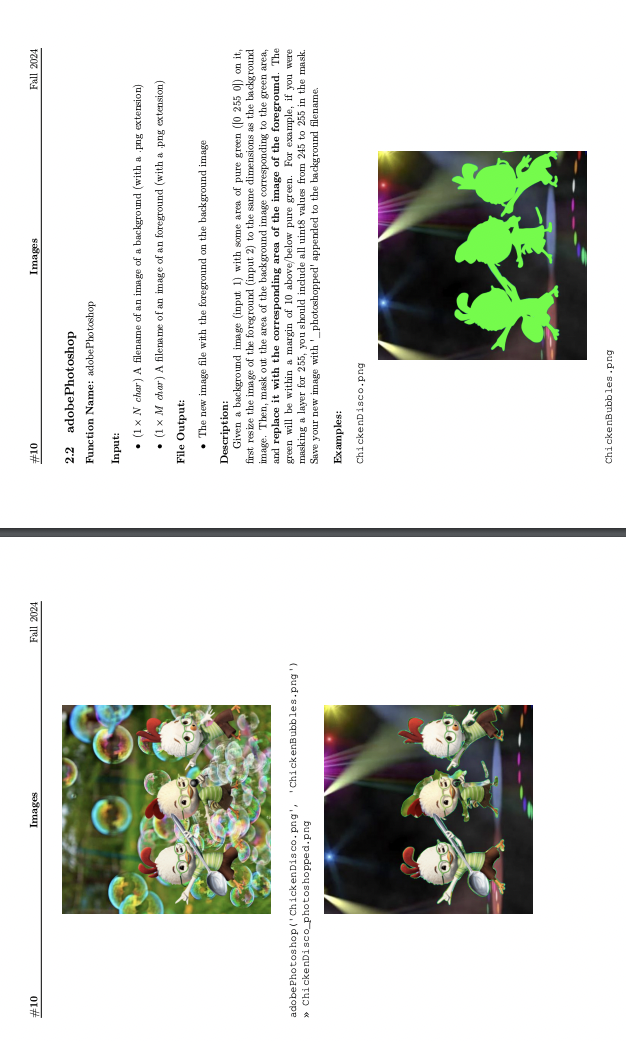
Given a background image input with some area of pure green on it
first resize the image of the foreground input to the same dimensions as the background
image. Then, mask out the area of the background image corresponding to the green area,
and replace it with the corresponding area of the image of the foreground. The
green will be within a margin of abovebelow pure green. For example, if you were
masking a layer for you should include all uints values from to in the mask.
Save your new image with photoshopped' appended to the background filename.
Examples:
ChickenDisco.png
Step by Step Solution
There are 3 Steps involved in it
1 Expert Approved Answer
Step: 1 Unlock

Question Has Been Solved by an Expert!
Get step-by-step solutions from verified subject matter experts
Step: 2 Unlock
Step: 3 Unlock
 Study Help