







Question: solve this problem using matlab software , Game of Life. In this problem, we will be simulating the fate of living cells using the rules
solve this problem using matlab software Game of Life.
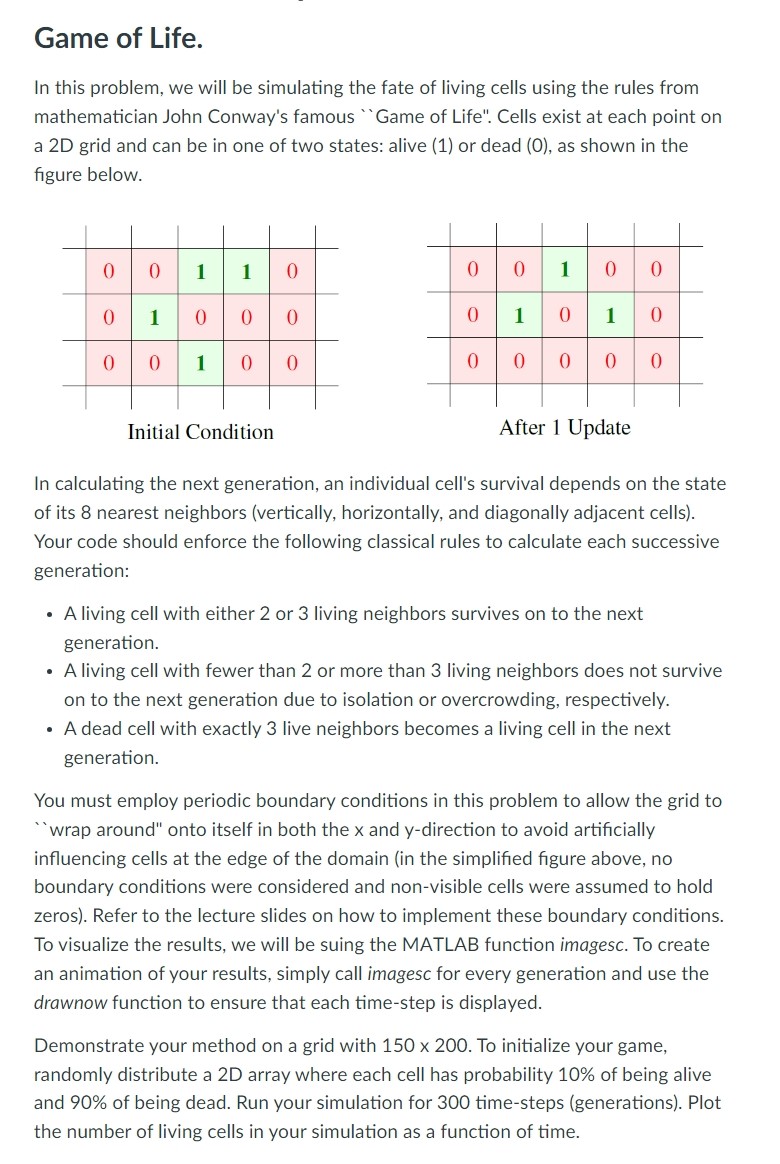
In this problem, we will be simulating the fate of living cells using the rules from mathematician John Conway's famous Game of Life". Cells exist at each point on a D grid and can be in one of two states: alive or dead as shown in the figure below.
Initial Condition
After Update
In calculating the next generation, an individual cell's survival depends on the state of its nearest neighbors vertically horizontally, and diagonally adjacent cells Your code should enforce the following classical rules to calculate each successive generation:
A living cell with either or living neighbors survives on to the next generation.
A living cell with fewer than or more than living neighbors does not survive on to the next generation due to isolation or overcrowding, respectively.
A dead cell with exactly live neighbors becomes a living cell in the next generation.
You must employ periodic boundary conditions in this problem to allow the grid to "wrap around" onto itself in both the x and y direction to avoid artificially influencing cells at the edge of the domain in the simplified figure above, no boundary conditions were considered and nonvisible cells were assumed to hold zeros Refer to the lecture slides on how to implement these boundary conditions. To visualize the results, we will be suing the MATLAB function imagesc. To create an animation of your results, simply call imagesc for every generation and use the drawnow function to ensure that each timestep is displayed.
Demonstrate your method on a grid with times To initialize your game, randomly distribute a D array where each cell has probability of being alive and of being dead. Run your simulation for timesteps generations Plot the number of living cells in your simulation as a function of time.
Step by Step Solution
There are 3 Steps involved in it
1 Expert Approved Answer
Step: 1 Unlock

Question Has Been Solved by an Expert!
Get step-by-step solutions from verified subject matter experts
Step: 2 Unlock
Step: 3 Unlock
 Study Help