







Question: solve this usuing Andorid studio. Lab Assignment 2 Write an app whose GUI looks like the following: Boat App Boat App Enter URL BESPLAY BOATS
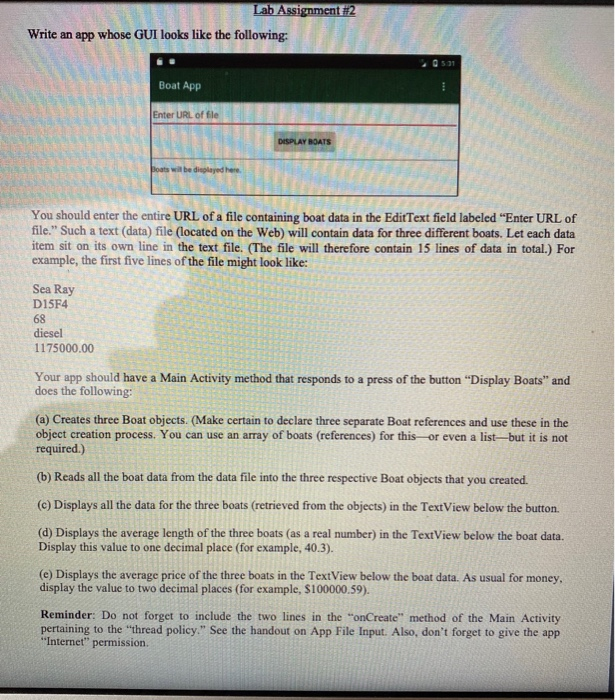
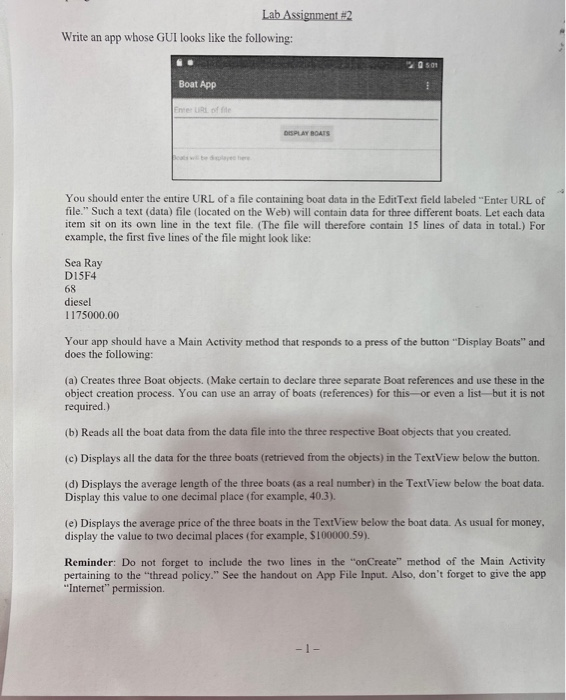
Lab Assignment 2 Write an app whose GUI looks like the following: Boat App Boat App Enter URL BESPLAY BOATS = You should enter the entire URL of a file containing boat data in the EditText field labeled "Enter URL of file." Such a text (data) file (located on the Web) will contain data for three different boats. Let each data item sit on its own line in the text file. (The file will therefore contain 15 lines of data in total.) For example, the first five lines of the file might look like: Sea Ray D15F4 68 diesel 1175000.00 Your app should have a Main Activity method that responds to a press of the button "Display Boats" and does the following: (a) Creates three Boat objects. (Make certain to declare three separate Boat references and use these in the can use an array of boats (references) for this or even a list but it is not required.) (b) Reads all the boat data from the data file into the three respective Boat objects that you created. (c) Displays all the data for the three boats (retrieved from the objects) in the TextView below the button. (d) Displays the average length of the three boats (as a real number) in the TextView below the boat data. Display this value to one decimal place (for example, 40.3). (e) Displays the average price of the three boats in the TextView below the boat data. As usual for money, display the value to two decimal places (for example, S100000.59). Reminder: Do not forget to include the two lines in the "onCreate" method of the Main Activity pertaining to the thread policy." See the handout on App File Input. Also, don't forget to give the app "Internet" permission. Lab Assignment #2 Write an app whose GUI looks like the following: Boat App Enter Lursofa DISPLAY BOATS You should enter the entire URL of a file containing boat data in the Edit Text field labeled "Enter URL of file." Such a text (data) file (located on the Web) will contain data for three different boats. Let each data item sit on its own line in the text file. (The file will therefore contain 15 lines of data in total.) For example, the first five lines of the file might look like: Sea Ray D15F4 diesel 1175000.00 Your app should have a Main Activity method that responds to a press of the button "Display Boats" and does the following: (a) Creates three Boat objects. (Make certain to declare three separate Boat references and use these in the object creation process. You can use an array of boats (references) for this or even a list but it is not required.) (b) Reads all the boat data from the data file into the three respective Boat objects that you created. (c) Displays all the data for the three boats (retrieved from the objects) in the TextView below the button. (d) Displays the average length of the three boats (as a real number) in the TextView below the boat data. Display this value to one decimal place (for example. 40.3). (e) Displays the average price of the three boats in the TextView below the boat data. As usual for money. display the value to two decimal places (for example, S100000.59). Reminder: Do not forget to include the two lines in the "onCreate" method of the Main Activity pertaining to the thread policy." See the handout on App File Input. Also, don't forget to give the app "Internet" permission. Lab Assignment 2 Write an app whose GUI looks like the following: Boat App Boat App Enter URL BESPLAY BOATS = You should enter the entire URL of a file containing boat data in the EditText field labeled "Enter URL of file." Such a text (data) file (located on the Web) will contain data for three different boats. Let each data item sit on its own line in the text file. (The file will therefore contain 15 lines of data in total.) For example, the first five lines of the file might look like: Sea Ray D15F4 68 diesel 1175000.00 Your app should have a Main Activity method that responds to a press of the button "Display Boats" and does the following: (a) Creates three Boat objects. (Make certain to declare three separate Boat references and use these in the can use an array of boats (references) for this or even a list but it is not required.) (b) Reads all the boat data from the data file into the three respective Boat objects that you created. (c) Displays all the data for the three boats (retrieved from the objects) in the TextView below the button. (d) Displays the average length of the three boats (as a real number) in the TextView below the boat data. Display this value to one decimal place (for example, 40.3). (e) Displays the average price of the three boats in the TextView below the boat data. As usual for money, display the value to two decimal places (for example, S100000.59). Reminder: Do not forget to include the two lines in the "onCreate" method of the Main Activity pertaining to the thread policy." See the handout on App File Input. Also, don't forget to give the app "Internet" permission. Lab Assignment #2 Write an app whose GUI looks like the following: Boat App Enter Lursofa DISPLAY BOATS You should enter the entire URL of a file containing boat data in the Edit Text field labeled "Enter URL of file." Such a text (data) file (located on the Web) will contain data for three different boats. Let each data item sit on its own line in the text file. (The file will therefore contain 15 lines of data in total.) For example, the first five lines of the file might look like: Sea Ray D15F4 diesel 1175000.00 Your app should have a Main Activity method that responds to a press of the button "Display Boats" and does the following: (a) Creates three Boat objects. (Make certain to declare three separate Boat references and use these in the object creation process. You can use an array of boats (references) for this or even a list but it is not required.) (b) Reads all the boat data from the data file into the three respective Boat objects that you created. (c) Displays all the data for the three boats (retrieved from the objects) in the TextView below the button. (d) Displays the average length of the three boats (as a real number) in the TextView below the boat data. Display this value to one decimal place (for example. 40.3). (e) Displays the average price of the three boats in the TextView below the boat data. As usual for money. display the value to two decimal places (for example, S100000.59). Reminder: Do not forget to include the two lines in the "onCreate" method of the Main Activity pertaining to the thread policy." See the handout on App File Input. Also, don't forget to give the app "Internet" permission
Step by Step Solution
There are 3 Steps involved in it

Get step-by-step solutions from verified subject matter experts
 Study Help