







Question: // Sorting Application // Author: Carl Mooney import java.awt.*; import java.awt.event.*; import javax.swing.*; public class Sort1 extends JFrame implements ActionListener{ private TextField[] items = new
// Sorting Application // Author: Carl Mooney
import java.awt.*; import java.awt.event.*; import javax.swing.*;
public class Sort1 extends JFrame implements ActionListener{
private TextField[] items = new TextField[6]; private JButton btnSort, btnClear, btnReset; private TextField tmp; private Label status;
private int pauseInterval = 100; // ms public static void main(String[] args) { new Sort1().setVisible(true); } public Sort1() { init(); }
public void init() { setTitle("Sorting Algorithms"); setDefaultCloseOperation(JFrame.EXIT_ON_CLOSE); setSize(440, 200); JPanel jp = new JPanel(new BorderLayout()); jp.setPreferredSize(new Dimension(440, 200)); jp.setBackground(Color.white); JPanel itemPanel = new JPanel(); itemPanel.setBackground(Color.white); for (int i = 0; i
private void initItems() { for (int i = 0; i
private void pause(int ms) { try { Thread.sleep(ms); } catch (InterruptedException e) { showStatus(e.toString()); } }
private void assign(TextField to, TextField from) { Color tobg = to.getBackground(); to.setBackground(Color.green); pause(pauseInterval); to.setText(from.getText()); pause(pauseInterval); to.setBackground(tobg); }
private void swapItems(TextField t1, TextField t2) { assign(tmp,t1); assign(t1,t2); assign(t2,tmp); } private boolean greaterThan(TextField t1, TextField t2) { boolean greater; Color t1bg = t1.getBackground(); Color t2bg = t2.getBackground(); t1.setBackground(Color.cyan); t2.setBackground(Color.cyan); pause(pauseInterval); greater = Integer.parseInt(t1.getText()) > Integer.parseInt(t2.getText()); pause(pauseInterval); t1.setBackground(t1bg); t2.setBackground(t2bg); return greater; }
private void bubbleSort() { showStatus("Sorting ..."); boolean swap = true; while (swap) { swap=false; for (int i = 0; i
public void actionPerformed(ActionEvent e) { String command = e.getActionCommand(); switch (command) { case "Clear": for (int i = 0; i
private void showStatus(String s) { status.setText(s); } }
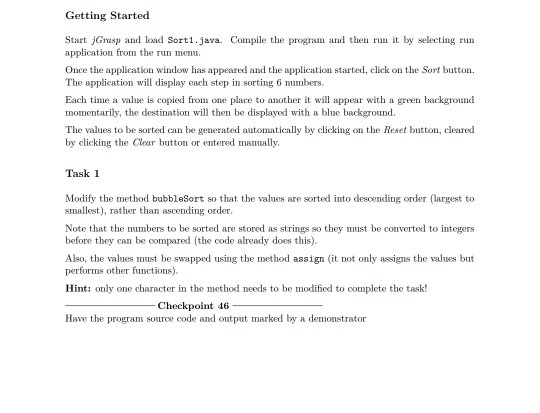
Getting Started Start jGrasp and load Sort1.java. Compile the program and then run it by selecting run application from the run memu. Once the application window has appeared and the application started, click e Sort button The application will display each step in sorting 6 numbers Each time a value is copied from one place to another it wllappear with a green backgnound momentarily, the destination will then be displayed with a blue background The values to be sorted can be generated automatically by clicking on the Reset button, cleared by clicking the Clear button or entered manually. Task 1 Modify the method bubbleSort so that the values are sorted into descending order (largest to smallest), rather than ascending order. Note that the numbers to be sorted are stored as strings so they must be converted to integers before they can be compared (the code already does this) Also, the values must be swapped using the method assign (it not only assigns the values but performs other functions Hint: only one character in the method needs to be modified to complete the task! Checkpoint 46 Have the program source code and output marked by a demonstrator
Step by Step Solution
There are 3 Steps involved in it

Get step-by-step solutions from verified subject matter experts
 Study Help