







Question: SQL. Please help with example code on how to Create a table, insert data into table, then create a query to pull data. Implementation/SQL Introduction:
SQL. Please help with example code on how to Create a table, insert data into table, then create a query to pull data.
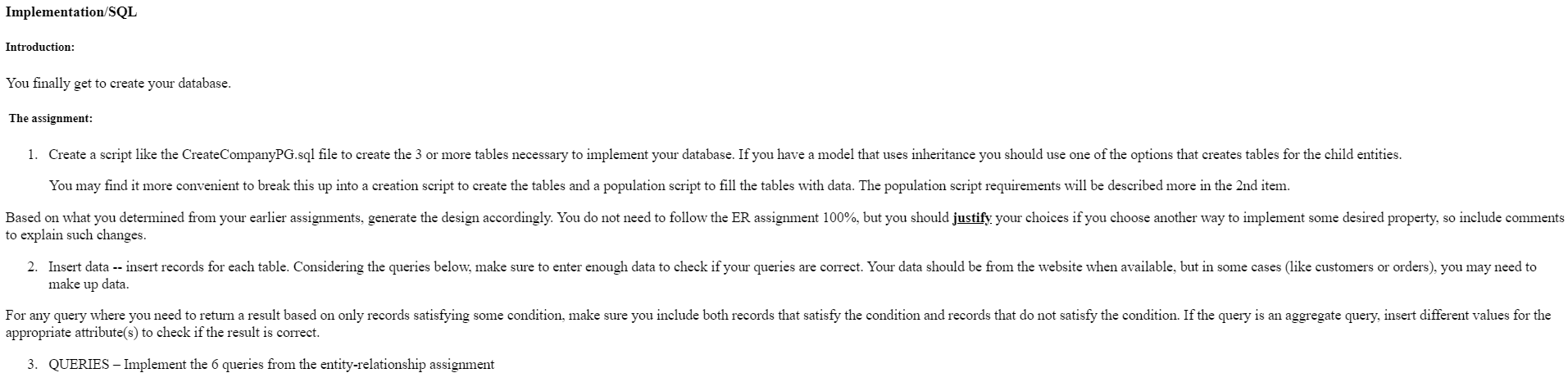
Implementation/SQL Introduction: You finally get to create your database. The assignment: 1. Create a script like the CreateCompanyPG.sql file to create the 3 or more tables necessary to implement your database. If you have a model that uses inheritance you should use one of the options that creates tables for the child entities. You may find it more convenient to break this up into a creation script to create the tables and a population script to fill the tables with data. The population script requirements will be described more in the 2nd item. Based on what you determined from your earlier assignments, generate the design accordingly. You do not need to follow the ER assignment 100%, but you should justify your choices if you choose another way to implement some desired property, so include comments to explain such changes. 2. Insert data -- insert records for each table. Considering the queries below, make sure to enter enough data to check if your queries are correct. Your data should be from the website when available, but in some cases (like customers or orders), you may need to make up data. For any query where you need to return a result based on only records satisfying some condition, make sure you include both records that satisfy the condition and records that do not satisfy the condition. If the query is an aggregate query, insert different values for the appropriate attribute(s) to check if the result is correct. 3. QUERIES - Implement the 6 queries from the entity-relationship assignment
Step by Step Solution
There are 3 Steps involved in it

Get step-by-step solutions from verified subject matter experts
 Study Help