







Question: Starting application: //========================================================== #include // For function getch() #include // For several general-purpose functions #include // For file handling #include // For formatted output #include
Starting application:
//==========================================================
#include // For function getch()
#include // For several general-purpose functions
#include // For file handling
#include // For formatted output
#include // For cin, cout, and system
#include // For string data type
using namespace std; // So "std::cout" may be abbreviated to "cout"
//==========================================================
// menuOption
//==========================================================
int menuOption()
{
// Declare variables
int option;
// Show menu and get option
cout
cout
cout
cout
cout
cin >> option;
return option;
}
//==========================================================
// main
//==========================================================
int main()
{
// Declare constants
const int ARRAY_SIZE = 6;
const string OUTPUT_FILE_NAME = "CitiesOut.txt";
// Declare variables
string cities[ARRAY_SIZE];
int cityCount;
int option;
ofstream outFile;
int lineCountOut;
// Initialize cities
cities[0] = "Detroit";
cities[1] = "Dearborn";
cities[2] = "Windsor";
cityCount = 3;
// Show application header
cout
cout
// Loop to process options
option = menuOption();
while (option != 9)
{
// Handle option
switch (option)
{
// Add city
case 1:
// Test if array limit reached
if (cityCount == ARRAY_SIZE)
cout
else
{
// Prompt for and get city name
cout
cin >> cities[cityCount];
cout
cityCount = cityCount + 1;
}
break;
// List cities
case 4:
// Loop to list cities
cout
for (int i = 0; i
cout
cout
break;
// Handle invalid option
default:
cout
}
// Get next option
option = menuOption();
}
// Attempt to open output file
outFile.open(OUTPUT_FILE_NAME);
if (!outFile.is_open())
cout
else
{
// Initialize line count
lineCountOut = 0;
// Write column headers
outFile
for (int i = 0; i
{
outFile
lineCountOut = lineCountOut + 1;
}
// Close output file
outFile.close();
cout
}
// Show application close
cout
// Pause before application window closes
cout
_getch();
}
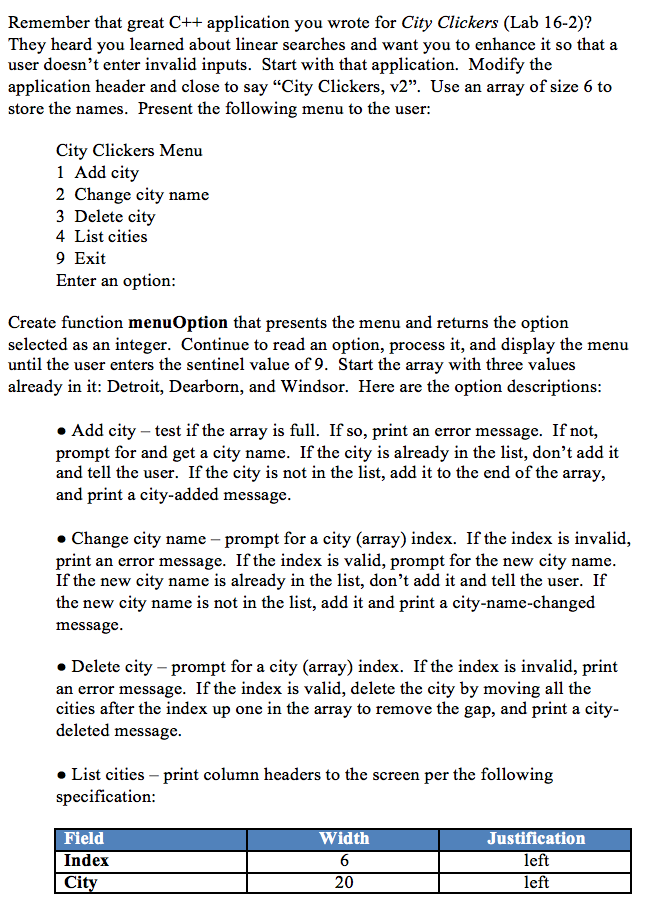
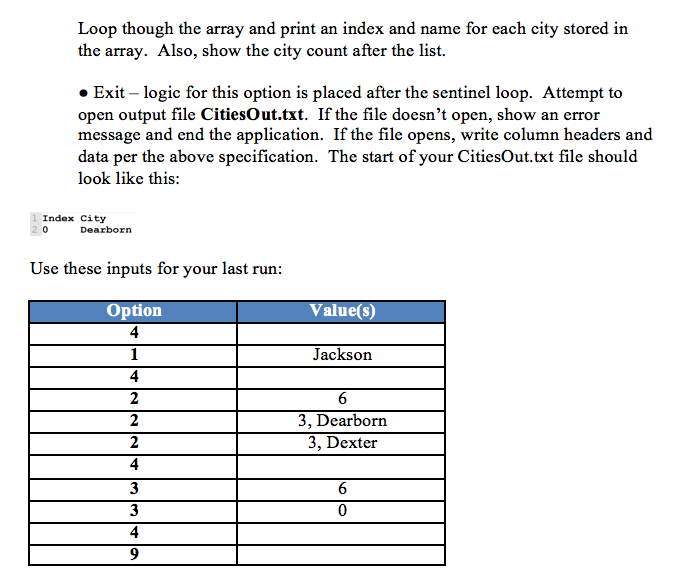
Remember that great C++ application you wrote for City Clickers (Lab 16-2)? They heard you learned about linear searches and want you to enhance it so that a user doesn't enter invalid inputs. Start with that application. Modify the application header and close to say City Clickers, v2. Use an array of size 6 to store the names. Present the following menu to the user: City Clickers Menu 1 Add city 2 Change city name 3 Delete city 4 List cities 9 Exit Enter an option: Create function menuOption that presents the menu and returns the option selected as an integer. Continue to read an option, process it, and display the menu until the user enters the sentinel value of 9. Start the array with three values already in it: Detroit, Dearborn, and Windsor. Here are the option descriptions Add city - test if the array is full. If so, print an error message. If not, prompt for and get a city name. If the city is already in the list, don't add it and tell the user. If the city is not in the list, add it to the end of the array, and print a city-added mess age Change city name - prompt for a city (array) index. If the index is invalid, print an error message. If the index is valid, prompt for the new city name If the new city name is already in the list, don't add it and tell the user. If the new city name is not in the list, add it and print a city-name-changed message Delete city - prompt for a city (array) index. If the index is invalid, print an error message. If the index is valid, delete the city by moving all the cities after the index up one in the array to remove the gap, and print a city- deleted message List cities - print column headers to the screen per the following specification Field Index Citv Width 6 20 Justification left left
Step by Step Solution
There are 3 Steps involved in it

Get step-by-step solutions from verified subject matter experts
 Study Help