





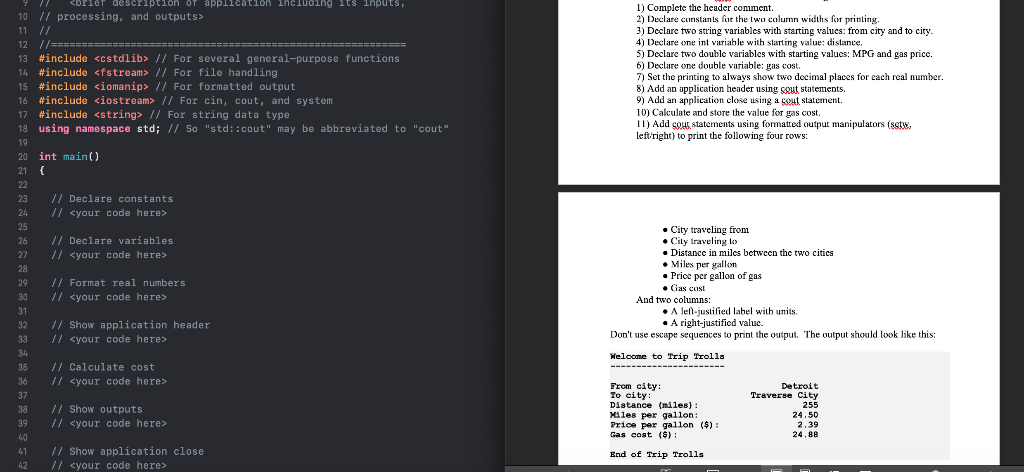
Question: y // 11 // 12 //=========EEEEEEEEEEEEEEEEEEEEEEEEEEEEEEEEEEEEEEEE========= 13 #include // For several general-purpose functions 14 #include // For file handling 15 #include // For formatted output
 y // 11 // 12 //=========EEEEEEEEEEEEEEEEEEEEEEEEEEEEEEEEEEEEEEEE========= 13 #include // For several

y // 11 // 12 //=========EEEEEEEEEEEEEEEEEEEEEEEEEEEEEEEEEEEEEEEE========= 13 #include // For several general-purpose functions 14 #include // For file handling 15 #include // For formatted output 16 #include // For cin, cout, and system 17 #include // For string data type 18 using namespace std; // So "std::cout" may be abbreviated to "cout" 1) Complete the header comment. 2) Declare constants for the two column widths for printing. 3) Declare two string variables with starting values: from city and to city. 4) Declare one int variable with starting value: distance, 5) Declare two double variables with starting values: MPG and gas price. 6) Declare one double variable: gas cost. 7) Set the printing to always show two decimal places for each real number. 8) Add an application header using sout statements. 9) Add an application close using a cout statement. 10) Calculate and store the value for gas cost. II) Add cout statements using formatted output manipulators (sets, leftright) to print the following four rows: 20 int main() 21 { // Declare constants // // Declare variables // // Format real numbers // City traveling from Cily traveling to Distance in miles between the two cities Miles per gallon Price per gallon of gas Gas cast And two columns A lel-justified label with units A right-justified value. Don't use escape sequences to print the output. The output should look like this: // Show application header // Welcome to Trip Trolls // Calculate cost // Detroit Traverse City 255 // Show outputs // From city: To city: Distance (miles): Miles per gallon: Price per gallon ($): Gas cost (S): 39 24.50 2.39 24.88 41 42 // Show application close // End of Trip Trolls

Step by Step Solution

There are 3 Steps involved in it

1 Expert Approved Answer
Step: 1 Unlock blur-text-image
Question Has Been Solved by an Expert!

Get step-by-step solutions from verified subject matter experts

Step: 2 Unlock
Step: 3 Unlock

Students Have Also Explored These Related Databases Questions!