





Question: Step 1: Import the data. Connect to the Excel file, Business Analytics Tableau Lab Quiz. There is just one worksheet, Invoices. Tableau should automatically import
Step 1: Import the data. Connect to the Excel
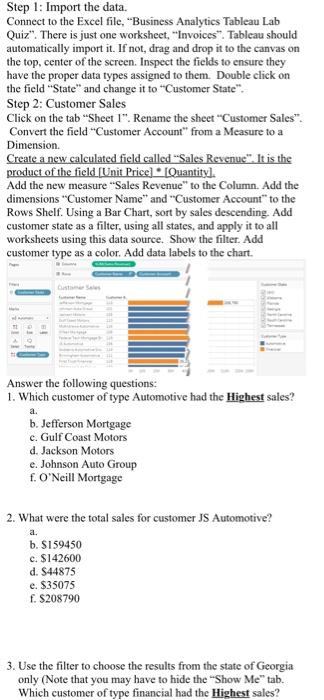
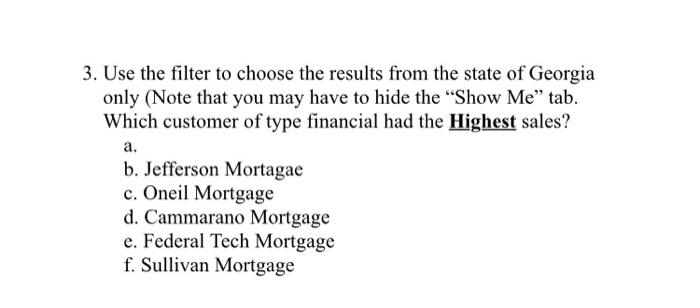
Step 1: Import the data. Connect to the Excel file, "Business Analytics Tableau Lab Quiz". There is just one worksheet, "Invoices". Tableau should automatically import it. If not, drag and drop it to the canvas on the top, center of the screen. Inspect the fields to ensure they have the proper data types assigned to them. Double click on the field State" and change it to "Customer State". Step 2: Customer Sales Click on the tab "Sheet I". Rename the sheet"Customer Sales". Convert the field "Customer Account" from a Measure to a Dimension Create a new calculated field called "Sales Revenue". It is the product of the field (Unit Price] [Quantity). Add the new measure Sales Revenue" to the Column. Add the dimensions Customer Name" and "Customer Account to the Rows Shelf. Using a Bar Chart, sort by sales descending. Add customer state as a filter, using all states, and apply it to all worksheets using this data source. Show the filter. Add customer type as a color. Add data labels to the chart. LE a. Answer the following questions: 1. Which customer of type Automotive had the Highest sales? b. Jefferson Mortgage c. Gulf Coast Mol d. Jackson Motors e. Johnson Auto Group f. O'Neill Mortgage 2. What were the total sales for customer JS Automotive? a. b. S159450 c. $142600 d. $44875 e. $35075 f. $208790 3. Use the filter to choose the results from the state of Georgia only (Note that you may have to hide the "Show Me" tab. Which customer of type financial had the Highest sales? 3. Use the filter to choose the results from the state of Georgia only (Note that you may have to hide the "Show Me" tab. Which customer of type financial had the Highest sales? a. b. Jefferson Mortagae c. Oneil Mortgage d. Cammarano Mortgage e. Federal Tech Mortgage f. Sullivan Mortgage Step 1: Import the data. Connect to the Excel file, "Business Analytics Tableau Lab Quiz". There is just one worksheet, "Invoices". Tableau should automatically import it. If not, drag and drop it to the canvas on the top, center of the screen. Inspect the fields to ensure they have the proper data types assigned to them. Double click on the field State" and change it to "Customer State". Step 2: Customer Sales Click on the tab "Sheet I". Rename the sheet"Customer Sales". Convert the field "Customer Account" from a Measure to a Dimension Create a new calculated field called "Sales Revenue". It is the product of the field (Unit Price] [Quantity). Add the new measure Sales Revenue" to the Column. Add the dimensions Customer Name" and "Customer Account to the Rows Shelf. Using a Bar Chart, sort by sales descending. Add customer state as a filter, using all states, and apply it to all worksheets using this data source. Show the filter. Add customer type as a color. Add data labels to the chart. LE a. Answer the following questions: 1. Which customer of type Automotive had the Highest sales? b. Jefferson Mortgage c. Gulf Coast Mol d. Jackson Motors e. Johnson Auto Group f. O'Neill Mortgage 2. What were the total sales for customer JS Automotive? a. b. S159450 c. $142600 d. $44875 e. $35075 f. $208790 3. Use the filter to choose the results from the state of Georgia only (Note that you may have to hide the "Show Me" tab. Which customer of type financial had the Highest sales? 3. Use the filter to choose the results from the state of Georgia only (Note that you may have to hide the "Show Me" tab. Which customer of type financial had the Highest sales? a. b. Jefferson Mortagae c. Oneil Mortgage d. Cammarano Mortgage e. Federal Tech Mortgage f. Sullivan Mortgage

Step by Step Solution

There are 3 Steps involved in it

1 Expert Approved Answer
Step: 1 Unlock blur-text-image

Question Has Been Solved by an Expert!

Get step-by-step solutions from verified subject matter experts

Step: 2 Unlock
Step: 3 Unlock

Students Have Also Explored These Related General Management Questions!