



Question: Step 10. Its the Formulas in the Under/Over Goal column. Im not sure what the correct steps are. Thank you ? I have the others
Step 10. Its the Formulas in the Under/Over Goal column. Im not sure what the correct steps are.
Thank you
? I have the others completed.. Excel is so confusing!
Thank you 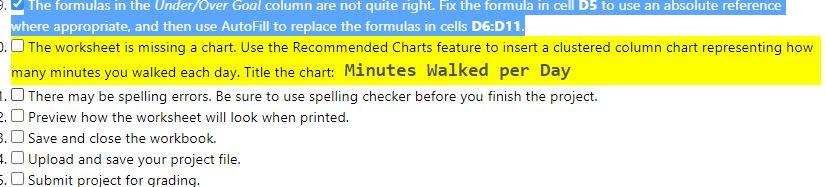
The formulas in the Under/Over Goal column are not quite right. Fix the formula in cell DS to use an absolute reference where appropriate, and then use AutoFill to replace the formulas in cells D6:011. . The worksheet is missing a chart. Use the Recommended Charts feature to insert a clustered column chart representing how many minutes you walked each day. Title the chart: Minutes walked per Day 1.There may be spelling errors. Be sure to use spelling checker before you finish the project. 2. Preview how the worksheet will look when printed. 3. Save and close the workbook. 1. Upload and save your project file. 5. Submit project for grading. The formulas in the Under/Over Goal column are not quite right. Fix the formula in cell DS to use an absolute reference where appropriate, and then use AutoFill to replace the formulas in cells D6:011. . The worksheet is missing a chart. Use the Recommended Charts feature to insert a clustered column chart representing how many minutes you walked each day. Title the chart: Minutes walked per Day 1.There may be spelling errors. Be sure to use spelling checker before you finish the project. 2. Preview how the worksheet will look when printed. 3. Save and close the workbook. 1. Upload and save your project file. 5. Submit project for grading
Step by Step Solution
There are 3 Steps involved in it

Get step-by-step solutions from verified subject matter experts