







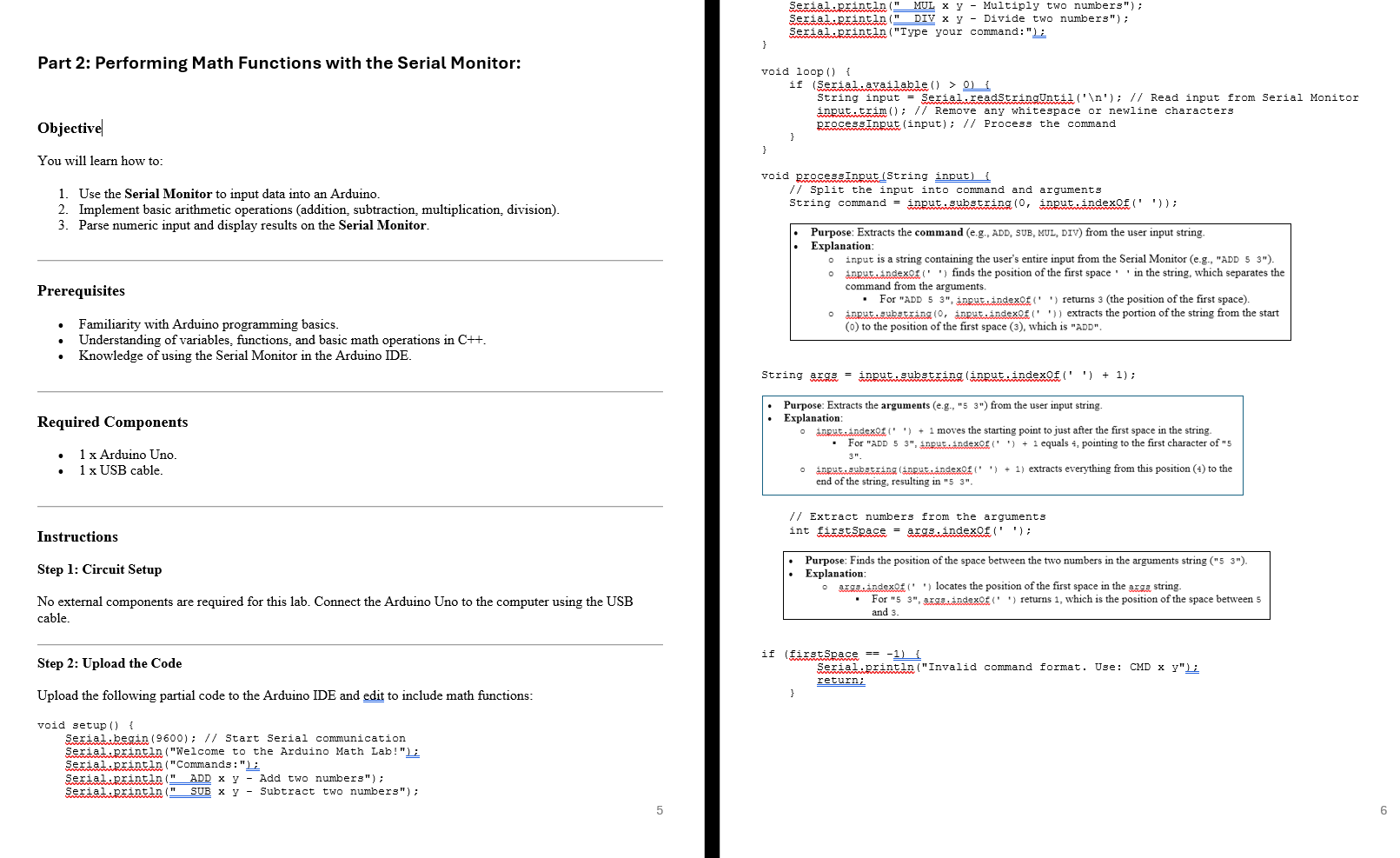
Question: Step 2 : Upload the Code Upload the following partial code to the Arduino IDE and edit to include math functions: void setup ( )
Step : Upload the Code
Upload the following partial code to the Arduino IDE and edit to include math functions:
void setup
Serial.begin; Start Serial communication
Serial.printlnWelcome to the Arduino Math Lab!";
Serial.printlnCommands:;
Serial.println ADD x y Add two numbers";
Serial.println SUB x y Subtract two numbers";
Serial.println MUL x y Multiply two numbers";
Serial.println DIV x y Divide two numbers";
Serial.printlnType your command:";
void loop
if Serialavailable
String input Serial.readStringUntil
; Read input from Serial Monitor
input.trim; Remove any whitespace or newline characters
processInputinput; Process the command
void processInputString input
Split the input into command and arguments
String command input.substring input.indexOf;
String args input.substringinputindexOf;
Extract numbers from the arguments
int firstSpace args.indexOf;
if firstSpace
Serial.printlnInvalid command format. Use: CMD x y;
return;
String numStr args.substring firstSpace;
String numStr args.substringfirstSpace ;
float num numStrtoFloat;
float num numStrtoFloat;
Execute the math command
if command "ADD"
CODE HERE
else if command
CODE HERE
add additional commands here
else
CODE HERE
else
Serial.printlnUnknown command. Please use ADD, SUB, MUL, or DIV.";
Serial.printlnCommands:;
Serial.println ADD x y Add two numbers";
Serial.println SUB x y Subtract two numbers";
Serial.println MUL x y Multiply two numbers";
Serial.println DIV x y Divide two numbers";
Step : Run the Program
Open the Serial Monitor in the Arduino IDE Ctrl Shift M
Set the baud rate to
Enter commands in the Serial Monitor in the following format:
ADD to add and SUB to subtract from MUL to multiply and DIV to divide by
Tasks:
Task : Perform Basic Math Operations
Use the Serial Monitor to perform:
Addition of two numbers eg ADD Subtraction of two numbers eg SUB Multiplication of two numbers eg MUL Division of two numbers eg DIV
Observe the results printed on the Serial Monitor.
Task : Handle Edge Cases
Try dividing a number by zero eg DIV and observe the error message.
Enter invalid commands eg XYZ or incomplete inputs eg ADD and observe the program's response.
Task : Modify the Code
Add a new math operation eg modulus MOD to calculate remainders
Test your modification by entering commands like MOD
Expected Output
When entering ADD the Serial Monitor should display:
Result:
When entering DIV the Serial Monitor should display:
Error: Division by zero is undefined.
For invalid input like XYZ the Serial Monitor should display:
Unknown command. Please use ADD, SUB, MUL, or DIV.
Discussion Questions
How does the program parse and extract numbers from the input string?
Why is trim used on the input string?
What happens if the user enters invalid input, and how can this be improved?
Assessment
Successfully perform all four math operations.
Demonstrate how the program handles edge cases.
Modify the code to include a new math function.
Key Takeaways
You should gain handson experience with Serial Monitor inputoutput
Understand the use of strings, parsing, and basic error handling in Arduino programming.
Explore the versatility of Arduino in performing computational tasks.
Step by Step Solution
There are 3 Steps involved in it
1 Expert Approved Answer
Step: 1 Unlock

Question Has Been Solved by an Expert!
Get step-by-step solutions from verified subject matter experts
Step: 2 Unlock
Step: 3 Unlock
 Study Help