







Question: Step 4. Remove Files with the rm Command The rm command can remove a single file or multiple files. You can remove several files at
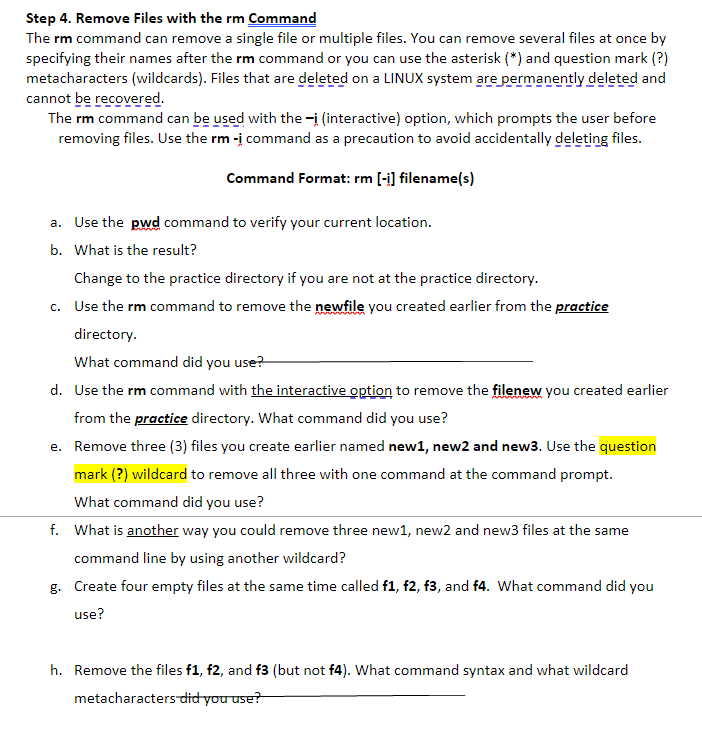
Step 4. Remove Files with the rm Command The rm command can remove a single file or multiple files. You can remove several files at once by specifying their names after the rm command or you can use the asterisk (*) and question mark (?) metacharacters (wildcards). Files that are deleted on a LINUX system are permanently deleted and cannot be recovered. The rm command can be used with the interactive) option, which prompts the user before removing files. Use the rm -; command as a precaution to avoid accidentally deleting files. Command Format: rm (-i] filename(s) a. Use the pwd command to verify your current location. b. What is the result? Change to the practice directory if you are not at the practice directory. C. Use the rm command to remove the newfile you created earlier from the practice directory. What command did you use? d. Use the rm command with the interactive option to remove the filenew you created earlier from the practice directory. What command did you use? e. Remove three (3) files you create earlier named new1, new2 and new3. Use the question mark (?) wildcard to remove all three with one command at the command prompt. What command did you use? f. What is another way you could remove three new1, new2 and new3 files at the same command line by using another wildcard? g. Create four empty files at the same time called f1, f2, f3, and f4. What command did you use? h. Remove the files f1, f2, and f3 (but not f4). What command syntax and what wildcard metacharacters did you use
Step by Step Solution
There are 3 Steps involved in it

Get step-by-step solutions from verified subject matter experts
 Study Help