







Question: Student infor: Joe Smith JS456 PLEASE ONLY USE JQUERY FOR ALL SCRIPTS. Snowing 1. Create a webpage that include your student information at the top.
Student infor: Joe Smith JS456
PLEASE ONLY USE JQUERY FOR ALL SCRIPTS.
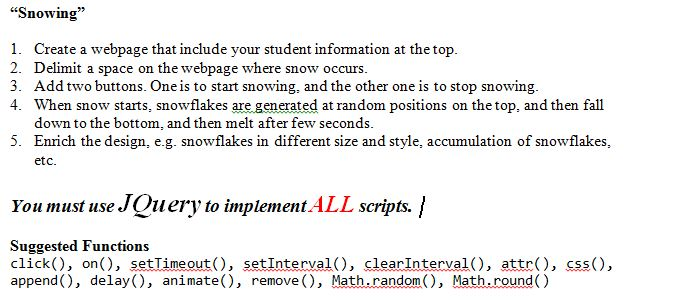
"Snowing" 1. Create a webpage that include your student information at the top. 2. Delimit a space on the webpage where snow occurs. 3. Add two buttons. One is to start snowing, and the other one is to stop snowing. 4. When snow starts, snowflakes are generated at random positions on the top, and then fall down to the bottom, and then melt after few seconds. 5. Enrich the design, e.g. snowflakes in different size and style, accumulation of snowflakes etc. Suggested Functions click(), on(), setTimeout(), setlnterval(), clearlnterval(), attr(), css() append(), delay(), animateQ, remove(), Math.random()? Math.round()
Step by Step Solution
There are 3 Steps involved in it

Get step-by-step solutions from verified subject matter experts
 Study Help