







Question: Subject: Mobile Programming Topic: Android View Binding Instructions 1) See the attached image resources as your guide. 1_Design_Before.PNG - an XML layout design. 1_Design_After.PNG -
Subject: Mobile Programming
Topic: Android View Binding
Instructions
1) See the attached image resources as your guide.
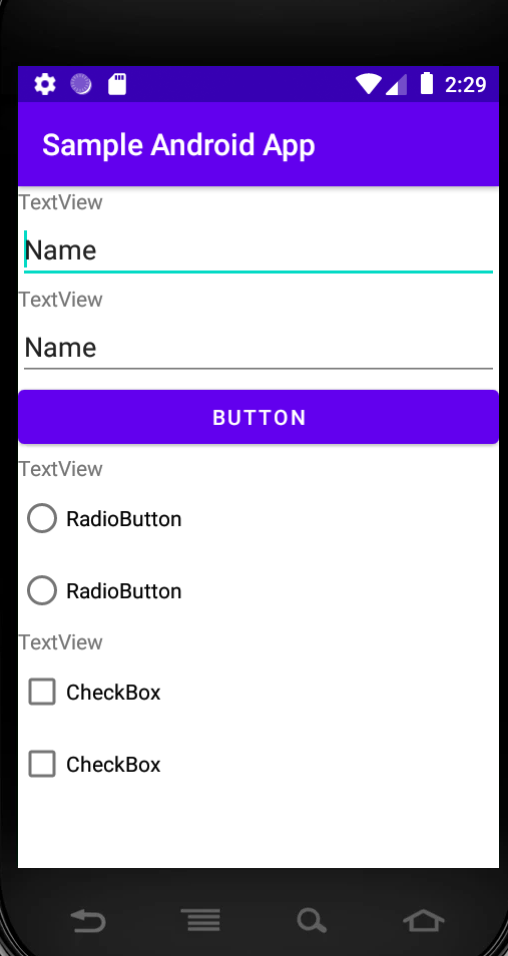
1_Design_Before.PNG - an XML layout design.
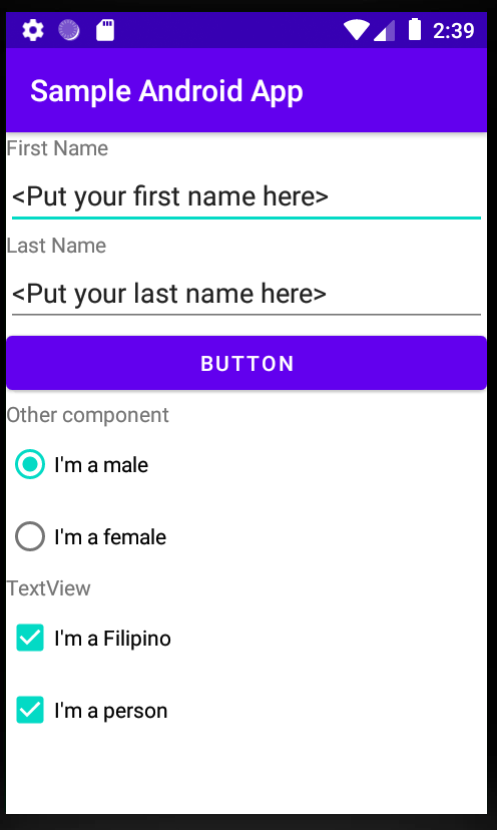
1_Design_After.PNG - An Android UI display after applying the Android View Binding code to the Activity
2) Create an android project :
Project Name: Activity
Android Template: Empty Activity
3) Create Layout:
name: layout_activity.xml
Then follow the 1_Design_Before.PNG to design the UI layout
4) Modify the Activity class.
Use the Android View Binding code to modify the content of the UI layout based on 1_Design_After.PNG.
Please Provide the xml and java codes along with the screenshots, thank you.
2:29 Sample Android App TextView Name TextView Name BUTTON TextView RadioButton RadioButton TextView CheckBox CheckBox 2:39 Sample Android App First Name
Step by Step Solution
There are 3 Steps involved in it

Get step-by-step solutions from verified subject matter experts
 Study Help