







Question: Instructions 1) See the attached image resources as guide. 2) Create Layout: name: activity_arithmetic.xml Then follow the image below to design the UI layout. After
Instructions
1) See the attached image resources as guide.
2) Create Layout:
name: activity_arithmetic.xml
Then follow the image below to design the UI layout. After you design this UI layout.
3) Modify the Activity class.
Create a java code based on the following task:
Create new method for each arithmetic operation. This method accepts two integer operands, and return the result of the operation. Example:
Sample Addition method:
int add(int num1, int num2) {
return num1 + num2;
}
The input values to be used for the method will come from the values from num1 and num2 of XML layout
(Example values in the sample layout: num1=8, num2=2)
The result of the operation will be displayed to the Addition text view.
Create a method also for other arithmetic operations (subtraction, division, multiplication)
See the image below as guide in creating the java code.
You may use either findViewById() or View Binding method from previous activity or assignment.
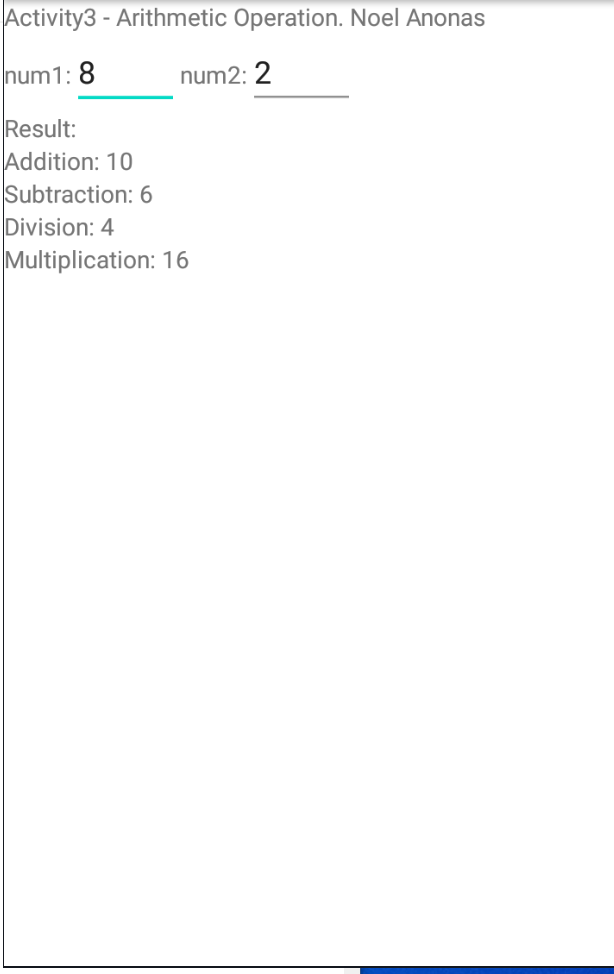
Activity3 - Arithmetic Operation. Noel Anonas num1: 8 num2: 2 Result: Addition: 10 Subtraction: 6 Division: 4 Multiplication: 16
Step by Step Solution
There are 3 Steps involved in it

Get step-by-step solutions from verified subject matter experts
 Study Help