







Question: Summary Create a functional Spring Boot system connected to H2 through JPA, then tool it up with an Entity Relationship! Today, we'll look at
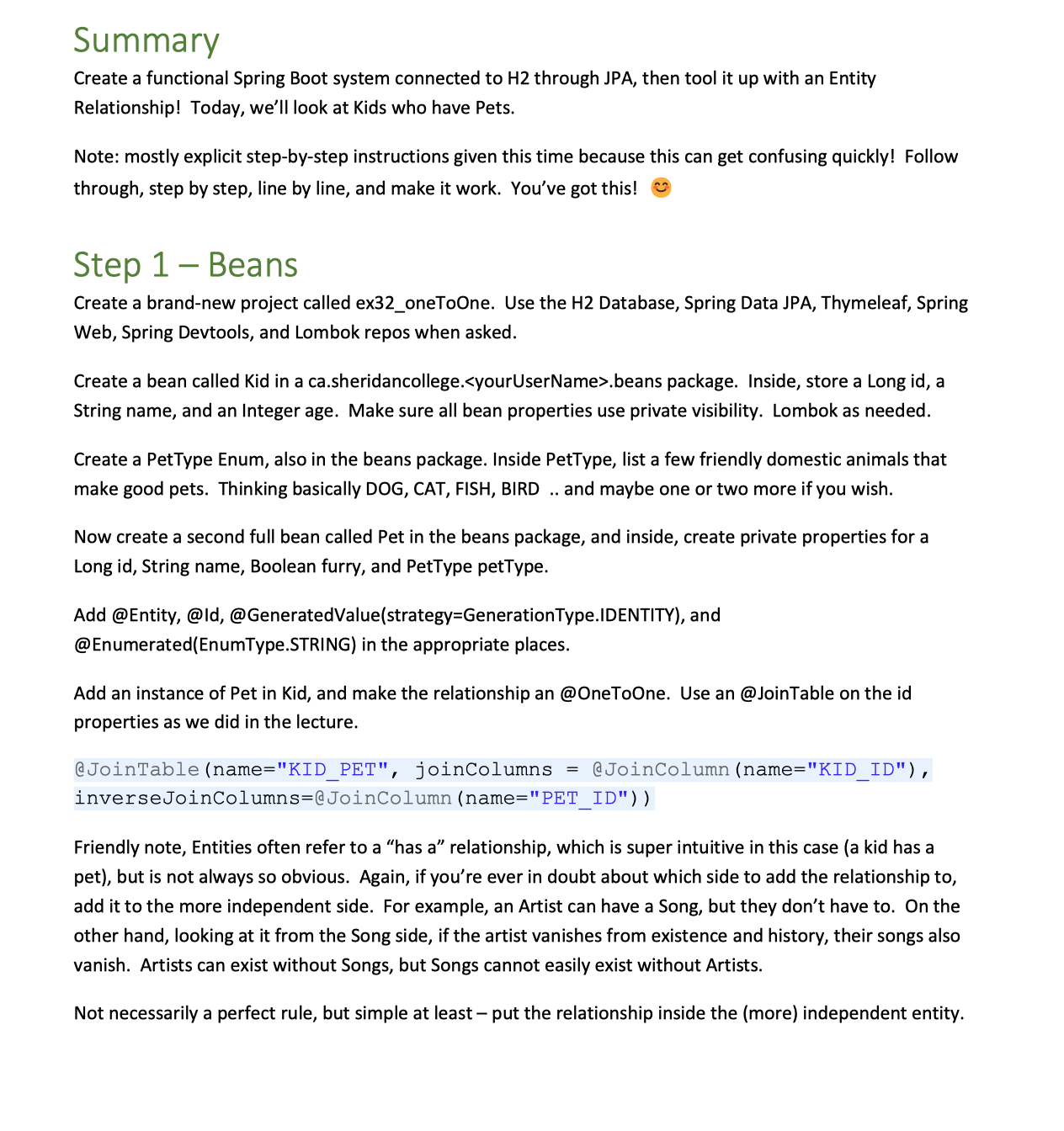
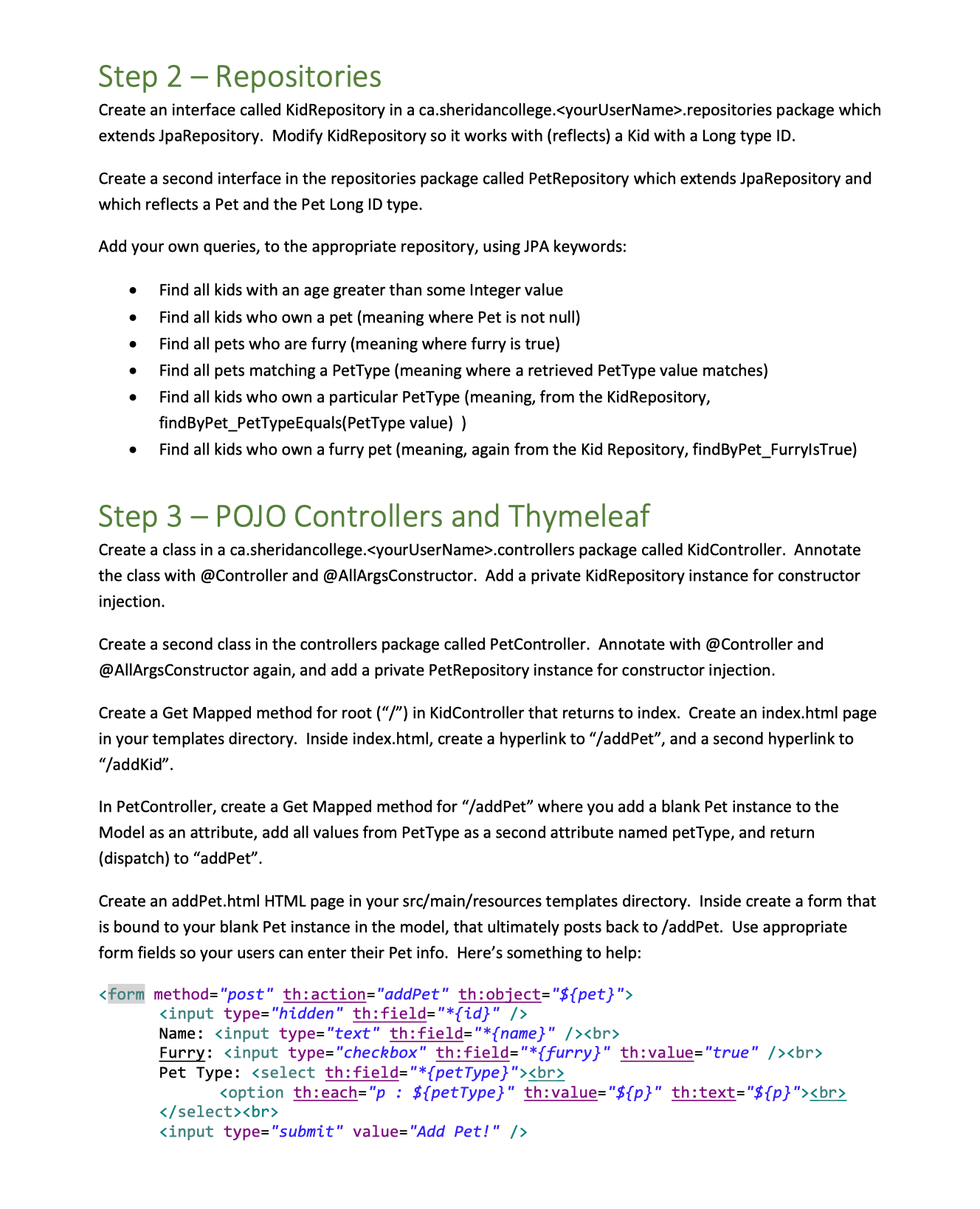
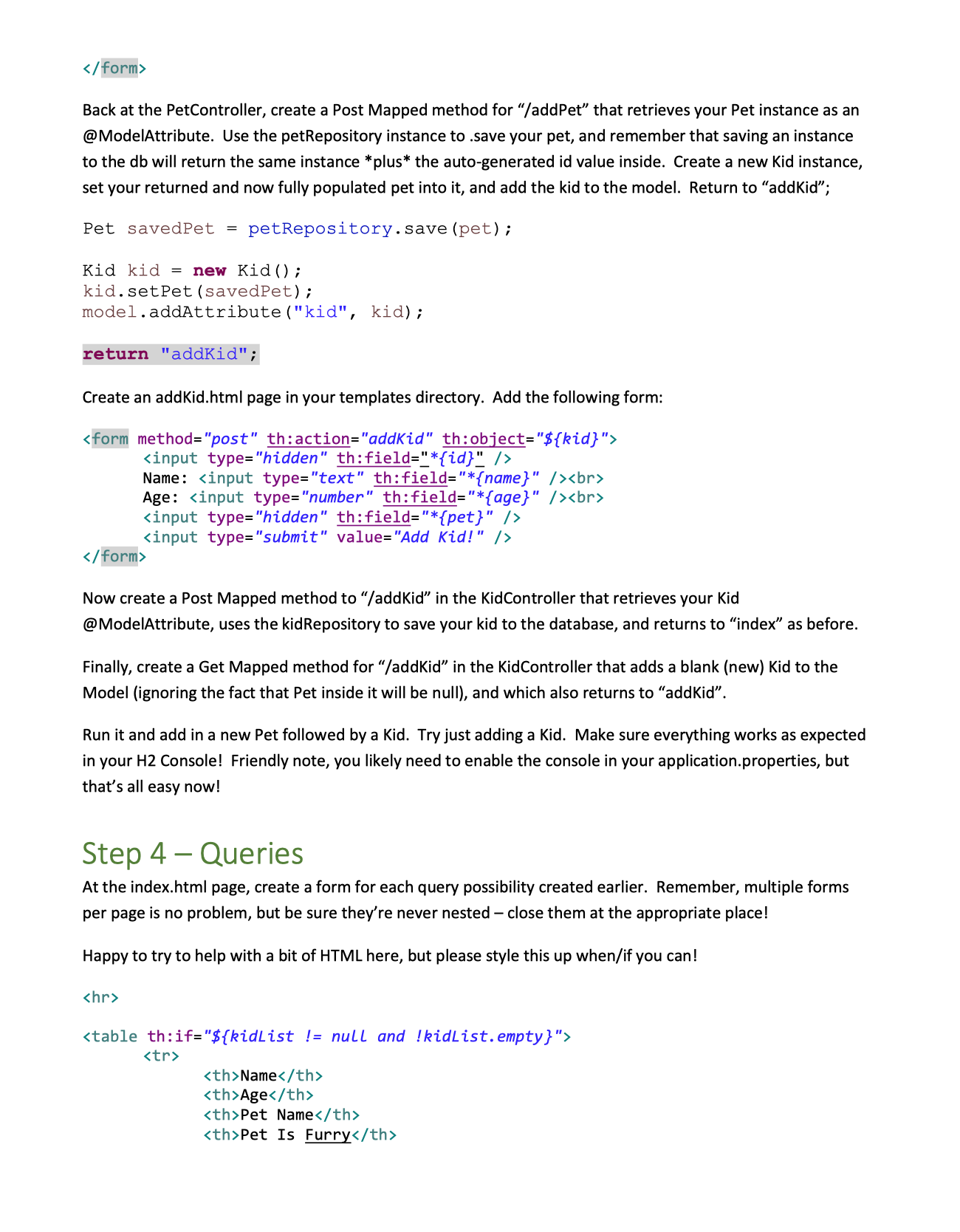
Summary Create a functional Spring Boot system connected to H2 through JPA, then tool it up with an Entity Relationship! Today, we'll look at Kids who have Pets. Note: mostly explicit step-by-step instructions given this time because this can get confusing quickly! Follow through, step by step, line by line, and make it work. You've got this! Step 1- Beans Create a brand-new project called ex32_oneToOne. Use the H2 Database, Spring Data JPA, Thymeleaf, Spring Web, Spring Devtools, and Lombok repos when asked. Create a bean called Kid in a ca.sheridancollege. .beans package. Inside, store a Long id, a String name, and an Integer age. Make sure all bean properties use private visibility. Lombok as needed. Create a PetType Enum, also in the beans package. Inside PetType, list a few friendly domestic animals that make good pets. Thinking basically DOG, CAT, FISH, BIRD .. and maybe one or two more if you wish. Now create a second full bean called Pet in the beans package, and inside, create private properties for a Long id, String name, Boolean furry, and PetType petType. Add @Entity, @ld, @GeneratedValue(strategy-Generation Type.IDENTITY), and @Enumerated (EnumType.STRING) in the appropriate places. Add an instance of Pet in Kid, and make the relationship an @OneToOne. Use an @JoinTable on the id properties as we did in the lecture. @JoinTable (name="KID_PET", joinColumns inverseJoinColumns=@JoinColumn (name="PET ID")) = @JoinColumn (name="KID_ID"), Friendly note, Entities often refer to a "has a" relationship, which is super intuitive in this case (a kid has a pet), but is not always so obvious. Again, if you're ever in doubt about which side to add the relationship to, add it to the more independent side. For example, an Artist can have a Song, but they don't have to. On the other hand, looking at it from the Song side, if the artist vanishes from existence and history, their songs also vanish. Artists can exist without Songs, but Songs cannot easily exist without Artists. Not necessarily a perfect rule, but simple at least - put the relationship inside the (more) independent entity. Step 2 Repositories Create an interface called KidRepository in a ca.sheridancollege. .repositories package which extends JpaRepository. Modify Kid Repository so it works with (reflects) a Kid with a Long type ID. Create a second interface in the repositories package called PetRepository which extends Jpa Repository and which reflects a Pet and the Pet Long ID type. Add your own queries, to the appropriate repository, using JPA keywords: Find all kids with an age greater than some Integer value Find all kids who own a pet (meaning where Pet is not null) Find all pets who are furry (meaning where furry is true) Find all pets matching a PetType (meaning where a retrieved PetType value matches) Find all kids who own a particular PetType (meaning, from the Kid Repository, findByPet_PetTypeEquals(PetType value)) Find all kids who own a furry pet (meaning, again from the Kid Repository, findByPet_FurrylsTrue) Step 3 - POJO Controllers and Thymeleaf Create a class in a ca.sheridancollege. .controllers package called KidController. Annotate the class with @Controller and @AllArgsConstructor. Add a private Kid Repository instance for constructor injection. Create a second class in the controllers package called PetController. Annotate with @Controller and @AllArgsConstructor again, and add a private PetRepository instance for constructor injection. Create a Get Mapped method for root ("/") in KidController that returns to index. Create an index.html page in your templates directory. Inside index.html, create a hyperlink to "/addPet", and a second hyperlink to "/addkid". In PetController, create a Get Mapped method for "/addPet" where you add a blank Pet instance to the Model as an attribute, add all values from PetType as a second attribute named petType, and return (dispatch) to "addPet". Create an addPet.html HTML page in your src/main/resources templates directory. Inside create a form that is bound to your blank Pet instance in the model, that ultimately posts back to /addPet. Use appropriate form fields so your users can enter their Pet info. Here's something to help: Name: Furry: Pet Type: /form> Back at the PetController, create a Post Mapped method for "/add Pet" that retrieves your Pet instance as an @ModelAttribute. Use the petRepository instance to .save your pet, and remember that saving an instance to the db will return the same instance *plus* the auto-generated id value inside. Create a new Kid instance, set your returned and now fully populated pet into it, and add the kid to the model. Return to "addKid"; petRepository.save (pet); Pet savedPet = Kid kid = new Kid (); kid.setPet (savedPet); model.addAttribute ("kid", kid); return "addKid"; Create an addKid.html page in your templates directory. Add the following form: Name: Age: Now create a Post Mapped method to "/addKid" in the KidController that retrieves your Kid @ModelAttribute, uses the kidRepository to save your kid to the database, and returns to "index" as before. Finally, create a Get Mapped method for "/addKid" in the KidController that adds a blank (new) Kid to the Model (ignoring the fact that Pet inside it will be null), and which also returns to "addkid". Run it and add in a new Pet followed by a Kid. Try just adding a Kid. Make sure everything works as expected in your H2 Console! Friendly note, you likely need to enable the console in your application.properties, but that's all easy now! Step 4 - Queries At the index.html page, create a form for each query possibility created earlier. Remember, multiple forms per page is no problem, but be sure they're never nested - close them at the appropriate place! Happy to try to help with a bit of HTML here, but please style this up when/if you can! Name Age Pet Name Pet Is Furry
Step by Step Solution
There are 3 Steps involved in it

Get step-by-step solutions from verified subject matter experts
 Study Help