







Question: switch ( choice ) { Question 2 You are provided with a SQL file named data.sql : here is it - - Connect to or
switch choice Question
You are provided with a SQL file named data.sql : here is it Connect to or create the CarDB database
CONNECT jdbc:derby:CarDB;createtrue';
Drop the table if it already exists to avoid conflicts
DROP TABLE Cars;
Create the Cars table
CREATE TABLE Cars
id INT PRIMARY KEY GENERATED ALWAYS AS IDENTITY,
make VARCHAR
model VARCHAR
manufactureyear INT,
price DECIMAL
;
Insert sample records into the Cars table
INSERT INTO Cars make model, manufactureyear, price
VALUES Toyota 'Corolla', ;
INSERT INTO Cars make model, manufactureyear, price
VALUES Ford 'Mustang', ;
INSERT INTO Cars make model, manufactureyear, price
VALUES Honda 'Civic', ;
INSERT INTO Cars make model, manufactureyear, price
VALUES Chevrolet 'Camaro', ;
INSERT INTO Cars make model, manufactureyear, price
VALUES BMW Series', ;
INSERT INTO Cars make model, manufactureyear, price
VALUES AudiA;
INSERT INTO Cars make model, manufactureyear, price
VALUES MercedesBenz', CClass', ;
INSERT INTO Cars make model, manufactureyear, price
VALUES Tesla 'Model ;
INSERT INTO Cars make model, manufactureyear, price
VALUES Hyundai 'Elantra', ;
INSERT INTO Cars make model, manufactureyear, price
VALUES Kia 'Optima', ;
INSERT INTO Cars make model, manufactureyear, price
VALUES Volkswagen 'Jetta', ;
INSERT INTO Cars make model, manufactureyear, price
VALUES Nissan 'Altima', ;
INSERT INTO Cars make model, manufactureyear, price
VALUES Mazda 'Mazda;
INSERT INTO Cars make model, manufactureyear, price
VALUES Subaru 'Impreza', ;
INSERT INTO Cars make model, manufactureyear, price
VALUES Jeep 'Wrangler', ;
INSERT INTO Cars make model, manufactureyear, price
VALUES Dodge 'Charger', ;
INSERT INTO Cars make model, manufactureyear, price
VALUES VolvoS;
INSERT INTO Cars make model, manufactureyear, price
VALUES Porsche 'Cayenne', ;
INSERT INTO Cars make model, manufactureyear, price
VALUES Ferrari Spider', ;
INSERT INTO Cars make model, manufactureyear, price
VALUES Lamborghini 'Huracan', ;
INSERT INTO Cars make model, manufactureyear, price
VALUES Bentley 'Continental GT;
INSERT INTO Cars make model, manufactureyear, price
VALUES RollsRoyce', 'Phantom', ;
INSERT INTO Cars make model, manufactureyear, price
VALUES Ford 'Explorer', ;
INSERT INTO Cars make model, manufactureyear, price
VALUES Chevrolet 'Tahoe', ;
INSERT INTO Cars make model, manufactureyear, price
VALUES BMWX;
INSERT INTO Cars make model, manufactureyear, price
VALUES MercedesBenz', 'GLE', ;
INSERTthat contains SQL state
ments to create and populate a Cars table.
Your Task:
You are required to write a Java program that connects to the CarShop database
and presents a menu to the user. The program should use a SELECT FROM
CARS query to retrieve all records from the Cars table and perform tasks by
processing the ResultSet.
The following code is provided:
public class CarShopApp
public static void mainString args
Establish connection to the database
Create a Statement object
Execute the SELECT FROM CARS query
Initialize Scanner for user input
Scanner scanner new Scanner
System.in;
try
boolean running true;
while running
Display menu
System.out.printInMenu: ;
System.out.printIn Check Stock";
System.out.printIn Exit";
System.out. printChoose an option: ;
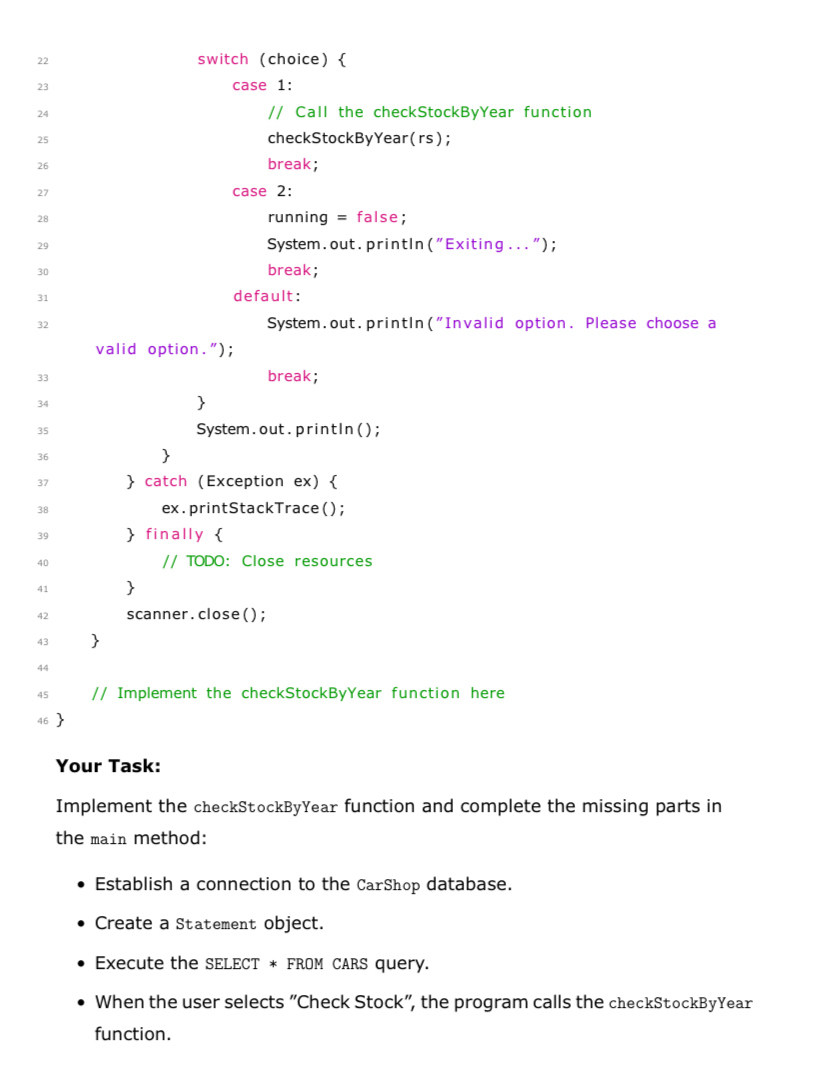
int choice scanner.nextInt; The function should prompt the user to enter a manufacture year.
The function should output the number of cars available for that year.
You are only allowed to use the SELECT FROM CARS query; you may
not use any other SQL statements to accomplish the task.
All logic should be implemented by working with the ResultSet obtained
from the SELECT query.
Instructions:
Complete the missing code in the main method to establish the database
connection and execute the query.
Implement the checkStockByYear function within the provided skeleton
code.
Ensure your code is properly formatted and includes necessary error
handling.
Test your program to verify that it works correctly.
Submission:
Submit the complete Java code including the implemented checkStockByYear
function and the completed main method.
Step by Step Solution
There are 3 Steps involved in it
1 Expert Approved Answer
Step: 1 Unlock

Question Has Been Solved by an Expert!
Get step-by-step solutions from verified subject matter experts
Step: 2 Unlock
Step: 3 Unlock
 Study Help