







Question: Task 0 1 Open the index.html file and add your name ( firstname lastname ) , the file name, and today's date ( MM /
Task
Open the index.html file and add your name firstname lastname the file name, and today's date MMDDYYYY to the comment at the top of the page.
Task
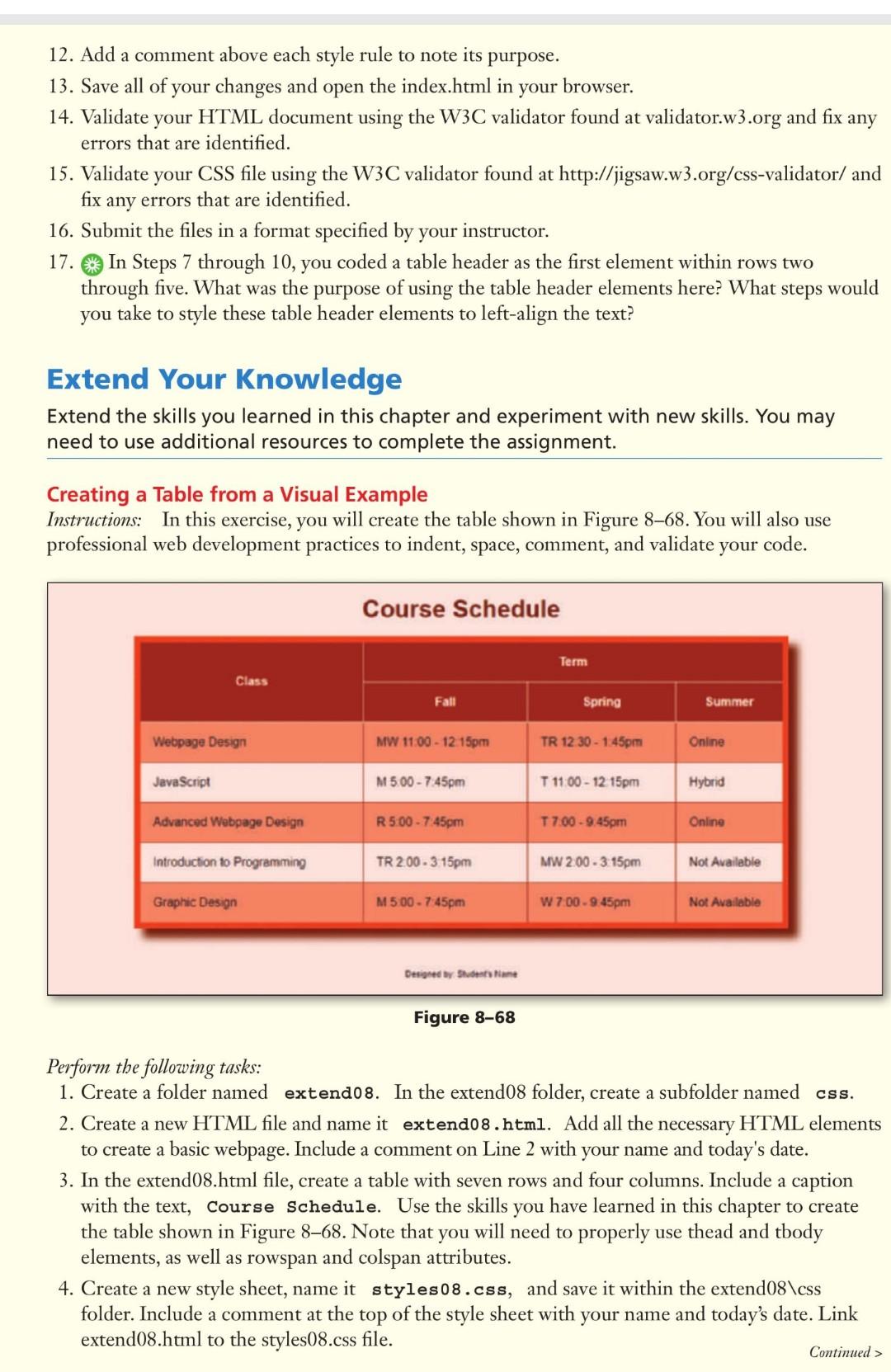
In the index.html file, create a table with seven rows and four columns. Include a caption with the text, Course Schedule.
Use the skills you have learned in this chapter to create the table shown in Figure Note that you will need to properly use thead and tbody elements, as well as rowspan and colspan attributes
Task
Use the styles.css file to create style rules to design the table as shown in Figure Thetable uses the following hexadecimal color codes: ffedc body backgroundcolor fddc table border colorbox shadow color actable data border color feodd rows background color
Apply a box shadow to the table and a sansserif font to the page
Task
Then, inside the cssstylescss file, add your name firstname lastname file name, and todays date MMDDYYYY to the comment at the top of the page.
Link index.html to the styles.css file.
Step by Step Solution
There are 3 Steps involved in it
1 Expert Approved Answer
Step: 1 Unlock

Question Has Been Solved by an Expert!
Get step-by-step solutions from verified subject matter experts
Step: 2 Unlock
Step: 3 Unlock
 Study Help