







Question: TASK 1 (OF 1) OBJECTIVES: Understand sequential flow, create flow diagram using sequential flow, and translate the flow diagram solution into a LabVIEW program. It
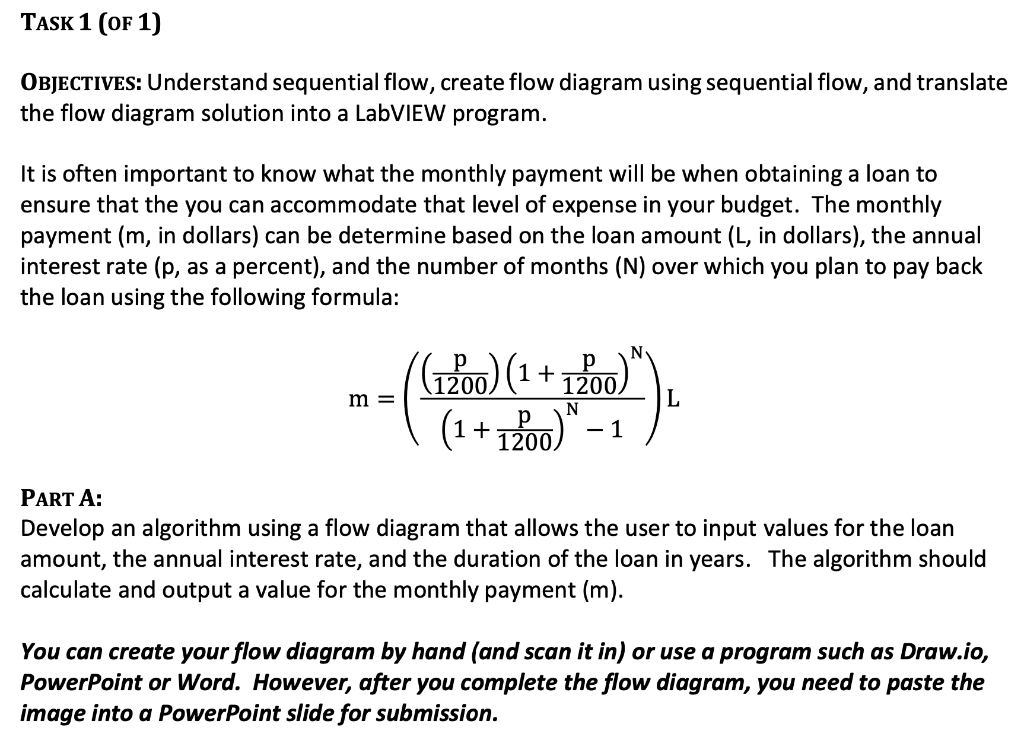
TASK 1 (OF 1) OBJECTIVES: Understand sequential flow, create flow diagram using sequential flow, and translate the flow diagram solution into a LabVIEW program. It is often important to know what the monthly payment will be when obtaining a loan to ensure that the you can accommodate that level of expense in your budget. The monthly payment (m, in dollars) can be determine based on the loan amount (L, in dollars), the annual interest rate (p, as a percent), and the number of months (N) over which you plan to pay back the loan using the following formula: m -(41200) (1 + 1200)"). | (1+1200)" -1 ) = PART A: Develop an algorithm using a flow diagram that allows the user to input values for the loan amount, the annual interest rate, and the duration of the loan in years. The algorithm should calculate and output a value for the monthly payment (m). You can create your flow diagram by hand (and scan it in) or use a program such as Draw.io, PowerPoint or Word. However, after you complete the flow diagram, you need to paste the image into a PowerPoint slide for submission. TASK 1 (OF 1) OBJECTIVES: Understand sequential flow, create flow diagram using sequential flow, and translate the flow diagram solution into a LabVIEW program. It is often important to know what the monthly payment will be when obtaining a loan to ensure that the you can accommodate that level of expense in your budget. The monthly payment (m, in dollars) can be determine based on the loan amount (L, in dollars), the annual interest rate (p, as a percent), and the number of months (N) over which you plan to pay back the loan using the following formula: m -(41200) (1 + 1200)"). | (1+1200)" -1 ) = PART A: Develop an algorithm using a flow diagram that allows the user to input values for the loan amount, the annual interest rate, and the duration of the loan in years. The algorithm should calculate and output a value for the monthly payment (m). You can create your flow diagram by hand (and scan it in) or use a program such as Draw.io, PowerPoint or Word. However, after you complete the flow diagram, you need to paste the image into a PowerPoint slide for submission
Step by Step Solution
There are 3 Steps involved in it

Get step-by-step solutions from verified subject matter experts
 Study Help