







Question: Task #1 The if Statement, Comparing Strings, and Flags Use the file PizzaOrder.java from the folder provided in WebStudy Make a new project in Eclipse
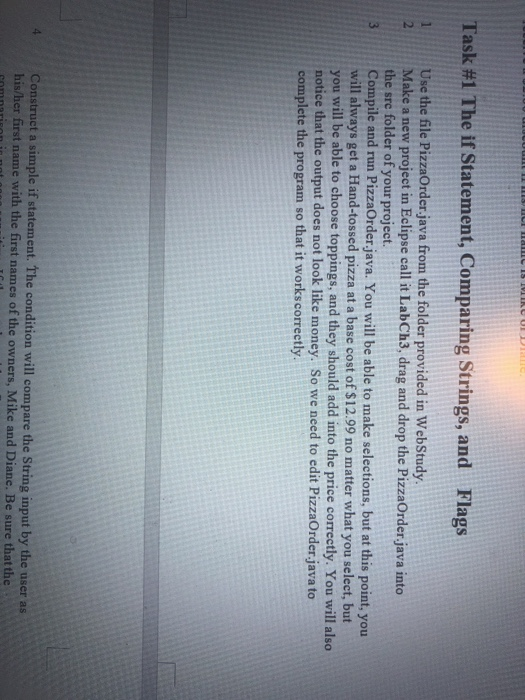
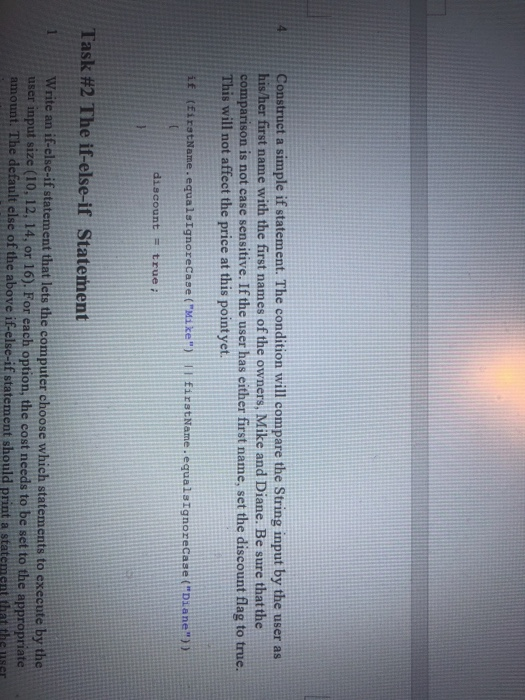
Task #1 The if Statement, Comparing Strings, and Flags Use the file PizzaOrder.java from the folder provided in WebStudy Make a new project in Eclipse call it LabCh3, drag and drop the PizzaOrder java into the sre folder of your project. 3 Compile and run PizzaOrder java. You will be able to make selections, but at this point, you will always get a Hand-tossed pizza at a base cost of $12.99 no matter what you select, but you will be able to choose toppings, and they should add into the price correetly. You will also notice that the output does not look like money. So we need to edit PizzaOrder.java to complete the program so that it works correctly 2 Construet a simple if statement. The condition will compare the String input by the user as first name with the first names of the owners, Mike and Diane. Be sure that the Construct a simple if statement. The condition will compare the String input by the user as his/her first name with the first names of the owners, Mike and Diane. Be sure thatthe comparison is not case sensitive. If the user has either first name, set the discount flag to true. This will not affect the price at this pointyet it (ELEStName equalsignoreCase ("MieEstName equalsTgnorecase ("Diane") ) discounttrue Task #2 The if-else-if Statement Write an if-else-if statement that lets the computer choose which statements to execute by the user input size (10, 12, 14. or 16). For each option, the cost needs to be set to th e appropriate amoun if statement should print a statement that the user Task #1 The if Statement, Comparing Strings, and Flags Use the file PizzaOrder.java from the folder provided in WebStudy Make a new project in Eclipse call it LabCh3, drag and drop the PizzaOrder java into the sre folder of your project. 3 Compile and run PizzaOrder java. You will be able to make selections, but at this point, you will always get a Hand-tossed pizza at a base cost of $12.99 no matter what you select, but you will be able to choose toppings, and they should add into the price correetly. You will also notice that the output does not look like money. So we need to edit PizzaOrder.java to complete the program so that it works correctly 2 Construet a simple if statement. The condition will compare the String input by the user as first name with the first names of the owners, Mike and Diane. Be sure that the Construct a simple if statement. The condition will compare the String input by the user as his/her first name with the first names of the owners, Mike and Diane. Be sure thatthe comparison is not case sensitive. If the user has either first name, set the discount flag to true. This will not affect the price at this pointyet it (ELEStName equalsignoreCase ("MieEstName equalsTgnorecase ("Diane") ) discounttrue Task #2 The if-else-if Statement Write an if-else-if statement that lets the computer choose which statements to execute by the user input size (10, 12, 14. or 16). For each option, the cost needs to be set to th e appropriate amoun if statement should print a statement that the user
Step by Step Solution
There are 3 Steps involved in it

Get step-by-step solutions from verified subject matter experts
 Study Help