







Question: Task 3: Read-only Domain Controllers Case Study: Toyota Company had a remote office with about 15 users. They were separated from their main office by
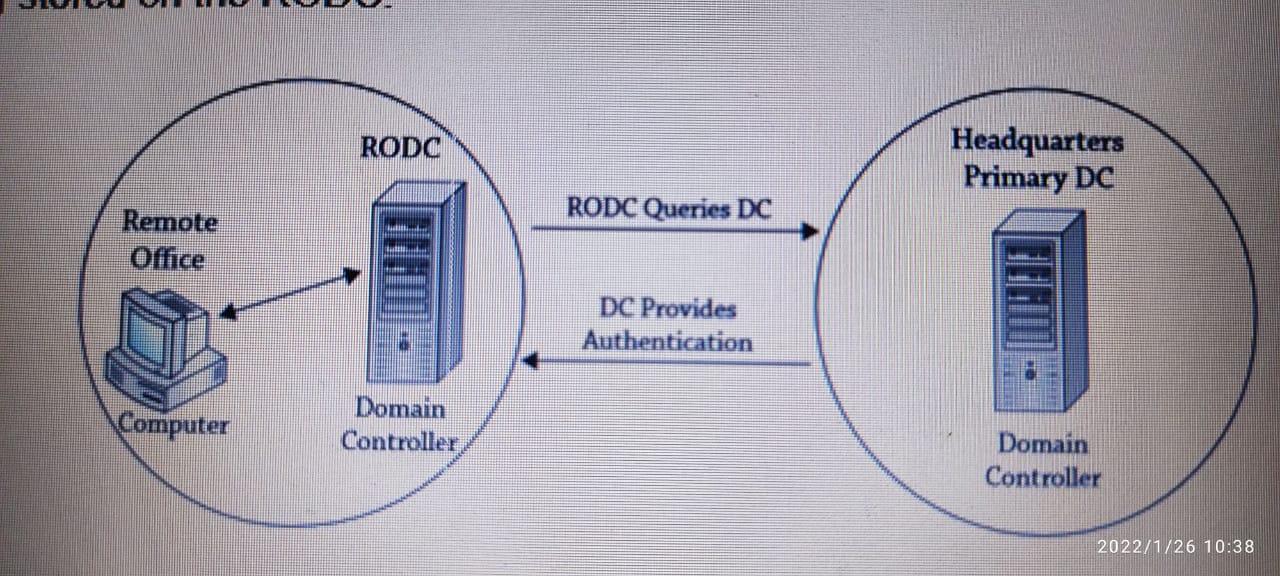
Task 3: Read-only Domain Controllers Case Study: Toyota Company had a remote office with about 15 users. They were separated from their main office by railroad tracks, and the railroad company would not allow cables to be run beneath the tracks. Users connected using a 256 Kbps dial-up modem that created a VPN between the main office and the remote office. Not surprisingly, the users often complained that the logons were taking too long. Eventually, domain administrators created a domain controller and placed it in the remote office. Unfortunately, the remote office had very poor physical security. About a month after they placed the DC in the remote office, it disappeared. Users werent even sure exactly when it disappeared, though administrators were able to narrow down the time frame using logs. A lot of circumstantial evidence pointed to an employee who had access to the office after hours, but nothing was ever proven. Since the DC had a full copy of Active Directory, including all the administrative accounts and their passwords, the IT department was soon in panic mode. They spent a great deal of time changing passwords and renaming accounts. They even seriously considered deleting their one-domain forest and starting over. Management spent a lot of time evaluating the risk of not rebuilding the forest and weighing it against the business impact of deleting the forest and rebuilding it from scratch. Eventually they accepted the risk. It paid off. They never saw any evidence that anything was compromised from this theft. If the DC were an RODC instead, the company would have lost the cost of the server, but the added risks that caused so much administrative and managerial headaches could have been avoided. In this situation, An RODC holds all the Active Directory accounts and most of the attributes that can be found on a writable DC. A significant difference between an RODC and a writable DC is that an RODC holds very few passwords. More specifically, the RODC will typically only hold the passwords of no administrator users who log on in the remote office. Other passwords are specifically blocked from being stored on the RODC. Figure shows the process if an RODC is placed in a remote office. Imagine Sally is logging onto the RODC for the first time. Her system will contact the RODC. The RODC doesnt have her account cached, so it will query the DC at the headquarters location.
To configure the RODC, please perform the following tasks.
Prepare a forest and a domain for RODCs
Prepare the domain
Allow passwords on any RODC
Allow passwords on a single RODC
Perform RODC password replication policy
Allowed RODC Password Replication Group
Delegating Administration for an RODC
Modifying the Allowed List
Connectivity between RODC and Main server
RODC Headquarters Primary DC RODC Queries DC Remote Office DC Provides Authentication Computer Domain Controller Domain Controller 2022/1/26 10:38 RODC Headquarters Primary DC RODC Queries DC Remote Office DC Provides Authentication Computer Domain Controller Domain Controller 2022/1/26 10:38
Step by Step Solution
There are 3 Steps involved in it

Get step-by-step solutions from verified subject matter experts
 Study Help