







Question: Tasks: 1. Develop SQL code to create the Airbase database given the relational schema below. Save all code in a single .sql file. Name the
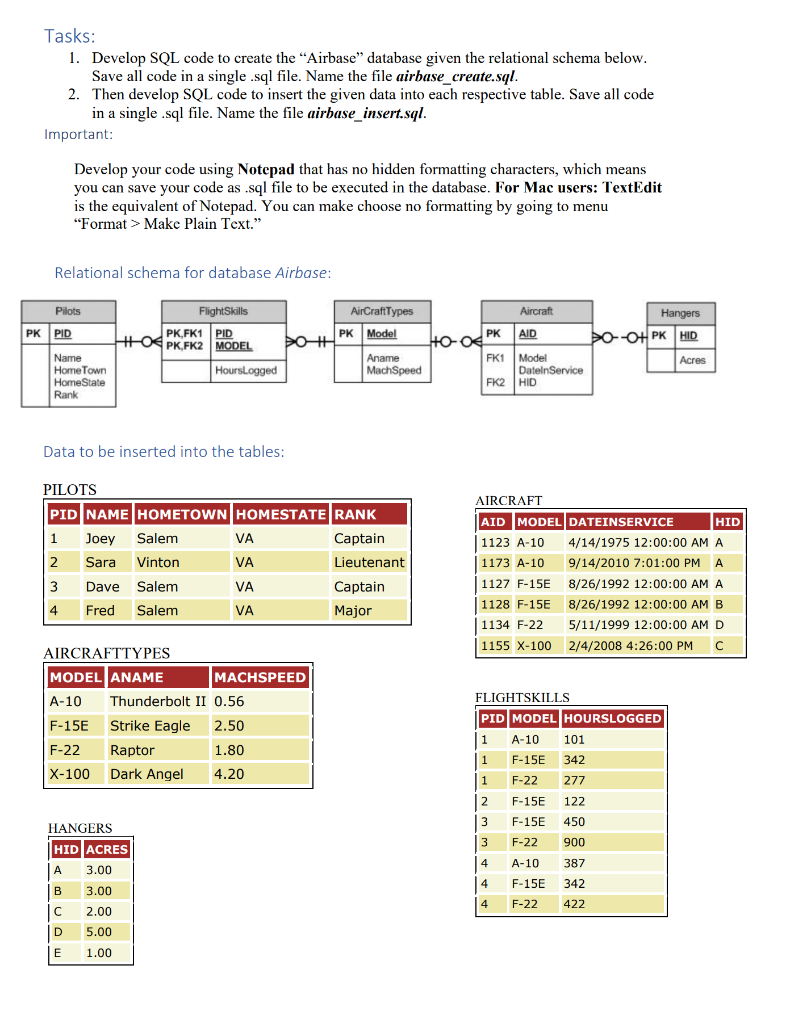
Tasks: 1. Develop SQL code to create the "Airbase" database given the relational schema below. Save all code in a single .sql file. Name the file airbase_create.sql. 2. Then develop SQL code to insert the given data into each respective table. Save all code in a single .sql file. Name the file airbase_insert.sql. Important: Develop your code using Notepad that has no hidden formatting characters, which means you can save your code as .sql file to be executed in the database. For Mac users: TextEdit is the equivalent of Notepad. You can make choose no formatting by going to menu "Format > Make Plain Text." Relational schema for database Airbase: Pilots PK PID FlightSkills PK,FK1 PID HOPK.FK2 MODEL Hours Logged > AirCraftTypes PK Model Ho-0 Aname MachSpeed Aircraft Hangers PK AID >O-0+ PK HID FK1 Model Acres DatelnService FK2 HID Name Home Town Home State Rank Data to be inserted into the tables: PILOTS PID NAME HOMETOWN HOMESTATE RANK 1 Joey Salem VA Captain 2 Sara Vinton VA Lieutenant 3 Dave Salem VA Captain 4 Fred Salem VA Major AIRCRAFT AID MODEL DATEINSERVICE HID 1123 A-10 4/14/1975 12:00:00 AM A 1173 A-10 9/14/2010 7:01:00 PM A 1127 F-15E 8/26/1992 12:00:00 AM A 1128 F-15E 8/26/1992 12:00:00 AM B 1134 F-22 5/11/1999 12:00:00 AM D 1155 X-1002/4/2008 4:26:00 PM C AIRCRAFTTYPES MODEL ANAME MACHSPEED A-10 Thunderbolt II 0.56 F-150 Strike Eagle 2.50 F-22 Raptor 1.80 X-100 Dark Angel 4.20 FLIGHTSKILLS PID MODEL HOURSLOGGED 1 A-10 101 1 F-15E 342 1 1 F-22 277 2 F-15E 122 13 3 F-15E 450 3 F-22 900 4 A-10 387 14 F-15E 342 4 F-22 422 HANGERS HID ACRES A 3.00 | 3.00 IC 2.00 D 5.00 E 1.00
Step by Step Solution
There are 3 Steps involved in it

Get step-by-step solutions from verified subject matter experts
 Study Help