







Question: thanks 4. Specify two use cases in tabular format, showing actors, preconditions, actor actions and system responses. You may use copies of the following table
thanks 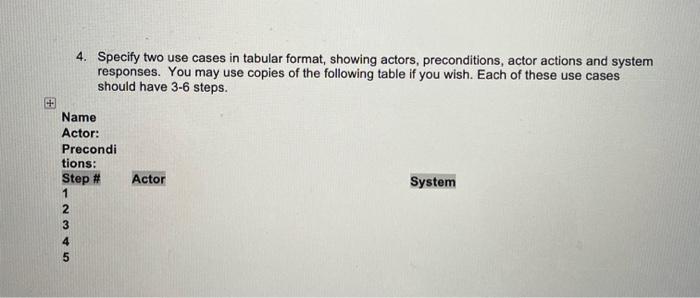
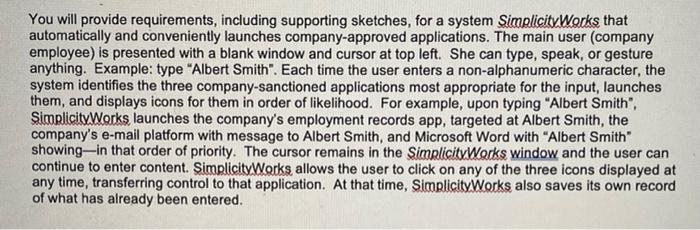
4. Specify two use cases in tabular format, showing actors, preconditions, actor actions and system responses. You may use copies of the following table if you wish. Each of these use cases should have 3-6 steps. Actor Name Actor: Precondi tions: Step # 1 2 3 4 5 System UNAN You will provide requirements, including supporting sketches, for a system SimplicityWorks that automatically and conveniently launches company-approved applications. The main user (company employee) is presented with a blank window and cursor at top left. She can type, speak, or gesture anything. Example: type "Albert Smith". Each time the user enters a non-alphanumeric character, the system identifies the three company-sanctioned applications most appropriate for the input launches them, and displays icons for them in order of likelihood. For example, upon typing "Albert Smith", SimplicityWorks launches the company's employment records app, targeted at Albert Smith, the company's e-mail platform with message to Albert Smith, and Microsoft Word with "Albert Smith" showing-in that order of priority. The cursor remains in the SimplicityWorks window and the user can continue to enter content. SimplicityWorks allows the user to click on any of the three icons displayed at any time, transferring control to that application. At that time, Simplicity Works also saves its own record of what has already been entered Step by Step Solution
There are 3 Steps involved in it
1 Expert Approved Answer
Step: 1 Unlock

Question Has Been Solved by an Expert!
Get step-by-step solutions from verified subject matter experts
Step: 2 Unlock
Step: 3 Unlock
 Study Help