







Question: The app design will follow the MVC pattern. There will be 3 model classes, 3 views, and 3 controllers. Begin by creating a new Android
The app design will follow the MVC pattern. There will be model classes, views, and controllers. Begin by creating a new Android project in Android Studio, named according to the lab guidelines project name should be lab Set the minimum SDK of the project to API Your application will read in data from files placed in the assets folder. Create a new assets folder in your project, and move the sample files into it
Add the following in the labmodel package:
Colony.java
Zone.java
Inhabitant.java
Your app should also contain:
MainActivity.java in thelabpackage
activitymain.xml in the res layout folder
ZoneActivity.java in thelabpackage
activityzone.xml in the res layout folder
InhabitantActivity.java in the lab package
activityinhabitant.xml in the res layout folder
Sample images extract and place images in the res drawable folder
zones.csv in the assets folder
inhabitants.csv in the assets folder
The View:
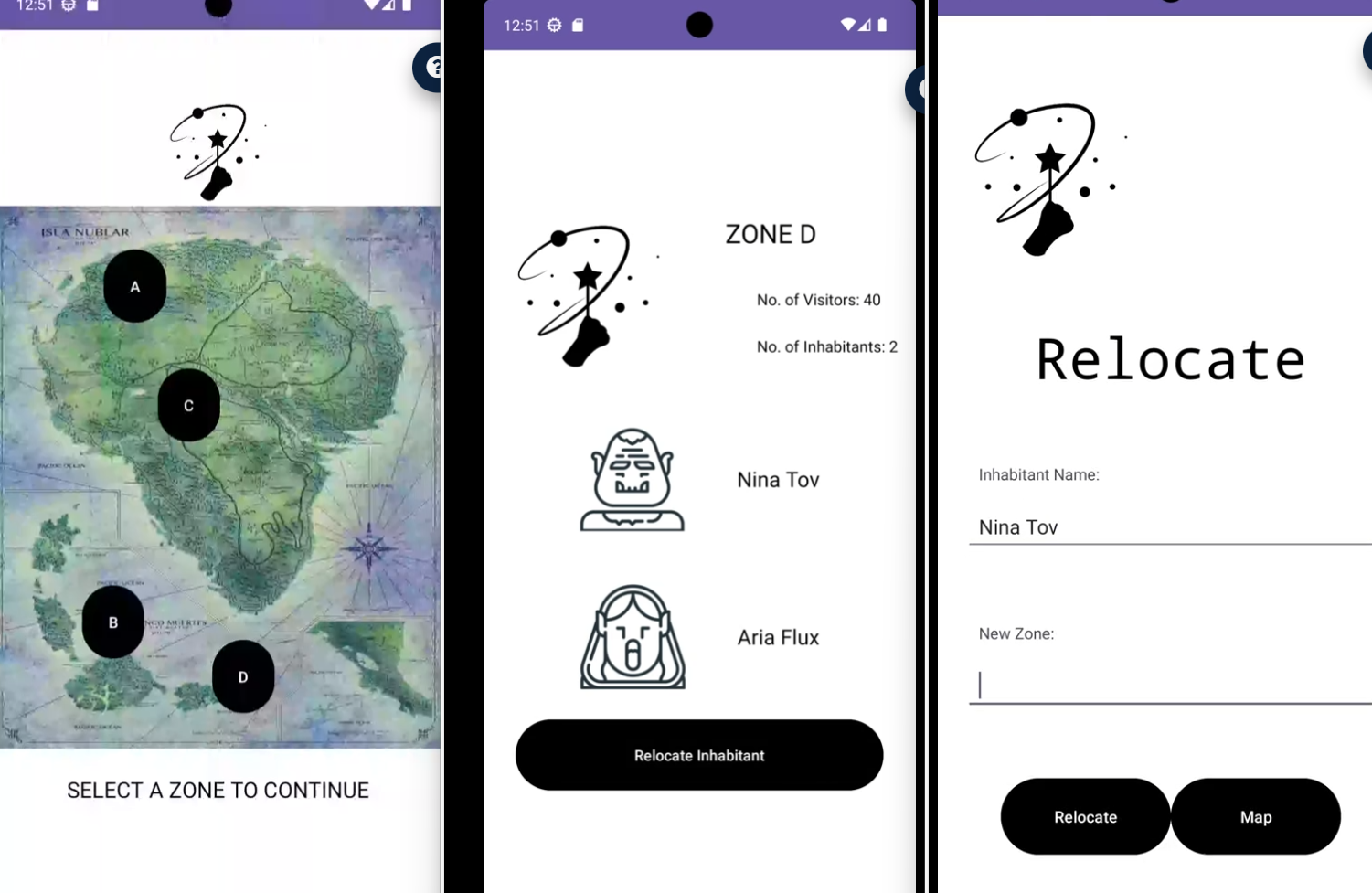
Your app will show a view that displays a map of the colony, a logo at the top, a label at the bottom giving instructions to the user to select a zone and buttons.
When the user chooses a zone one of the labeled buttons they will be moved to the second screen, wherethe user sees the name of the zone chosen eg Zone D the number of visitors currently in that zone, and the number of inhabitants in that zone. In addition, there is a list of inhabitants with details such as name and image Finally, there is a button on the screen to allow the user to relocate an inhabitant. All data on this screen is read from a file these have been provided in inhabitants.csv If an inhabitant is relocated from this zone, the number of inhabitants should change and that inhabitant should be removed from the listing.
When the user clicks the button to relocate inhabitant they will be moved to the third screen, an example of which is in the image to the right below. Here the user sees again the name of the zone, a label indicating instructions to relocate an inhabitant, and a short form to complete. The form consists of a text field to enter an inhabitant name and another text field to enter a zone to relocate that inhabitant to When the user completes these fields correctly and clicks the Relocate button, a Toast should appear with a message indicating they were successfully moved. If the user clicks the Map button, they should be returned to the first screen with the colony map. See Exception Handling below for instructions for invalid user input.
You may customize your app however you choose this includes fonts, images, colors, configuration.
This app must have the described GUI components on each screen.
Any images shown in the samples have been provided. If you choose to use them or you may optionally find your own images Place these image files in res drawable.
The Controller:
MainActivity.javawill launch when the application is run, and show theactivitymain.xml
MainActivity will have implementation for the View.OnClickListener interface using Anonymous Inner Classes to enable the buttons to listen to user clicks from the buttons on the GUI.
When the user clicks on a button for a Zone, the ZoneActivity should load the data from the given files by calling on the Colony or Zone classes to retrieve this information.
Controllers in your application should neverread files or update data. Instead, to follow MVC the controller classes will call upon the model classes to complete these tasks.
The Model:
It is up to you to configure your code to work with this new app the Colony one per app will have Zones, and each Zone contains or more inhabitants.
The zone should also keep a count of how many visitors are in that zone at that time.
This data will be stored in files load the initial information for each zone from these files, then update the files if an inhabitant is moved.
Note that the zones.csv data file includes a count of the number of visitors, but not a count of the number of inhabitants this will need to be calculated, according to the locations of the inhabitants listed in inhabitants.csv
All classes in the model must always have Javadoc comments, getters and setters for all class variables. Constructors are required for all required variables in a class.
Exception Handling
On the third screen, the user is able to enter information into the text fields for Name and New Zone. Users may not always enter data perfectly, so lets set up a plan to handle any exceptions
If all data is entered and valid, a Toast should appear informing the user that the inhabitant named has been moved to the new zone. If they return to the previous screen to see the zone, it should no longer show that inhabitant and have an updated count for the number of inhabitants in that zone.
Relocate
Step by Step Solution
There are 3 Steps involved in it
1 Expert Approved Answer
Step: 1 Unlock

Question Has Been Solved by an Expert!
Get step-by-step solutions from verified subject matter experts
Step: 2 Unlock
Step: 3 Unlock
 Study Help