







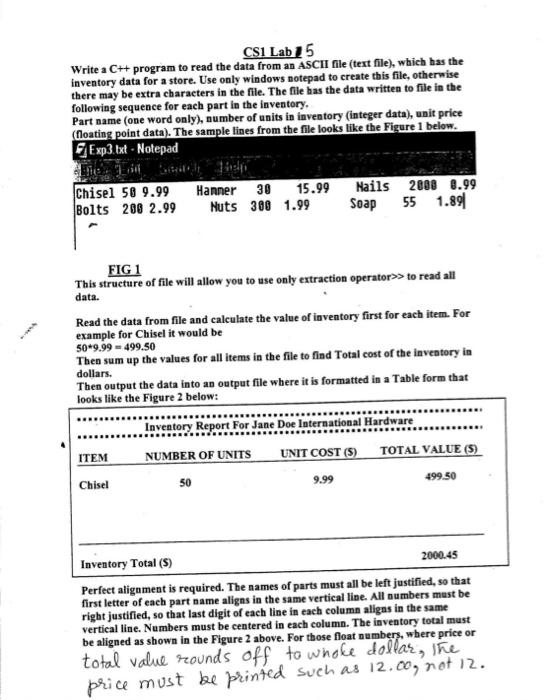
Question: The code I ran was: #include #include #include #include using namespace std; int main ( ) { / / Open input and output files ifstream
The code I ran was:
#include #include #include #include using namespace std; int main Open input and output files ifstream inputFileinventorytxt; Input file ofstream outputFileinventoryreport.txt; Output file Check if the file is opened successfully if inputFile cout "Error opening the input file!" endl; return ; Variables to store data from the file string itemName; int numberOfUnits; double unitCost, totalValue, grandTotal ; Print header to the output file outputFile fixed setprecision; outputFile "Inventory Report For Jane Doe International Hardware" endl; outputFile endl; outputFile setw left "ITEM" setw right "NUMBER OF UNITS" setw "UNIT COST $ setw "TOTAL VALUE $ endl; outputFile endl; Read data from input file and calculate the total value for each item while inputFile itemName numberOfUnits unitCost totalValue numberOfUnits unitCost; grandTotal totalValue; Print each item in the formatted table outputFile setw left itemName setw right numberOfUnits setw unitCost setw totalValue endl; Print total inventory value, right aligned under TOTAL VALUE column outputFile endl; outputFile setw left "Inventory Total $ setw right grandTotal endl; Close the files inputFile.close; outputFile.close; cout "Inventory report generated successfully." endl; return ;
Have also confirmed that I have the running project and text document on the same folder. Somehow I keep getting an error indicating that it cannot open the input file.
Step by Step Solution
There are 3 Steps involved in it
1 Expert Approved Answer
Step: 1 Unlock

Question Has Been Solved by an Expert!
Get step-by-step solutions from verified subject matter experts
Step: 2 Unlock
Step: 3 Unlock
 Study Help