







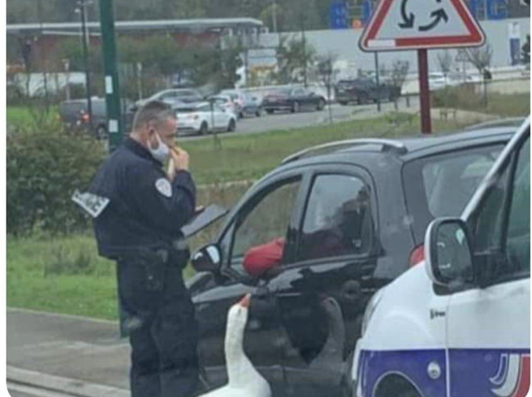
Question: The codes will be written in Python. Task 1: Image filtering and edges detection. 1. Read the original image copduck.png into variable OrigCopduck; display the
The codes will be written in Python.
Task 1: Image filtering and edges detection.
1. Read the original image copduck.png into variable OrigCopduck; display the original image
2. Create a box filter B3 of size 3 3
3. Create the blurred image B3Copduck (i.e. filter-convolve OrigCopduck with B3) and display it nearby OrigCopduck
4. Increase the size of mask B3 to 5 5; let us call this new mask B5
5. Create the blurred image B5Copduck (i.e. filter-convolve OrigCopduck with B5) and display it nearby OrigCopduck and B3Copduck.
6. Create the Laplacian 2D derivative Edge Detection (ED) mask of size 3 3: ED3=[0 1 0; 1 -4 1; 0 1 0]
7. Create and display ED3Copduck. Give the title Edges in Copduck with ED3
8. Create the 1-st derivative Roberts edge detection masks: R_x=[1 0; 0 -1] and R_y=[0 -1; 1 0]
9. Applying R_x to the blurred image B3Copduck; give the title('Vertical edges in Copduck with Roberts mask')
10. Applying R_y to the blurred image B3Copduck; give the title(Horizontal edges in Copduck with Roberts mask')
11. Create the gradient image
12. Create the Sobel edge detection masks. Note that inside the Sobel masks there is already the smoothing kernel, therefore it must be applied directly to the original image
13. Create and show horizontal and vertical edges in Copduck with Sobel mask
14. Create and show The Sobel operator applied to Copduck
15. Create the Prewitt edge detection masks.
16. Create and show horizontal and vertical edges in Copduck with Prewitt mask
17. Create and show The Prewitt operator applied to Copduck
Step by Step Solution
There are 3 Steps involved in it

Get step-by-step solutions from verified subject matter experts
 Study Help